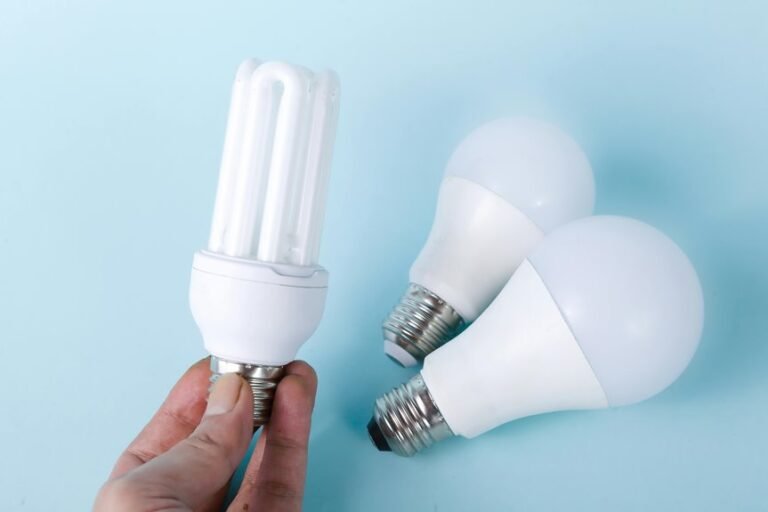
A good Z-Wave dimmer makes smart lighting simple and easy to control.
It gives smooth brightness control and works with many smart home hubs.
Many models fit standard wiring, while others handle multi-way switches or LED bulbs better.
The picks below focus on practical features, dependable performance, and easier installation.
| Enbrighten Z-Wave Light Dimmer Switch (58438) |  | Best Overall | Product Type: In-wall dimmer switch | Connectivity: Z-Wave | Voice Control: Alexa/Google Assistant | VIEW LATEST PRICE | Read Our Analysis |
| Enbrighten Add-On In-Wall Smart Lighting Switch (46199) | Best Add-On | Product Type: Add-on switch | Connectivity: Wi-Fi/Z-Wave/ZigBee | Voice Control: Alexa/Google Assistant | VIEW LATEST PRICE | Read Our Analysis | |
| Enbrighten Z-Wave Smart Motion Sensor Light (26931) | 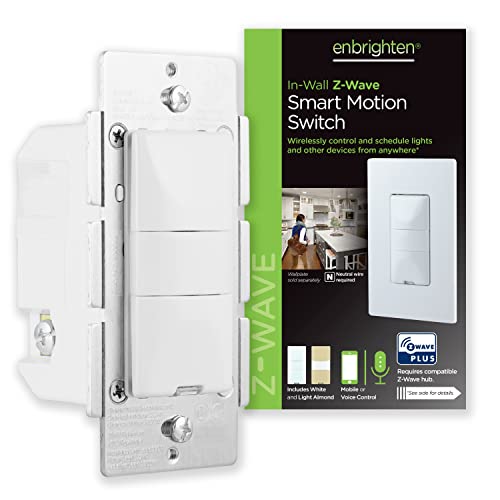 | Best Motion Sensor | Product Type: Motion sensor switch | Connectivity: Z-Wave | Voice Control: Alexa | VIEW LATEST PRICE | Read Our Analysis |
| TREATLIFE 3 Way Smart Dimmer Switch (2 Pack) |  | Best Wi-Fi Option | Product Type: 3-way smart dimmer | Connectivity: Wi‑Fi | Voice Control: Alexa/Google Home | VIEW LATEST PRICE | Read Our Analysis |
| Honeywell UltraPro Z-Wave Plus Smart Light Dimmer Switch | 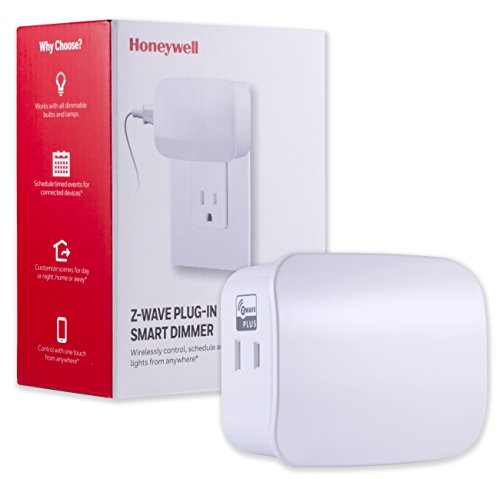 | Best Plug-In | Product Type: Plug-in dimmer | Connectivity: Z-Wave Plus | Voice Control: Alexa/Google Assistant | VIEW LATEST PRICE | Read Our Analysis |
| Minoston Smart Plug Z-Wave 800 Series (MP21Z) |  | Best Smart Plug | Product Type: Smart plug | Connectivity: Z-Wave 800 | Voice Control: Alexa/Google Assistant | VIEW LATEST PRICE | Read Our Analysis |
| Enbrighten Zigbee Smart Paddle Dimmer (43080) |  | Best Zigbee Alternative | Product Type: In-wall paddle dimmer | Connectivity: ZigBee | Voice Control: Alexa/Google Assistant | VIEW LATEST PRICE | Read Our Analysis |
More Details on Our Top Picks
Enbrighten Z-Wave Light Dimmer Switch (58438)
If you want a reliable in-wall dimmer for a Z-Wave smart home, the Enbrighten Z-Wave Light Dimmer Switch (58438) is a strong fit, especially if you already use a compatible hub like SmartThings, Ring Alarm, or HomeSeer. You get 700 Series Z-Wave Plus performance, SmartStart QR pairing, and voice control through Alexa or Google Assistant. Its QuickFit design, SimpleWire terminals, and reduced housing depth help you install it in crowded boxes. You can dim lights from 0–100%, use add-on switches in 3-way setups, and rely on its built-in repeater for stronger coverage.
- Product Type:In-wall dimmer switch
- Connectivity:Z-Wave
- Voice Control:Alexa/Google Assistant
- Dimmer Control:0–100% dimming
- Hub Requirement:Hub required
- Multi-Location Use:3-way/add-on compatible
- Additional Feature:SmartStart QR pairing
- Additional Feature:150 ft range
- Additional Feature:8 LED colors
Enbrighten Add-On In-Wall Smart Lighting Switch (46199)
The Enbrighten Add-On In-Wall Smart Lighting Switch (46199) is a smart choice for anyone building a multi-location Z-Wave lighting setup, especially when you need control from older or space-limited switch boxes. You can pair it with one smart switch or dimmer and add up to four companions for control from five locations. QuickFit and SimpleWire trim installation time, while the slimmer housing fits tighter boxes. It works with Enbrighten and UltraPro systems, plus Alexa, Google Assistant, SmartThings, and Vera. You’ll get a durable, UL-listed, IP54-rated add-on in white or light almond.
- Product Type:Add-on switch
- Connectivity:Wi-Fi/Z-Wave/ZigBee
- Voice Control:Alexa/Google Assistant
- Dimmer Control:ON/OFF only
- Hub Requirement:Controller required
- Multi-Location Use:Up to 5 locations
- Additional Feature:QuickFit SimpleWire design
- Additional Feature:Fits multi-gang boxes
- Additional Feature:Control from 5 locations
Enbrighten Z-Wave Smart Motion Sensor Light (26931)
For rooms that need hands-free lighting control, the Enbrighten Z-Wave Smart Motion Sensor Light (26931) is a strong fit because it can switch lights on and off automatically in occupancy mode, while vacancy and manual modes give you more control when needed. You can fine-tune motion-only or low-light activation, choose from five timeout settings, and set one of three sensitivity levels to match busy or quiet spaces. It installs with a neutral wire, works in single-pole or multi-switch setups, and pairs with Z-Wave hubs like SmartThings, Wink, and Alexa, while also extending signal range up to 150 feet.
- Product Type:Motion sensor switch
- Connectivity:Z-Wave
- Voice Control:Alexa
- Dimmer Control:Motion-based lighting
- Hub Requirement:Hub required
- Multi-Location Use:Multi-switch compatible
- Additional Feature:Occupancy and vacancy modes
- Additional Feature:5 timeout settings
- Additional Feature:3 sensitivity levels
TREATLIFE 3 Way Smart Dimmer Switch (2 Pack)
Built for homes with a neutral wire and a standard 3-way setup, the TREATLIFE 3 Way Smart Dimmer Switch (2 Pack) is a strong fit when you want smart dimming without adding a hub. You can replace one switch in a 3-way circuit and keep the other standard, or use it as a single-pole dimmer. It works over 2.4GHz Wi‑Fi, supports Alexa, Google Home, and SmartThings, and lets you adjust brightness from 1% to 100%. You also get app control, schedules, voice control, and built-in safety features.
- Product Type:3-way smart dimmer
- Connectivity:Wi‑Fi
- Voice Control:Alexa/Google Home
- Dimmer Control:1%–100% dimming
- Hub Requirement:No hub required
- Multi-Location Use:3-way compatible
- Additional Feature:Neutral wire required
- Additional Feature:2.4GHz Wi‑Fi only
- Additional Feature:Last brightness memory
Honeywell UltraPro Z-Wave Plus Smart Light Dimmer Switch
Honeywell’s UltraPro Z-Wave Plus Smart Light Dimmer Switch is a strong fit if you want a simple plug-in dimmer for a lamp or other dimmable fixture without rewiring your home. You get full-range dimming from 0–100%, plus manual on/off control, scheduling, and custom day, night, home, and away scenes. It works with a Z-Wave certified hub, including SmartThings, Ring, Wink, and others, and supports Alexa or Google Assistant through that hub. The compact white plug keeps the lower outlet usable, and the built-in repeater helps extend your network.
- Product Type:Plug-in dimmer
- Connectivity:Z-Wave Plus
- Voice Control:Alexa/Google Assistant
- Dimmer Control:0–100% dimming
- Hub Requirement:Hub required
- Multi-Location Use:1-way circuit
- Additional Feature:Plug-in outlet design
- Additional Feature:Timed event scheduling
- Additional Feature:Built-in repeater
Minoston Smart Plug Z-Wave 800 Series (MP21Z)
If you want a compact Z-Wave smart plug that extends your network while giving you reliable app and voice control, the Minoston Smart Plug Z-Wave 800 Series (MP21Z) is a strong fit. You get a 15A mini outlet with a built-in repeater, so it boosts coverage while handling lamps and small appliances. Its Z-Wave 800 Series chip supports S2 security and SmartStart pairing, and it works with SmartThings, Vera, Hubitat, and more through a compatible hub. You can also set timers, build scenes, and control devices remotely. The two-pack includes a manual, and it’s FCC and ETL listed.
- Product Type:Smart plug
- Connectivity:Z-Wave 800
- Voice Control:Alexa/Google Assistant
- Dimmer Control:ON/OFF control
- Hub Requirement:Hub required
- Multi-Location Use:Multi-device scenes
- Additional Feature:Z-Wave 800 Series
- Additional Feature:Long Range support
- Additional Feature:2-pack included
Enbrighten Zigbee Smart Paddle Dimmer (43080)
The Enbrighten Zigbee Smart Paddle Dimmer (43080) is a strong choice if you want a hardwired in-wall dimmer that works with Zigbee 3.0 and supports direct pairing with select Echo devices for easy voice control. You’ll also get Alexa, Google Assistant, and Vera compatibility through a Zigbee hub. It handles dimmable LEDs, CFLs, incandescent, and halogen bulbs at 120 volts and up to 600 watts. You need a neutral wire, but SimpleWire, auto-detecting terminals, and QuickFit make setup easier. Its mesh support can extend Zigbee coverage up to 150 feet.
- Product Type:In-wall paddle dimmer
- Connectivity:ZigBee
- Voice Control:Alexa/Google Assistant
- Dimmer Control:0–100% dimming
- Hub Requirement:Hub/gateway required
- Multi-Location Use:3-way/add-on compatible
- Additional Feature:Zigbee 3.0 certified
- Additional Feature:Neutral wire required
- Additional Feature:IP54 rating
Factors to Consider When Choosing a Z Wave Dimmer
When you choose a Z Wave dimmer, check the wiring requirements first so it fits your setup. Make sure it works with your hub, can handle the load capacity, and offers the dimming range you want. You should also confirm the switch configuration matches how you use the lights.
Wiring Requirements
Before you buy a Z-Wave dimmer, check the wiring in your box so the device will actually work with your setup. You’ll want to know whether the dimmer needs a neutral wire, because some models do and others don’t. Next, confirm the circuit type: choose a single-pole unit for one location, or a 3-way or multi-way model if you control the light from more than one spot. Also, match the line and load arrangement in your box, since some dimmers expect a specific side or use auto-detecting terminals. If your box is crowded or multi-gang, look for reduced-depth housing. For multi-location control, pick a dimmer that supports add-on switches, and make sure it handles the number you need.
Hub Compatibility
A Z-Wave dimmer won’t do much on its own, so make sure it’s compatible with your Z-Wave hub or gateway before you buy. Your hub decides whether you can control the dimmer locally, remotely, or with voice assistants, so check support first. Confirm that the dimmer matches your hub’s Z-Wave generation and certification level; newer Z-Wave Plus, 700, or 800 Series models often still work with older hubs, but they may pair faster and reach farther. If you want a simpler install, choose SmartStart or QR-based pairing. Also verify support for any multi-location or add-on switch setup you plan to use. For better whole-home coverage, pick a dimmer that can repeat signals and strengthen your mesh network.
Load Capacity
Once you’ve confirmed your hub compatibility, check the dimmer’s load capacity so it can safely handle the lights you plan to control. Compare the dimmer’s maximum wattage rating with your total connected load; many in-wall models handle about 600 watts, while plug-in units may support less or different loads. Verify that your bulbs are dimmable, since many Z-Wave dimmers won’t properly control non-dimmable LED, CFL, incandescent, or halogen lamps. Also check the current rating, especially on higher-voltage or multi-device circuits, because a unit can be listed at 15 amps yet still have a lower dimming limit. If you’re wiring multiple fixtures or a multi-gang box, add every watt and stay under the rated capacity to avoid overheating and performance problems.
Dimming Range
Dimming range matters because it determines how finely you can adjust your lights, from a soft night-light glow to full brightness. You’ll want a dimmer that offers a wide range, ideally 0–100%, so you can set the exact mood you need. Check that it stays smooth at both the low and high ends, since some models flicker or become unstable outside a narrow sweet spot. Your bulb type also matters, because LEDs, CFLs, incandescent, and halogen lamps don’t all respond the same way. When the range matches your light source, you get better scenes, more reliable scheduling, and consistent results in multi-location control. A limited range can leave you stuck with settings that are too dim, too bright, or just plain uneven.
Switch Configuration
Switch configuration is one of the first things you should check, because not every Z-Wave dimmer works in the same wiring setup. You need to know whether your circuit is single-pole, 3-way, or multi-way, since some dimmers only handle one type while others let you control the same light from up to five spots with add-on switches. Check how many companion switches the model supports; many setups allow four add-ons per circuit. Verify whether you need a neutral wire, line/load identification, or a standard companion switch, because wiring rules vary. Also match the dimmer to the load you plan to control. If your box is crowded, choose a configuration with reduced housing depth and daisy-chain support so it fits more easily.
Installation Depth
Installation depth matters just as much as wiring type, especially if your electrical box is cramped or older. You should measure the box before you buy, because some Z Wave dimmers use reduced-depth housings that’re about 20% slimmer and fit crowded spaces better. That matters most in multi-gang installs, where several devices share one box and every millimeter counts. Look for compact wiring features too, like auto-detecting line/load terminals and no break-off tabs, since they keep the body cleaner and easier to tuck in. If your box is tight, choose a model made for limited-space or older switch boxes. Don’t forget add-on switches; in 3-way or multi-location setups, their combined depth can affect whether everything fits neatly.
Smart Features
When you choose a Z-Wave dimmer, pay close attention to the smart features you actually need, because not every model offers the same level of control or automation. If you want app control, voice commands, or routines, make sure the dimmer is hub-dependent and works with your smart home hub, Alexa, or Google Assistant. Look for full-range dimming so you can set lighting anywhere from 0–100% for scenes and schedules. Features like SmartStart, S2 security, and built-in repeater support can simplify pairing and strengthen your mesh. If you need control from multiple spots, choose a 3-way or multi-switch model with add-on switch support. Also, check for timers, preset scenes, motion modes, and memory of last brightness level.
Frequently Asked Questions
How Many Z-Wave Dimmers Can One Hub Support?
You can usually connect dozens, and sometimes hundreds, of Z Wave dimmers. The exact limit depends on your hub hardware and software. Check the hub specifications because the total network size, not only the dimmers, affects performance and reliability.
Do Z-Wave Dimmers Work With LED Bulbs?
Yes, they usually do, but you should use LED bulbs that are known to work with your dimmer and make sure the dimmer is rated for LED use. Otherwise, the lights may flicker, buzz, or dim unevenly. Check the manufacturer’s compatibility list before buying.
Can I Control Z-Wave Dimmers Remotely?
Yes, you can control Z Wave dimmers remotely through a compatible hub and app. You can adjust lights from anywhere, set schedules, and check their status, as long as the hub stays online and connected.
Are Z-Wave Dimmers Compatible With Voice Assistants?
Yes, Z Wave dimmers can work with voice assistants when they are connected through a compatible hub. Depending on your setup, you can control your lights with Alexa, Google Assistant, or Siri.
Do Z-Wave Dimmers Require a Neutral Wire?
No, not every Z Wave dimmer needs a neutral wire. Some models work without one, while others need a neutral for dependable operation. Check the wiring in your switch box and select a dimmer that fits your setup.