

Should you want to cut energy use without giving up convenience, motion sensor light switches can make a bigger difference than you perhaps expect. You’ll find smart options for connected homes, no-neutral models for older wiring, and hardwired switches that work well in busy rooms like bathrooms, hallways, and garages. The key is understanding which features actually matter before you choose one, and that’s where the real tradeoffs start.
| Lutron Caseta Smart Lighting Motion Sensor (PD-OSENS-WH) | 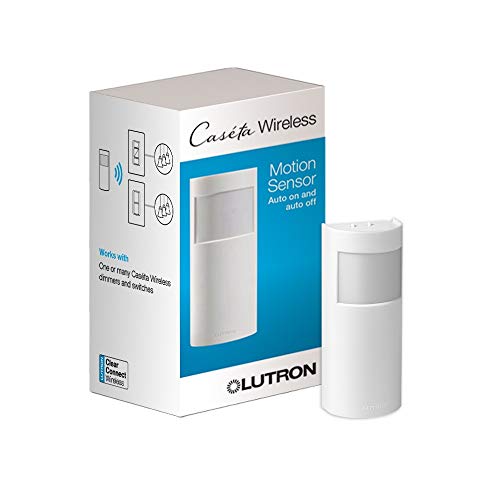 | Smart Home Pick | Sensor Type: Motion sensor | Switch Type: Smart lighting control | Auto Control: Auto on/off | VIEW LATEST PRICE | Read Our Analysis |
| Sensky BS033C Motion Sensor Light Switch (110V) |  | Budget Pick | Sensor Type: PIR motion sensor | Switch Type: Wall switch | Auto Control: Auto on/off | VIEW LATEST PRICE | Read Our Analysis |
| 4 Pack Motion Sensor Light Switch White |  | Best Value | Sensor Type: Occupancy/vacancy sensor | Switch Type: Single pole switch | Auto Control: Manual/auto on | VIEW LATEST PRICE | Read Our Analysis |
| 2 Pack 3-Way Motion Sensor Light Switch |  | Best for 3-Way | Sensor Type: Occupancy sensor | Switch Type: 3-way switch | Auto Control: Manual/auto on | VIEW LATEST PRICE | Read Our Analysis |
| Leviton Motion Sensor Light Switch No Neutral Required |  | Best Overall | Sensor Type: PIR infrared sensor | Switch Type: Single pole switch | Auto Control: Auto/manual on/off | VIEW LATEST PRICE | Read Our Analysis |
More Details on Our Top Picks
Lutron Caseta Smart Lighting Motion Sensor (PD-OSENS-WH)
If you want a hands-free way to automate your Caseta lights, fan controls, or switches, the Lutron Caseta Smart Lighting Motion Sensor (PD-OSENS-WH) is a strong fit. You can use it as an occupancy or vacancy sensor that turns devices on when you enter and off after you leave. With the Caseta Smart Hub and app, you can set Active Hours, time-based triggers, device ranges, and preset light levels. It covers up to 60 feet with a 180° view, needs no wiring, runs on one CR123A battery, and can last about 10 years.
- Sensor Type:Motion sensor
- Switch Type:Smart lighting control
- Auto Control:Auto on/off
- Neutral Wire:Not specified
- Field of View:180°
- Indoor Use:Indoor
- Additional Feature:Active Hours scheduling
- Additional Feature:10-year battery life
- Additional Feature:Controls multiple devices
Sensky BS033C Motion Sensor Light Switch (110V)
The Sensky BS033C 110V motion sensor light switch is a smart pick for you if you want a simple, wall-mounted occupancy sensor that automatically turns lights on and off based on motion and room brightness. It uses a PIR sensor with a 180° view and can detect movement up to 9 meters. You can set it to AUTO, ON, or OFF, and adjust the delay from 10 seconds to 7 minutes. It needs a neutral wire, uses three wires, and works as a single-pole switch. It isn’t smart-home compatible, but it’s practical and affordable.
- Sensor Type:PIR motion sensor
- Switch Type:Wall switch
- Auto Control:Auto on/off
- Neutral Wire:Required
- Field of View:180°
- Indoor Use:Indoor
- Additional Feature:Adjustable time delay
- Additional Feature:Ambient light sensing
- Additional Feature:Three-wire installation
4 Pack Motion Sensor Light Switch White
EverElectrix’s 4-pack white motion sensor light switch is a smart fit for homeowners who want hands-free lighting in single-pole indoor spaces like bathrooms, hallways, garages, and closets. You get occupancy and vacancy sensing, manual-on or automatic-on modes, an adjustable timer, and 180° coverage that catches motion without waving. It requires a neutral wire and isn’t for 3-way setups, so professional installation helps. UL and FCC certification, plus Title 24 compliance, support confidence. You can count on the four-pack to cut wasted energy while keeping lighting simple.
- Sensor Type:Occupancy/vacancy sensor
- Switch Type:Single pole switch
- Auto Control:Manual/auto on
- Neutral Wire:Required
- Field of View:180°
- Indoor Use:Indoor
- Additional Feature:Four-pack value bundle
- Additional Feature:UL certified
- Additional Feature:Title 24 compliant
2 Pack 3-Way Motion Sensor Light Switch
Built for homes and workspaces that need a true 3-way setup, this EverElectrix 2-pack motion sensor light switch is a smart pick whenever you want automatic lighting from either location without replacing a single-pole switch. You get indoor in-wall control, a white wall plate, and all required wires, including neutral. The sensor detects movement, turns lights on automatically, and shuts them off on an adjustable timer. You can tune sensitivity and coverage up to 8 meters. It’s UL certified, FCC listed, and California Title 24 compliant for energy savings.
- Sensor Type:Occupancy sensor
- Switch Type:3-way switch
- Auto Control:Manual/auto on
- Neutral Wire:Required
- Field of View:180°
- Indoor Use:Indoor
- Additional Feature:3-way application
- Additional Feature:Adjustable sensitivity
- Additional Feature:Automatic illumination entry
Leviton Motion Sensor Light Switch No Neutral Required
Leviton’s DOS02-LW motion sensor light switch is a smart pick when you need automatic lighting without a neutral wire, especially in closets, pantries, laundry rooms, or basements. You get a PIR sensor with a 180° field of view and about 900 square feet of coverage, so it catches movement fast. Use auto-on/auto-off or manual-on with vacancy mode. It handles 120V loads up to 150W LED/CFL, and it’s rated for lights, fans, and similar wall-switch devices. Its slim white design fits a standard wallbox.
- Sensor Type:PIR infrared sensor
- Switch Type:Single pole switch
- Auto Control:Auto/manual on/off
- Neutral Wire:Not required
- Field of View:180°
- Indoor Use:Indoor
- Additional Feature:No neutral required
- Additional Feature:900 sq. ft. coverage
- Additional Feature:Manual-on option
Factors to Consider When Choosing a Motion Sensor Light Switch
When you choose a motion sensor light switch, check the wiring requirements first so it fits your setup. You’ll also want to compare smart compatibility, detection range, adjustable timing, and mounting type to make sure it works the way you need. These details help you pick a switch that’s easy to install and reliable in daily use.
Wiring Requirements
Before you buy a motion sensor light switch, check the wiring requirements to make sure it matches your setup. You’ll need to know whether the switch requires a neutral wire, because some models do and others work without one. Count the wires in your box too, since installations can range from a simple single-pole setup to versions needing 3, 4, or 5 wires. Make sure the switch type fits your circuit; single-pole and 3-way switches aren’t interchangeable. Also, verify that your box provides the needed hot, load, neutral, and ground terminals. Should you’re working in an older home or the wiring isn’t clear, call an electrician initially. Matching wires correctly helps you avoid false triggering, malfunction, and unsafe installation.
Smart Compatibility
Once you’ve confirmed the wiring matches your setup, the next thing to check is smart compatibility. You’ll want to see whether the switch works with your smart home hub or app, since some models need a dedicated hub for customization and others aren’t smart-home compatible at all. When you want more than basic motion control, look for app-based settings like active hours, time-of-day triggers, sensitivity, and preset on-levels. Also verify that the switch can control the device type you plan to use, whether that’s a light, fan, dimmer, or fan control. Check whether one sensor can manage multiple loads, and make sure it explicitly supports occupancy or vacancy automation in a connected setup, not just standalone on/off behavior.
Detection Range
Detection range tells you how far away a motion sensor can reliably pick up movement, and it can vary a lot by model—some cover about 8 to 9 meters, while others reach up to 60 feet. You’ll want a longer range for garages, hallways, and laundry rooms, where people move through larger areas. In closets or small bathrooms, a shorter range can work just fine. Don’t check distance alone, though. A sensor with a wide 180° field of view can spot motion across more of the room, while a narrow one may miss activity off to the side. You should also look for fine-motion sensitivity, since better subtle-movement detection helps the light stay responsive when you’re standing still.
Adjustable Timing
After you’ve checked range and coverage, look at adjustable timing, since it controls how long the light stays on after motion stops. You can set the delay to match how you actually use the room, so the light won’t shut off too soon. Many switches let you choose anything from about 10 seconds to around 7 minutes, which helps you fine-tune short visits and longer stays. Use shorter delays in low-traffic areas to cut wasted runtime, and pick longer ones where motion comes and goes. Some models also offer occupancy and vacancy modes, giving you more control over whenever the light turns on. Whenever you compare options, treat timer adjustability as a must-have feature because it improves convenience, enhances energy savings, and reduces repeated waving.
Mounting Type
When it comes to mounting type, make sure the motion sensor switch matches your electrical setup and installation space. You’ll find some models meant for wall-mounted in-wall use, while others fit an embedded box or wall-box opening. If you want the easiest route, choose a freestanding or surface-placed option that doesn’t need wiring, though most switch-style sensors still require fixed wall mounting. Check whether your circuit needs a single-pole switch or a 3-way model, since the mounting method must suit the wiring. Measure the wallbox depth and opening before you buy, and favor slim, compact units when space is tight. Also confirm if the product calls for wall mount, embedded mount, or wall plate installation so you get a safe, clean fit.
Coverage Area
Once you’ve matched the switch to the right mounting setup, make sure its coverage area fits the space you want to control. You should compare the sensor’s maximum detection range with the room size, since models can cover about 8 to 9 meters or reach about 60 feet. Check the field of view too; many switches offer 180°, which works well in open rooms but can miss movement behind furniture or around corners. Whenever you want to control a hallway, garage, bathroom, or laundry room, choose broader coverage, especially whenever one sensor needs to handle multiple loads. In spaces with partial obstructions, adjustable sensitivity helps reduce missed detections. For large or irregular rooms, pick a sensor with strong fine-motion detection so it picks up activity throughout the full zone.
Power Source
Power choices can make or break a motion sensor light switch install. You’ll want to check whether your wall box already has the right power available, because some switches run on hardwired AC or corded electric power, while others use batteries. If your existing setup lacks a neutral wire, pick a model built to work without one. Battery-powered sensors skip wiring and can last years, with some rated for about 10 years on one included battery. Hardwired models usually drive the light load directly, so match the switch’s voltage, current, and wattage ratings to your circuit. Also, confirm the unit’s indoor-only status and operating temperature range so the power option fits your electrical setup and the device stays reliable.
Use Location
Where you plan to install a motion sensor light switch should guide your choice, because different rooms call for different coverage and behavior. You’ll usually get the best results in bathrooms, hallways, garages, closets, pantries, laundry rooms, basements, kitchens, and inhabited rooms. In larger or oddly shaped spaces, pick a sensor with a wider field of view, like 180°, and a detection range of about 8 to 9 meters or more. When people might sit still for a while, choose one with adjustable sensitivity and time delay so the lights don’t shut off too soon. For entryways and busy areas, automatic switching enhances convenience and cuts waste. Check wall-box space and neutral-wire needs before you buy.
Frequently Asked Questions
Can Motion Sensor Switches Work With LED Bulbs?
Yes, motion sensor switches can work with LED bulbs, but the switch must match the bulb type to prevent flicker or buzzing. Check the switch’s minimum load rating and use dimmable LEDs if the switch requires them.
How Do I Reset a Motion Sensor Light Switch?
Reset a motion sensor light switch by turning off its breaker for 10 seconds, turning the power back on, then pressing the reset button or paddle until it flashes. Set the preferences again afterward.
Do Motion Sensors Work Through Closed Doors?
Usually, detection through a closed door is unreliable because most sensors need an unobstructed path. If the door has thin panels or gaps around it, the sensor may still pick up movement nearby, but the result can be inconsistent.
Are Motion Sensor Switches Compatible With Dimmer Circuits?
Not all motion sensor switches work with dimmer circuits. Use one only if the product label says it is dimmer compatible. If it is not, flicker or damage can occur. Check the switch specifications before installation.
What Is the Average Lifespan of a Motion Sensor Switch?
A motion sensor switch typically lasts 10 to 15 years, with actual lifespan shaped by how often it is used, the build quality, and how well it is installed. Protecting it from overloads, moisture, and repeated power surges can help it last longer.
Final Thoughts
As you choose the right motion sensor light switch, you make your home work a little smarter and a lot more efficiently. Whether you want the polished convenience of Lutron Caseta, the budget-friendly simplicity of Sensky, or the flexible fit of Leviton, you can keep lights from lingering on longer than they need to. That means less wasted energy, fewer forgotten switches, and a more comfortable home that quietly takes care of itself.