

A motion sensing light switch can make daily life easier with almost no fuss. It turns lights on for you and switches them off after use. That means less fumbling in the dark and less wasted power.
This guide covers top picks for 2026, from smart Lutron Caseta options to reliable Sensky and Leviton models.
| Lutron Caseta Smart Lighting Motion Sensor (PD-OSENS-WH) | 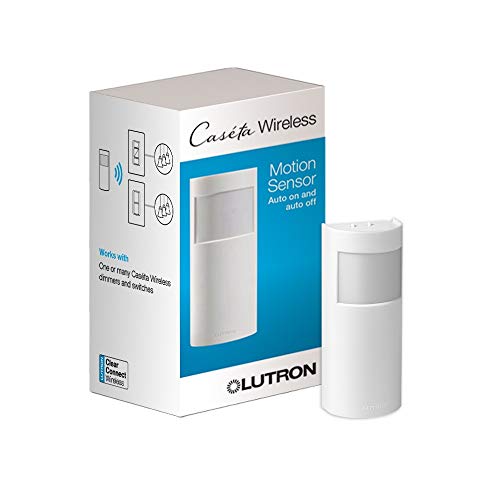 | Best Smart Choice | Sensor Type: Motion sensor | Control Mode: Auto on/off | Field of View: 180° | VIEW LATEST PRICE | Read Our Analysis |
| Sensky Motion Sensor Light Switch (BS033C) |  | Budget-Friendly Pick | Sensor Type: PIR motion sensor | Control Mode: Auto/manual | Field of View: 180° | VIEW LATEST PRICE | Read Our Analysis |
| 4 Pack Motion Sensor Light Switch White |  | Best Multi-Pack | Sensor Type: Motion sensor | Control Mode: Occupancy/vacancy | Field of View: 180° | VIEW LATEST PRICE | Read Our Analysis |
| TOPGREENER Dual Tech Humidity Sensor Switch (TDHOS5) | 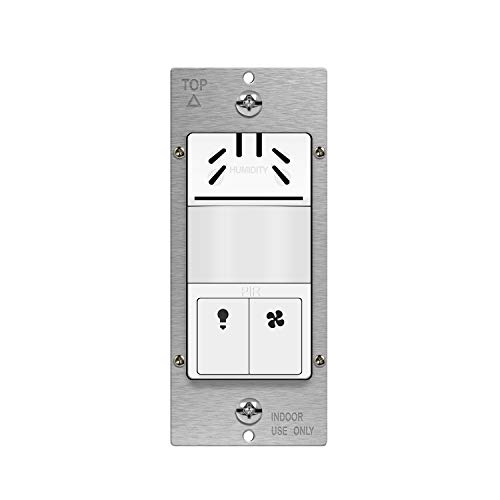 | Best For Bathrooms | Sensor Type: PIR motion + humidity | Control Mode: Occupancy/vacancy | Field of View: 180° | VIEW LATEST PRICE | Read Our Analysis |
| Leviton Motion Sensor Light Switch No Neutral Required |  | Best No-Neutral | Sensor Type: PIR infrared sensor | Control Mode: Auto/manual | Field of View: 180° | VIEW LATEST PRICE | Read Our Analysis |
| Leviton Motion Sensor Light Switch (No Neutral Required) |  | Best Versatile Pick | Sensor Type: Passive infrared | Control Mode: Auto/manual | Field of View: 180° | VIEW LATEST PRICE | Read Our Analysis |
| Leviton Motion Sensor Light Switch (DOS02-1LT) |  | Best Color Match | Sensor Type: Passive infrared | Control Mode: Auto/manual | Field of View: 180° | VIEW LATEST PRICE | Read Our Analysis |
More Details on Our Top Picks
Lutron Caseta Smart Lighting Motion Sensor (PD-OSENS-WH)
When you want a motion sensor that does more than just flip lights on and off, the Lutron Caseta Smart Lighting Motion Sensor (PD-OSENS-WH) is a strong fit because it gives you hands-free control without any wiring hassle. You can set it as an occupancy or vacancy sensor, and you can choose which Caseta dimmers, switches, or fan controls it runs. The Lutron app lets you set active hours and light levels, so your rooms feel just right. It also works with Serena shades, sees motion up to 60 feet, and mounts easily in bathrooms, halls, garages, or laundry rooms.
- Sensor Type:Motion sensor
- Control Mode:Auto on/off
- Field of View:180°
- Neutral Wire:Not required
- Mounting Type:Wall mount
- Indoor Use:Indoor
- Additional Feature:Works with Serena shades
- Additional Feature:10-year battery life
- Additional Feature:60-foot range
Sensky Motion Sensor Light Switch (BS033C)
The Sensky Motion Sensor Light Switch BS033C is a smart pick for anyone who wants a simple, hands-free way to control indoor lights without extra tech getting in the way. You get a 180-degree PIR sensor, a light sensor, and AUTO, ON, and OFF modes for easy control. It needs a neutral wire and uses three wires, so install it carefully. Once set, you can adjust the delay from 10 seconds to 7 minutes. It fits single-pole lights, saves energy, and helps you walk into a room with confidence.
- Sensor Type:PIR motion sensor
- Control Mode:Auto/manual
- Field of View:180°
- Neutral Wire:Required
- Mounting Type:Embedded
- Indoor Use:Indoor
- Additional Feature:Light-sensing automation
- Additional Feature:Adjustable time delay
- Additional Feature:7-minute max delay
4 Pack Motion Sensor Light Switch White
A 4 pack motion sensor light switch in white is a smart pick for anyone who wants easy light control in busy rooms without constant button pushing. You get a clean white look, a wall plate, and a single-pole setup for indoor spaces like bathrooms, hallways, garages, and closets. It needs a neutral wire and a four-wire connection, so you should check compatibility first. Because it isn’t for 3-way circuits, ask an electrician if you’re unsure. With 180° motion detection, adjustable sensitivity, and occupancy or vacancy modes, it helps save power while keeping lights ready. UL, FCC, and California Title 24 compliance add peace of mind.
- Sensor Type:Motion sensor
- Control Mode:Occupancy/vacancy
- Field of View:180°
- Neutral Wire:Required
- Mounting Type:Wall plate
- Indoor Use:Indoor
- Additional Feature:UL certified
- Additional Feature:California Title 24
- Additional Feature:Wall plate included
TOPGREENER Dual Tech Humidity Sensor Switch (TDHOS5)
TOPGREENER’s Dual Tech Humidity Sensor Switch, model TDHOS5, is a smart fit for anyone who wants bathroom fan and light control to feel effortless, especially in rooms where steam builds fast after showers. You get PIR motion sensing and humidity detection in one in-wall switch, so your fan can start whenever moisture rises and stop whenever air clears. It also supports Occupancy and Vacancy modes, plus adjustable delay and humidity settings. With LED compatibility, UL listing, and CA Title 24 compliance, it helps your bathroom feel fresher, safer, and easier to manage.
- Sensor Type:PIR motion + humidity
- Control Mode:Occupancy/vacancy
- Field of View:180°
- Neutral Wire:Required
- Mounting Type:Wall mount
- Indoor Use:Indoor
- Additional Feature:Humidity-based fan control
- Additional Feature:Dual-tech PIR sensing
- Additional Feature:Up to 600 sq ft
Leviton Motion Sensor Light Switch No Neutral Required
Need a smart motion switch that doesn’t ask for a neutral wire? The Leviton DOS02-LW gives you easy control without rewiring stress. You get auto-on and auto-off, plus manual-on and vacancy mode whenever you want more choice. Its PIR sensor watches a 180-degree area and covers up to 900 square feet, so it works well in closets, pantries, basements, and laundry rooms. It handles LED, CFL, incandescent, and fan loads, fits most wallboxes, and includes a slim rocker design. You’ll also like its CSA rating and 5-year warranty.
- Sensor Type:PIR infrared sensor
- Control Mode:Auto/manual
- Field of View:180°
- Neutral Wire:Not required
- Mounting Type:Wall mount
- Indoor Use:Indoor
- Additional Feature:900 sq ft coverage
- Additional Feature:Wallplate sold separately
- Additional Feature:Five-year warranty
Leviton Motion Sensor Light Switch (No Neutral Required)
Leviton’s Motion Sensor Light Switch, model DOS02-1LI, is a smart pick for anyone who wants hands-free lighting without needing a neutral wire. You can install it in a standard wallbox and swap line and load wires if needed, which makes setup less stressful. It uses passive infrared sensing with a 180 degree view and covers up to 900 square feet, so it works well in laundry rooms, basements, pantries, garages, and baths. You can set time out, sensitivity, and ambient light, and the manual-on option gives you control when you want it.
- Sensor Type:Passive infrared
- Control Mode:Auto/manual
- Field of View:180°
- Neutral Wire:Not required
- Mounting Type:Wall mount
- Indoor Use:Indoor
- Additional Feature:Humidity sensing
- Additional Feature:Push-pad adjustment
- Additional Feature:IP54 rating
Leviton Motion Sensor Light Switch (DOS02-1LT)
The Leviton Motion Sensor Light Switch (DOS02-1LT) is a smart pick whenever you want a simple, hands-free switch that still gives you control whenever you need it. You get motion-activated lighting with auto-on and auto-off, plus a manual-on option when you’d rather decide. Its passive infrared sensor watches a 180-degree area and covers up to 900 square feet, so it works well in garages, basements, pantries, and laundry rooms. Since it needs no neutral wire, installs stay easier. You can also adjust time-out, sensitivity, and ambient light without removing the wallplate.
- Sensor Type:Passive infrared
- Control Mode:Auto/manual
- Field of View:180°
- Neutral Wire:Not required
- Mounting Type:Wall mount
- Indoor Use:Indoor
- Additional Feature:Light Almond finish
- Additional Feature:CSA certified
- Additional Feature:Humidity sensing
Factors to Consider When Choosing a Motion Sensing Light Switch
Whenever you choose a motion sensing light switch, start with the basics so you don’t end up with a switch that’s almost right but not quite. Check the wiring requirements and load compatibility initially, then match the detection range, time delay settings, and sensor type to the room and how you actually use it. Whenever those details line up, you’ll get lighting that feels simple, reliable, and a little bit smarter than your old setup.
Wiring Requirements
Wiring might seem like the boring part of choosing a motion sensing light switch, but it’s the detail that can save you from a lot of headaches later. First, check whether you need a neutral wire, because some models won’t work without one. Next, count the conductors in your box so you know whether the switch uses line, load, and ground only, or needs that extra neutral lead. Then confirm the switch is meant for a single-pole setup, since many won’t fit 3-way circuits. Before you touch any wires, match hot, load, neutral, and ground to the right terminals. Also, make sure the switch style fits your wall box and your standard 120V residential circuit, so installation feels smooth instead of messy.
Load Compatibility
Load compatibility can make or break how well your motion sensing light switch works, so it’s worth checking before you buy. You need to match the switch to your load type, whether that’s LED, CFL, incandescent, halogen, low-voltage, resistive, fan, or light use. Exceeding wattage or current limits can stop the switch from working or even damage it. Next, confirm what the switch controls. Some models handle only a light, while others can run a bathroom fan and light together. You should also check voltage, usually 120V, and current ratings like 2A or 3A. Don’t forget the neutral wire. Finally, make sure the wiring setup fits your circuit, including single-pole use and any line/load rules.
Detection Range
Once you’ve matched the switch to your load, the next thing to check is how far it can actually “see.” Detection range decides whether the light comes on right as you need it or leaves you waving your arm like you’re trying to flag down a plane. You’ll see ranges from about 9 meters on some wall switches to 60 ft, or about 18 meters, on stronger sensors. But distance alone doesn’t tell the full story. A wide 180° field of view helps the switch catch movement across a room or hallway, while finer motion detection can spot someone sitting still. Also, check the coverage area, since some models cover about 900 sq. ft. and others around 600. So, match the sensing distance and motion type to your space.
Time Delay Settings
Many switches let you choose anywhere from 10 seconds to 30 minutes. For hallways and closets, a few minutes often works well. For rooms where you linger, pick a longer setting. If your switch allows small adjustments, you can dial in the sweet spot without guessing. Also, check whether the delay controls only lights or other loads too.
Sensor Type
Sensor type matters because it shapes how the switch reacts in real life, not just on paper. Most motion sensing light switches use PIR infrared sensors, and they watch for body heat and movement in a set field of view, often 180 degrees. That works well when you want simple, reliable detection. If you want a smarter touch, look for a model with a light sensor, so it only turns on while the room is dark enough too. In some spaces, dual-technology sensing can help with pairing motion and humidity or other signals. Also check sensitivity and coverage, since some units catch slow movement while others reach about 900 square feet. Finally, choose occupancy mode or vacancy mode based on whether hands-off you want the control to feel.
Installation Location
Start with the room itself, because the best switch location depends on how you use the space. You’ll usually get the most value in bathrooms, hallways, garages, closets, laundry rooms, basements, pantries, and storage areas, where hands-free lighting feels like a small gift. Next, check the wiring at the wall box. Some switches need a neutral wire, while others don’t, so don’t assume the old setup will work. Also, make sure the box fits the device, since many models are made for standard wall boxes and single-pole installs. If you’re controlling a bathroom fan, confirm the spot allows safe wiring and smooth sensor use. Finally, consider moisture, temperature, and the sensor’s view, because clear coverage helps it catch movement reliably.
Frequently Asked Questions
What’s the Difference Between PIR and Dual-Tech Motion Sensors?
PIR sensors detect heat changes from moving people, which can reduce energy use but may overlook some movement. Dual-tech sensors combine PIR and microwave detection, giving you more dependable detection and fewer false alarms.
Can Motion Sensing Switches Work With LED Dimmable Bulbs?
Yes, many motion sensing switches work well with dimmable LED bulbs when the switch and bulb are compatible and the load meets the switch’s minimum requirement. Checking the specifications first helps prevent flicker, ghosting, and uneven dimming.
Do Motion Switches Require a Neutral Wire for Installation?
Not always. Many motion switches, especially smart models, need a neutral wire. If your box does not have one, choose a no neutral model and confirm it works with your wiring before installation.
How Long Do Motion Sensors Usually Keep Lights On?
Motion sensors typically keep lights on for 30 seconds to 20 minutes, depending on the timer setting. You can adjust that duration so lights stay on longer in high traffic areas and turn off sooner in quieter spaces.
Are Motion Sensing Switches Suitable for Outdoor Use?
Yes, they can work outdoors. Choose a weatherproof, fully sealed model with an exterior rating so rain, freezing temperatures, and sunlight do not damage it.