

Setting up video lighting for the first time can feel like learning a new language. I want to walk through seven solid options that handle the most common situations: small-room interviews, two-light setups, run-and-gun work, and tight studio corners. Each pick here solves a specific problem, so you can match gear to your actual shoot rather than guessing.
A Snapshot Of The Selections
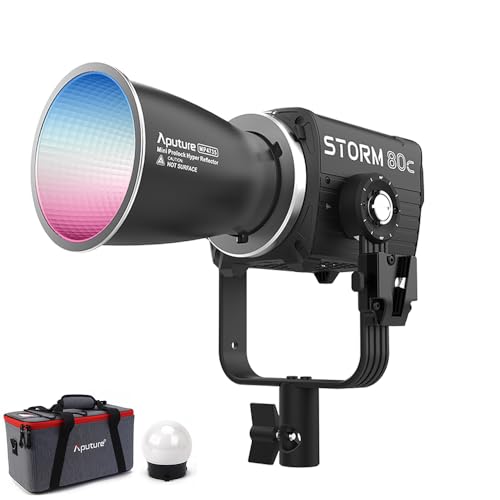
Aputure Storm 80c RGB LED Monolight

Aputure CF4 Fresnel Modifier for Storm 80c

Aputure Lantern 30 Omnidirectional Softbox

Aputure Quick Dome 40 Circular Softbox with Mini ProLock Mount

Aputure Amaran 150c 150W RGBWW COB Video Light

NEEWER Basics RGB Video Light, SL90C Rechargeable
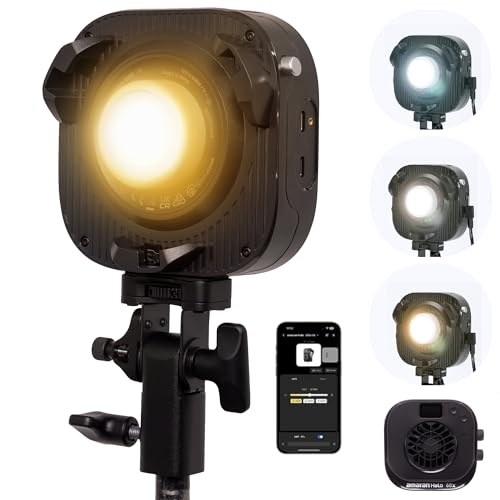
Amaran Halo 60X COB LED Video Light, Bowens Mount
The Strengths Of Each Pick
The Storm 80c is the headline pick for shooters who treat color accuracy as a hard requirement. Its BLAIR-CG engine uses a wider diode mix (including Cyan and Indigo) than typical RGBWW units, which means saturated reds and cyans read cleaner on camera and skin tones look more honest under mixed light. In a small studio where you bounce into walls or shoot against colored backdrops, that broader spectrum pays off immediately.
Where it differs from later picks is sheer precision: this is the monolight I would choose for product reels, music videos, or any project where color grading starts from a tight baseline. The Mini ProLock mount also means the modifiers coming up in this list attach cleanly without rattle.
What Stands Out
- Seven-diode BLAIR-CG chipset delivers high SSI (P3200 of 88) and broad Rec.2020 coverage for accurate color.
- CCT range stretches from warm tungsten-style to clean daylight without green-magenta drift.
- Mini ProLock mount keeps modifiers seated during long shoots and fast swaps.
- Full HSI control gives creative room for stylized gels without buying physical filters.
- Quiet fan behavior matters in dialogue-heavy interview setups.
Points To Note
- Owner feedback commonly mentions a learning curve for the deeper menu structure, so first sessions feel slow.
- As a monolight, it needs a sturdy stand and a separate control box setup on larger rigs.
- Headroom is generous but power draw climbs quickly when you push to full daylight.
Key Attributes
Who It Suits Best
Working creators who shoot graded footage and want a single monolight they can lean on across commercial, narrative, and music projects.
Where Another Pick Suits Better
If you mostly travel light and shoot handheld, the NEEWER Basics RGB Video Light (SL90C) covers the run-and-gun case without the monolight footprint.
The CF4 Fresnel is not a standalone light. Think of it as a precision lens for the Storm 80c, the kind of attachment you reach for when the bare bulb is too soft and you want a controllable pool of light from a distance. The Mini ProLock mount drops onto the monolight, and a single barrel adjustment moves you from a tight spot to a wider flood.
Where this piece earns its place is long-throw work. Across a wide interview room or down a long hallway, the CF4 concentrates the Storm 80c’s output so the subject still sits in a clear hot spot without pushing the fixture to its noisy top end.
The Upside
- Boosts daylight 5600K output roughly 5.5x, reaching 36,000 lux at one meter for true punch.
- Spot-to-flood range of 15 to 40 degrees gives precise framing control without swapping modifiers.
- Includes a protective carrying case, so the optic travels safely between locations.
Trade Offs
- Requires the Storm 80c to function, so it is an add-on rather than a starter piece.
- The concentrated beam can feel harsh close to the subject without diffusion in front.
Made For
Interviewers and commercial shooters who need one key light to read clearly across a large room without flooding the back wall.
Reach For A Different Pick When
Group scenes where you want soft, wrapping ambient should skip the CF4 and grab the Aputure Lantern 30 instead.
The Lantern 30 is the modifier I would pull for documentary-style group coverage. At roughly 30 cm across, it spreads light in every direction, so a single fixture placed overhead lifts an entire table, a small office, or a roundtable conversation evenly. Hook-and-loop light-control skirts let you trim spill where you need it, which is rare in this style of softbox.
Compared to the Quick Dome 40 that comes next, the Lantern trades tight directional control for ambient wrap. You give up punchy contrast, but you gain a softer overall room tone that flatters multiple faces at once.
Strong Points
- Omnidirectional diffusion fills an entire room from a single overhead placement.
- Mini ProLock mount matches the Storm 80c cleanly.
- Built-in skirts tame spill without buying extra flags.
Minor Gripes
- The shape needs careful packing, so owners commonly report dedicating a soft case slot for it.
- Less effective as a single-subject key where you want directional shadow.
Feature Snapshot
Best Suited To
Documentary crews and roundtable interviewers who want one overhead source to do the work of two.
Skip It When
Single-subject interviews with sculpted shadows call for the Aputure Quick Dome 40 instead.
The Quick Dome 40 solves a problem I hear about constantly: setup speed on a one-person shoot. The quick-release latch on the speed ring tensions the fabric in seconds, so you can collapse the modifier into a small footprint between takes. At 40 cm it lands in the sweet spot where softboxes stop looking small but still fit in tight rooms.
Where it differs from the Lantern 30 is direction: this is a forward-firing soft key, not an ambient lift. For two-person talking-head setups where you want round catchlights and gentle falloff, the Quick Dome gives a polished look without a long throw distance.
Benefits That Matter
- Quick-release latch cuts teardown time between locations.
- 40 cm diameter produces round, flattering catchlights on a single subject.
- Compact folded size slips into a standard lighting bag.
- Built specifically for the Storm 80c with native ProLock fit.
Honest Caveats
- The soft fabric needs careful handling; owners often note the rod ends can wear if the box is folded aggressively.
- Tied to the Storm 80c ecosystem, so it is not useful across other lights.
Whose Shelf It Belongs On
Solo creators running talking-head content who value fast setup over maximum softness.
A Better Fit Elsewhere
If you shoot broader scenes and want ambient lift, the Aputure Lantern 30 serves the room better.
The Amaran 150c hits the sweet spot for creators who want serious output without stepping all the way up to a flagship monolight. The expanded bi-color CCT range of 2,500K to 7,500K with green-magenta adjustment lets you match mixed lighting conditions in real locations, which is the kind of flexibility you appreciate on documentary or commercial location work.
Compared to the Storm 80c, this light trades some spectral precision for raw power. CRI/TLCI scores above 95 and broad Rec.2020 coverage still hold up under grading, but the diode mix is the classic RGBWW rather than the BLAIR-CG engine.
What Helps Most
- 150W COB output drives modifiers like Bowens-mount softboxes with room to spare.
- CCT range of 2,500K to 7,500K plus green-magenta shift handles tricky mixed lighting.
- Full HSI color control supports creative gel work without physical filters.
- High CRI/TLCI scores above 95 give clean skin tones.
Points To Keep In Mind
- At 150W the fan ramps up during long full-power sessions, which may matter in quiet rooms.
- Larger than on-camera units, so it leans toward mounted studio use.
Key Product Details
The Right Fit
Mid-tier creators who want flagship-level flexibility in a single COB without the highest-tier price.
Not Your Match When
Strict spectral accuracy for high-end commercial color work points back toward the Aputure Storm 80c.
The SL90C is the smallest panel in this lineup and the one I would recommend for travel. The metal housing feels reassuring in the hand, the 4,000 mAh internal battery removes the wall-tether problem on location, and at 9W it pulls its weight as a fill or accent light without dominating a small scene.
Three operating modes (CCT, HSI, and FX with 17 scene presets) cover the practical bases. CRI 97 means it does not muddy skin tones even when used as a key for a single talking head in a hotel room, and the metal chassis shrugs off bag wear better than plastic-bodied panels tend to.
Where It Excels
- 4,000 mAh rechargeable battery frees you from mains power on location.
- CRI 97 keeps skin tones clean even at close range.
- 17 built-in FX scenes speed up stylized shots like candles, sirens, or storms.
- Metal body holds up to travel wear better than plastic panels.
- CCT range of 2,700K to 7,500K handles mixed lighting quickly.
Where It May Fall Short
- 9W output is honest fill territory, so it cannot replace a larger key in big rooms.
- Owners commonly note the small on-body controls take a moment to learn.
Who Should Grab It
Traveling shooters and vloggers who need a portable, battery-powered RGB light that fits in a camera bag.
Consider Something Else When
Studio shooters wanting a strong main key should reach for the Aputure Amaran 150c instead.
The Halo 60X is a tidy 60W bi-color point-source that punches above its size class. Bare output lands at 3,270 lux at one meter, which makes it a confident single key for a home studio or a small office interview. The Bowens mount opens up the wider modifier ecosystem, so existing softboxes and reflectors slot straight in.
Where this light earns its place is bridging the gap between on-camera panels and full-power COBs. CRI 96 and TLCI 97 plus solid TM-30 scores mean skin tones stay flattering without a heavy correction pass, depending on how strict your grading pipeline is.
Positive Takeaways
- 60W COB output reads 3,270 lux at one meter bare, plenty for single-subject keys.
- Bowens mount accepts a wide range of third-party modifiers.
- Bi-color range of 2,700K to 6,500K handles most indoor/outdoor mixes.
- CRI 96 / TLCI 97 produce clean skin tones out of camera.
- DC power supports fixed studio setups.
Room For Improvement
- No RGB, so creative gel work needs physical filters.
- Bare COB output is intense; you will want a softbox or diffuser in most cases.
Quick Facts
Perfect Match For
Home studio creators who want a strong bi-color key with broad modifier compatibility.
Look Elsewhere When
Shooters needing full RGB creative control should consider the Aputure Amaran 150c instead.
Choosing Video Lighting That Actually Fits Your Shoot
Picking light gear for video comes down to matching the fixture to the room, the subject, and the way you work. Output matters, but so does modifier compatibility, color control, and how fast you can move the kit between setups.
Output And Throw Distance
Higher wattage gives you headroom to push light through bigger modifiers or to throw across a long room. For typical talking-head work in a home studio, a 60W to 150W COB is comfortable. For wide interview rooms or sets where the light sits far from the subject, a monolight with a Fresnel modifier concentrates output cleanly without pushing the fixture to its noisy top end.
Color Control And Accuracy
RGBWW panels (red, green, blue, plus warm and white diodes) give you full HSI color, useful for stylized scenes and matching unusual ambient light. The trade-off is accuracy; entry-level RGBWW can drift from the target white point. Engines like BLAIR-CG add extra diodes (such as Cyan and Indigo) to widen the spectral response and improve color rendering under grading. For documentary or commercial work where skin tones must hold up, look for high CRI and TLCI scores (above 95 is a safe baseline).
Mount And Modifier Ecosystem
Bowens mounts open up the broadest third-party modifier range, which matters if you already own softboxes or reflectors. Proprietary mounts like Mini ProLock give a tighter, more secure fit and faster swaps within one product family. If you only ever plan to use one ecosystem, the proprietary path is convenient. If you mix brands or upgrade over time, Bowens offers more flexibility.
Power And Portability
AC-powered COBs and monolights give consistent output for long studio days. Battery-powered panels (like compact RGB lights with internal cells) trade raw output for true portability, ideal for travel, run-and-gun, and locations without power. The honest read is that neither replaces the other, so a balanced kit often pairs one of each.
Key Considerations Across These Picks
Pitfalls Shoppers Hit
A common mistake is buying a light with plenty of power and no plan for diffusion, leaving the subject with harsh shadows and bright hotspots. A second is chasing maximum wattage without checking modifier compatibility, then discovering your existing softbox does not fit the mount. The fix is simple: decide on a modifier ecosystem first, then pick a light that drops into it cleanly.
Where The Extra Money Goes
Higher-tier video lights cost more for reasons that show up in real shoots: tighter color accuracy under grading, quieter fans during dialogue, broader spectral coverage for tricky mixed lighting, and build quality that survives years of travel. For most creators, mid-tier gear like the Amaran 150c hits a practical balance. For commercial and narrative work where color is graded rigorously, the upgrade to a BLAIR-CG-class monolight pays off in shorter color sessions.
Frequently Asked Questions
How Many Video Lights Do I Need For A Talking-Head Setup?
A single soft key plus a fill or reflector works for most home studios. A two-light setup with a separate hair light gives more polish if you have the room and the time.
What Is CRI And Why Does It Matter?
CRI (Color Rendering Index) measures how accurately a light source renders colors compared to a reference. High CRI scores (above 95) mean skin tones and product colors look natural on camera without heavy correction.
Can I Mix Different Light Brands In One Setup?
Yes, as long as the color temperatures and CRI scores are close. Using lights with very different spectral signatures creates mixed white points that are hard to grade out.
Do I Need RGB Color For Video Work?
Not always. For interviews and natural-looking footage, bi-color is enough. RGB becomes valuable for stylized scenes, music videos, and creative effects where you want precise hue control.
How Important Is Fan Noise For Video Lighting?
For dialogue-heavy scenes, fan noise matters because built-in microphones (and even some shotgun mics) can pick up coil whine or fan hum. Quieter fixtures earn their keep in interview-heavy work.
Closing Remarks
Any light on this list solves a real problem, so the right pick depends on the room you shoot in and the look you want. Match the gear to your actual workflow rather than the spec sheet, and you will spend less time troubleshooting and more time filming.