

Shooting a stream from a spare room or home office used to mean squinting into a dim ring light while my laptop fan whirred. I know the frustration of looking washed out on camera, and I also know how the right light can turn a flat, grainy feed into something that actually feels professional. After digging through specs, comparing beam angles, and thinking about real streaming setups, I pulled together seven lighting options that cover everything from casual Twitch sessions to polished podcast work. Whether you’re broadcasting from a closet studio, a shared apartment, or a full desk rig, there’s a fit below.
A Snapshot Of The Selections

LitONES Dual-Side LED Desk Lamp with Clamp

LitONES Tall Computer Ring Light CRI 97.8
NEEWER 660 PRO RGB LED Video Light

LitONES Remote LED Desk Lamp Metal Arm CRI 97.8

Newmowa Clip Selfie Light 2000mAh Pink
LitONES Zoom Conference Light 30 Modes CRI>98
Amaran Halo 60X COB LED Video Light Bowens Mount
The Picks, Examined More Closely
The LitONES dual-side lamp stands out because it lights both your face and your keyboard at the same time, which solves the classic streaming headache of a glowing face over a pitch-black desk. Edge-lit diffusion spreads the beam wide and soft, so reflections on glasses stay manageable during long broadcast sessions. For anyone running a stream from a shared home office, the clamp-on form frees up the surface area you’d usually lose to a panel stand.
The stepless remote is a small but meaningful upgrade: you can nudge brightness or color temperature mid-stream without leaning across the desk. CRI (Color Rendering Index, a measure of how accurately a light reveals true colors) tends to be solid on LitONES fixtures, which matters if your background has clothing or props that need to look right. For most remote workers who also stream, this is the kind of lamp that quietly disappears into the setup and just does its job.
Strong Points
- Dual-side output lights both face and workspace, saving desk real estate
- Edge-lit diffusion softens shadows and reduces harsh reflections on glasses
- Stepless remote control avoids visible flicks during a live broadcast
- Clamp mount keeps the footprint small in tight streaming corners
- Eye-care diffusion helps during marathon stream days
Things To Consider
- Not designed as a key light: heavy on fill, so a second source helps for cinematic looks
- Clamp requires a sturdy desk edge; glass tops may not grip as reliably
Who Will Love This
Remote workers who run occasional streams from a home office and want one light to handle both the camera and the desk without rearranging the whole space.
Consider Something Else When
The Amaran Halo 60X suits creators who need a powerful key light with Bowens-mount modifiers, where the LitONES dual-side lamp would feel underpowered.
This is the lamp that convinced me ring lights have grown up. The head pivots from a tall desk fixture down to a classic ring configuration, which means the same unit handles a day of spreadsheets and an evening Twitch session. A CRI of 97.8 puts it in the territory where skin tones look natural rather than the muddy orange some cheaper LEDs produce. For creators who hate clutter, one fixture doing two jobs is genuinely useful.
The trade-off shows up in size: it’s tall, so short desks or low monitor setups may feel crowded. Compared to the previous LitONES entry, this one leans harder into “I’m a creator” aesthetics rather than pure office utility. If your streaming identity matters as much as the light quality, the look will probably appeal to you.
Everyday Advantages
- CRI 97.8 renders skin tones accurately on camera
- Adjustable head switches between task lamp and ring light without buying two units
- Tall profile frames the face nicely for seated streaming
- Soft, even output reduces the need for post-production color correction
Worth Noting
- Height may overwhelm compact desks or short monitor arms
- When used as a ring light, expect the classic ring reflection in glasses
Made For
Creators who want a single, attractive piece of equipment that pulls double duty as office lighting and a stream-ready ring light.
Look Elsewhere When
The NEEWER 660 PRO is a better fit for streamers who want RGB color effects and app control, since the LitONES ring light stays in the white-light spectrum.
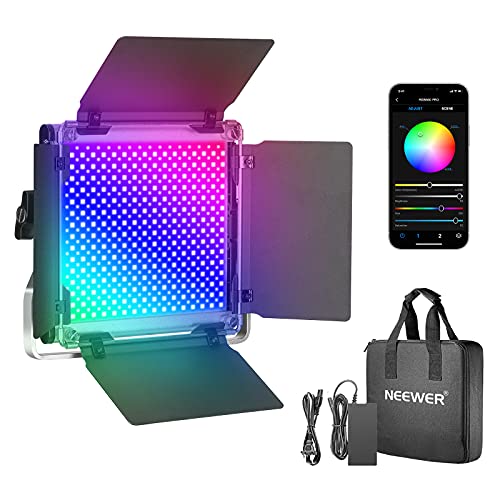
The NEEWER 660 PRO is what I picture when someone says “real creator lighting.” It brings 660 SMD LED beads (Surface-Mounted Diodes, the tiny individual emitters packed onto the panel) for high output, plus a barn door attachment that shapes and directs the beam, which is something desk lamps simply cannot do. RGB control through the app means you can shift your entire background hue from a phone, then snap back to natural white for a sponsored segment. For streamers who care about scene design as much as face light, this is the flexible workhorse.
The honest read is that the 660 PRO is closer to studio gear than desk gear. Newcomers may find the menu and app setup more than they need. Owners commonly report that the panel runs warm during long sessions, so positioning matters. Compared to the LitONES dual-side lamp, the NEEWER trades ambient desk lighting for raw creative power.
Useful Touches
- RGB control opens up mood lighting and themed stream scenes
- Barn doors shape spill, keeping light off reflective monitors and walls
- App-based remote control is faster than reaching for onboard buttons mid-stream
- U-bracket mount allows tilting for overhead or angled lighting
Trade Offs
- Panel generates noticeable heat during extended use, so ventilation around it matters
- Learning curve for first-time users exploring RGB and app pairing
- U-bracket typically needs a separate stand, adding to the total footprint
Key Specs
Best Suited To
Streamers who want RGB atmosphere, app-based control, and the ability to shape their light with barn doors rather than relying on a soft, fixed lamp.
A Better Fit Elsewhere
The LitONES Zoom Conference Light suits someone who just needs flattering, no-fuss lighting for talking-head streams, where the 660 PRO would be overkill.
Where the earlier LitONES dual-side lamp emphasizes fill, this metal-arm version leans into control. The metal arm holds position firmly, which matters when your camera is angled from above and the lamp has to stay locked in place across long sessions. Thirty lighting modes sounds like marketing fluff, but in practice it means there’s almost always a setting that flatters your skin tone and your room without fiddling for ten minutes. The remote keeps adjustments invisible to viewers.
CRI 97.8 again places this firmly in “natural-looking” territory for streaming. Where it lags behind the NEEWER is creative flexibility: there’s no RGB, no barn doors, and no app. For a creator whose stream is mostly talking head, those omissions are features, not flaws, because simpler controls mean fewer things to mess up.
What Helps Most
- Metal arm holds position reliably across multi-hour streams
- 30 lighting modes let you tune warmth and brightness without guesswork
- High CRI 97.8 keeps skin tones accurate on camera
- Remote-only adjustments keep on-stream changes invisible
Points To Note
- No RGB color, so mood lighting requires a separate fixture
- Clamp style limits placement to compatible desk edges
Right Fit For
Hybrid professionals who stream from the same desk they use for focused daytime work and want a single, sturdy lamp with precise mode control.
Skip It When
The NEEWER 660 PRO suits streamers who want RGB accents and barn-door shaping, while this LitONES is better for pure white-light control.
The Newmowa clip light isn’t trying to compete with the desk fixtures above. It clips onto a phone, runs on a built-in 2000mAh battery, and uses a smart light sensor to adjust output to your surroundings. For mobile-first streamers on TikTok or Instagram Live, that combination is genuinely freeing: no outlet hunting, no panel stands, just clip and shoot.
The smart sensor is the detail that makes this more than a cheap accessory. Walk from a sunny window into a dim hallway, and the light adapts rather than blowing out your face. Owners commonly find the clip strong enough for standard phone cases, though very thick cases may need a moment to seat properly. Compared to the LitONES Zoom light, the Newmowa trades power and CRI for portability, and that’s the whole point.
What It Does Well
- Battery-powered design removes dependence on outlets for mobile streams
- Smart light sensor adapts brightness to changing environments
- Compact clip form factor slips into a bag or pocket
- Affordable entry point for creators testing mobile streaming
Honest Caveats
- Limited output compared to panel or COB lights, so it won’t carry a dark room alone
- Battery runtime depends on brightness setting and may need daily top-ups
- Clip width may not fit every rugged or oversized phone case
Whose Shelf It Belongs On
Mobile-first streamers, vloggers, and anyone who broadcasts from a phone in shifting lighting conditions rather than a fixed desk setup.
Another Choice May Suit
The LitONES Zoom Conference Light serves creators who stream from a stationary desk and want higher CRI output, while the Newmowa shines when portability matters most.
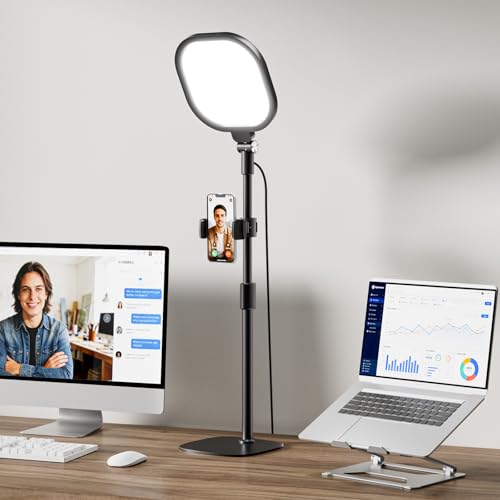
If the camera is your audience, this is the light built specifically for that conversation. A CRI above 98 means skin tones look about as close to real life as LED technology allows, which matters on Zoom calls where people scrutinize every shadow. The included stand sets it beside a monitor at face height, so the light lands where broadcasters actually need it: on the person, not the desk.
Thirty modes translate into practical variety: warmer tones for cozy conversation, cooler tones for product demos. The four-layer optical panel softens the beam so the harsh “ring-light look” fades away. Where it diverges from the NEEWER 660 PRO is in intent, since this light is tuned for faces and video calls rather than creative scene design.
What Makes Sense
- CRI above 98 delivers near-natural skin tone reproduction on camera
- Four-layer diffusion softens glare for comfortable long calls
- Stand elevates the light to proper face height for seated streaming
- 30 modes cover most meeting, podcast, and stream scenarios
Points To Keep In Mind
- Stand footprint adds clutter in tight desk setups
- White-light focus means no creative RGB color options
Feature Snapshot
Who Should Grab It
Professionals who run frequent Zoom meetings, podcast recordings, or talking-head streams where face quality matters more than atmospheric lighting.
Reach For A Different Pick When
The NEEWER 660 PRO is a better match for streamers wanting RGB color scenes and barn-door shaping, while this LitONES is built for clean, natural face light.
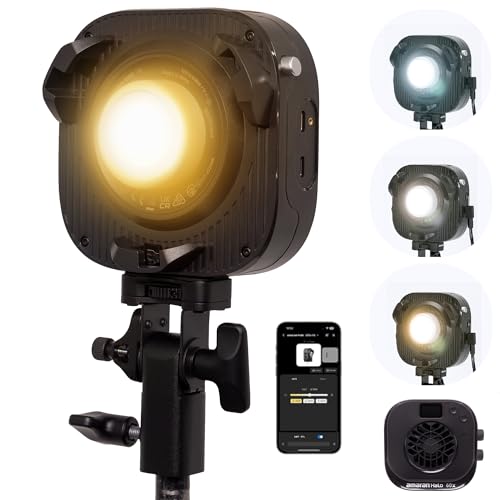
The Amaran Halo 60X is the heavyweight on this list. COB (Chip-on-Board) LED technology concentrates output into a single bright source rather than spreading it across hundreds of tiny emitters, which is why this fixture can throw real light across a room. Bi-color from 2700K to 6500K (warm tungsten to clean daylight) covers everything from cozy interviews to crisp product shots, and the Bowens mount opens the door to softboxes, reflectors, and other studio modifiers.
The honest trade-off is complexity. Bowens-mount modifiers are sold separately, so the all-in cost climbs fast. For most bedroom streamers this is genuinely more light than they need. Compared to the NEEWER 660 PRO, the Amaran trades RGB versatility for sheer output and modifier flexibility, which is the right call for dedicated studio spaces.
Everyday Perks
- High-output COB LED delivers strong key light for larger spaces
- Bi-color range from 2700K to 6500K handles warm and cool scenes
- Bowens mount accepts softboxes and other professional modifiers
- Slim profile compared to older COB designs
Some Limits To Know
- Overkill for small desk setups where softer fill is enough
- Bowens modifiers sold separately, raising total cost
- DC power means it isn’t as portable as battery-driven options
Built With In Mind
Dedicated studio streamers, YouTubers, and podcasters with a fixed shooting space who want professional key light and modifier flexibility.
Where A Sibling Pick Shines
The LitONES Dual-Side LED Desk Lamp is the friendlier pick for apartment-sized streaming spaces where the Halo 60X would feel oversized.
Factors To Weigh Before Choosing Streaming Lightings
Output, Size, And Where You Stream
Beam intensity matters more than people expect. A small desk lamp can wash out a single face in a dark closet, but it disappears the moment your room has competing window light. Match the fixture to your space: compact LED panels and clip lights handle a corner desk, while COB fixtures like the Amaran Halo 60X thrive in larger rooms where you need punch. If your streaming space doubles as an office, a dual-side lamp may save you from buying two units.
Color Accuracy And Skin Tones
CRI tells you how faithfully a light reproduces color. Anything above 95 looks natural on most webcams, while lower-CRI lights can push skin toward yellow or green in ways that are hard to fix in software. For creators whose face is the product, a high-CRI lamp pays for itself in fewer post-production headaches. RGB fixtures like the NEEWER 660 PRO add creative color but rarely match dedicated white lights on pure accuracy.
Mounting, Modifiers, And Setup Footprint
A clamp-on lamp disappears into the desk edge, while a stand-mounted panel adds visible clutter. Bowens-mount fixtures unlock professional softboxes and grids, but those accessories cost extra and need storage. Think about where the light will live between sessions, since a light you have to set up before every stream tends to stay in the box.
Power And Portability
Battery-powered options like the Newmowa clip light free you from outlet placement, but most high-output fixtures need AC power. If you stream from a single fixed room, corded lights are fine. Mobile creators and frequent travelers should weight runtime and battery size heavily, since a dead light mid-stream is not recoverable.
Where Shoppers Go Wrong And When Spending Up Pays Off
Pitfalls Shoppers Hit
The most common mistake is buying the brightest light on the page without thinking about diffusion. Raw output without softening produces harsh shadows and reflective hotspots on glasses, which is exactly what streamers are trying to avoid. A second frequent slip is ignoring CRI in favor of wattage: a high-wattage low-CRI lamp can actually make skin look worse than a softer, more accurate unit. Finally, shoppers often skip the mount question entirely and end up with a light they cannot position properly above or beside their camera.
Where The Extra Money Goes
Higher-tier fixtures earn their cost through better color rendering, stronger build quality, and modifier compatibility. A Bowens-mount COB like the Amaran Halo 60X accepts softboxes that completely change the look of the light, which a fixed panel cannot replicate. Premium lamps also tend to hold position more reliably, with metal arms and sturdier stands that survive daily adjustments. For creators who stream several times a week, those upgrades save time and frustration; for casual broadcasters, a mid-range lamp is usually enough.
Frequently Asked Questions
What CRI should I look for in streaming lightings?
Aim for a CRI of 95 or higher so skin tones look natural on camera without heavy color correction in post.
Do I need RGB lightings for streaming?
RGB lights add creative mood and themed scene options, but they aren’t required for clean talking-head streams where natural white light performs better.
Can a desk lamp work for streaming?
Yes, especially dual-side or clamp-on LED desk lamps designed with diffusion and high CRI, though they work best as fill light in compact setups.
How bright should streaming lightings be?
Enough to clearly light your face without competing with window light, generally a few hundred lumens at face distance for most home setups.
Are COB lights overkill for home streaming?
For small desk setups, yes, but for creators with dedicated studio space or larger rooms, COB lights offer flexibility that panel lights cannot match.
The Takeaway
Streaming lightings range from pocket-sized clip lights to studio-grade COB panels, and the right pick depends on your room, your camera distance, and how much creative control you want. Match the fixture to your actual space rather than chasing raw output, and look for high CRI and solid mounting before anything else. Whichever option fits your workflow, the upgrade shows up on camera almost immediately, and your viewers will notice even if they cannot name why.