

A bare monitor in a dim room is a recipe for tired eyes and washed-out video calls. The right lighting behind or around your screen changes all of that, softening contrast, easing fatigue, and making you look alert on camera. This guide walks through nine solid options, from screen-mounted bars to bias-light strips and full architect-style desk lamps, so the setup behind your monitor finally pulls its weight.
The Essentials At A Glance

LitONES Premium LED Desk Lamp with Knob Remote

Pzloz LED Desk Lamp with Clamp, 24W

HumanCentric Video Conference Light, Single Kit

HumanCentric DSLR Monitor Mount, Small

HumanCentric DSLR Monitor Mount, Extra Large

HumanCentric Video Conference Light, Double Kit
HumanCentric Add-On Video Conference Light
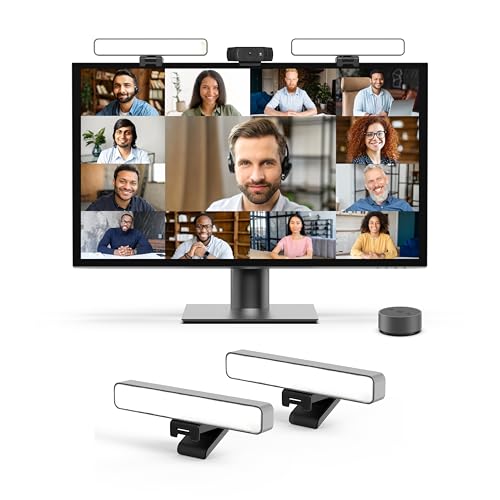
HumanCentric Premium Video Conference Light (HighBeam Pro)

Power Practical Luminoodle Backlight, 60-80″ TV
A Breakdown Of The Leading Choices
The LitONES desk lamp takes a different swing from the screen-mounted bars later in this list. Rather than sitting on your monitor, it spreads diffused light across both the desk surface and the surrounding area, with an edge-lit panel that softens harsh transitions. For people who stare at spreadsheets for hours, that wide, low-contrast wash helps the eyes stop fighting between bright screen pixels and a dim backdrop.
A knob-style remote keeps adjustments tactile, so you can dim or shift color without leaving your chair. In most home offices, the lamp slips into a corner and disappears, which is a quiet win if you hate visual clutter.
What Helps Most
- Edge-lit panel produces softer shadows than bare LEDs, easing the constant pupil adjustment that causes late-day headaches.
- Knob remote makes blind adjustment easy, especially when the lamp sits behind a second monitor.
- Wide spread works well over a single large display or a laptop-and-keyboard setup.
- Dual-sided output fills the desk and the wall behind the monitor, which lifts contrast without screen glare.
Things To Consider
- It is a desk lamp, not a screen-mounted bar, so it won’t directly light your face on video calls.
- Taller monitor stands may block part of the throw; you may find the angle wants tweaking.
Key Specs
Who It Suits Best
Writers, coders, and analysts who log long hours at a single screen and care more about ambient comfort than on-camera lighting.
Where Another Pick Suits Better
The HumanCentric Double Kit serves better if your priority is appearing well-lit on Zoom rather than filling the whole workspace.
The Pzloz architect-style lamp borrows the swing-arm design used in drafting studios and adapts it for monitor desks. It clamps to the back edge of your work surface, freeing up desk space that the LitONES lamp would otherwise occupy. For dual-monitor setups, the long arm reaches across without forcing you to rearrange your gear.
You get five color temperatures and five brightness levels, which together make 25 combinations. In practice that means a warm bias for evening reading and a cooler, punchier light for spreadsheet detail work. The 270-degree rotating head lets you angle the beam away from the screen entirely, so it acts as background fill rather than screen glare.
Real Benefits
- Clamp mount keeps the footprint tiny, useful on small desks where the LitONES lamp would crowd the keyboard.
- Adjustable swing arm reaches over monitors, keyboards, and notebooks without rebalancing.
- Multiple color temperatures cover late-night work and daytime focus without separate lamps.
- Wide beam softens shadows around paperwork and peripherals.
Worth Noting
- The clamp fits a limited desk thickness range; thinner glass tops may need a shim.
- It lights the desk, not your face, so video-call appearance still depends on another source.
Right Fit For
Drafters, engineers, and dual-monitor users who want adjustable task lighting without sacrificing desk space.
A Better Fit Elsewhere
Pick the LitONES Premium LED Desk Lamp if you prefer a freestanding base and softer ambient wash over a swing-arm layout.
The single-bar HumanCentric video light shifts the focus from desk lighting to face lighting. It rests on top of your monitor like an oversized webcam and points forward at you, the opposite direction from most of the lamps in this guide. That’s exactly what you want when the goal is looking alert on a Tuesday afternoon call.
Compared with a ring light, this bar style avoids the circular catchlight in your eyes and sits closer to flush with the screen. The kit includes one light and one power cable, so setup stays simple. Owners commonly find the single bar handles low-light rooms well, though bright backlit situations still need attention.
Points In Its Favor
- Top-of-monitor placement keeps the light aimed at your face, not the desk.
- Bar form factor produces a more natural catchlight than a circular ring.
- Compact single-cable setup suits laptops and small monitors alike.
- Sits without suction cups or adhesive, so removal is clean for shared spaces.
Small Caveats
- Single bar can cast one-sided shadows if you sit at an angle to the screen.
- Won’t bias-light the wall behind the monitor, so contrast comfort on long writing sessions is limited.
Feature Snapshot
Made For
Remote workers who take frequent one-on-one calls and need a single, compact face light.
Swap It Out When
Choose the HumanCentric Double Kit if you present to groups or sit further from the screen, where one bar alone feels uneven.
This isn’t a light, but it earns its place in any honest list of behind-monitor gear. The Small DSLR Monitor Mount clamps onto a VESA-compatible display (the 100x100mm mounting holes on the back) and creates a shelf directly above the screen for a mirrorless or DSLR camera. For creators who already own a real camera, it’s the cleanest way to get it to eye level without a tripod eating desk space.
The smaller shelf version suits compact camera bodies. Pair it with one of the video lights in this roundup and you have a full creator rig without a single stack of books propping things up.
The Helpful Details
- VESA clamp ties the shelf directly to your monitor, so the camera moves with the screen.
- Frees the desk of tripod legs, useful in tight setups.
- Stable mounting reduces micro-vibration that cheap tripods introduce to long lenses.
Trade Offs
- Requires a VESA-compatible monitor, which excludes many slim office displays.
- Smaller shelf won’t accept larger DSLRs with cage rigs; the Extra Large version handles those.
Best Suited To
YouTubers and streamers using a small-to-mid mirrorless body who want a stable, screen-aligned mount.
Look Elsewhere When
Step up to the HumanCentric DSLR Monitor Mount Extra Large if your camera rig includes a shotgun mic or a cage.
The Extra Large version of the HumanCentric mount does the same job as the Small one, just with a wider shelf. That extra width matters once you strap a shotgun mic, audio recorder, or a full cage rig to the camera. Many creators rig their video and audio together, and a too-narrow shelf becomes the weak link in that chain.
Like the smaller model, it installs on VESA-compatible monitors using the 100x100mm pattern. In studio-leaning home offices where you treat the desk as a set, this version feels more like production gear than a clever hack.
Notable Gains
- Wider shelf accepts camera-plus-mic combinations without crowding.
- Keeps the screen-to-camera relationship consistent as you adjust monitor height.
- Solid mounting prevents the subtle wobble that hurts autofocus on long lenses.
- Cleans up the desk compared with a separate boom arm and tripod.
Honest Caveats
- Bigger footprint on top of the monitor, which may clash with slim displays.
- VESA-only compatibility still rules out many lightweight office monitors.
Who Should Grab It
Studio creators running heavier rigs with onboard mics, recorders, or matte boxes who want a stable mount that travels with the screen.
Not Your Match When
Stick with the Small mount if your camera is a compact mirrorless without much extra gear bolted on.
Where the single kit aims one bar at your face, the Double Kit aims two. The result is symmetrical fill light that softens shadows on either side of your nose and chin, which matters when the camera sits slightly off-center from your screen. Presenters who flip between slides and face-time on camera tend to prefer this even look.
Both bars share one power cable, so cable management stays clean. A preinstalled diffuser keeps the light soft rather than clinical, and the kit includes brightness and color-temperature adjustments plus cable clips and Velcro straps. For most people who take calls daily, the upgrade from single to double is the single most noticeable improvement.
Useful Highlights
- Two bars produce even, flattering face light from both sides.
- Adjustable brightness and color temperature suit different rooms and skin tones.
- Shared power cable reduces clutter behind the monitor.
- Soft diffuser panel keeps the glow natural instead of harsh.
Things To Consider
- Two bars sit a bit higher on the screen, which can clip into ultra-thin bezels.
- USB-A power limitations mean you shouldn’t daisy-chain more than two without proper USB-C delivery.
Feature Rundown
Whose Shelf It Belongs On
Frequent video presenters, online teachers, and anyone whose professional reputation rides on how they look on camera.
Consider Something Else When
The HumanCentric Premium Video Conference Lighting is a better choice if you want one stronger key light instead of two softer bars.
This add-on bar only works if you already own a HumanCentric single or double kit. It doesn’t ship with a power cable or controller, so on its own it’s basically decorative. Treat it as a third or fourth light in a daisy-chained setup.
For creators who started with the single kit and want to scale up to a wider light array, this is the official path forward. You can daisy-chain up to four bars total, which lets you wrap the light around unusually wide ultrawide monitors without gaps. In a narrow office, that much light may be overkill.
What It Does Well
- Expands an existing HumanCentric kit to three or four bars for wider coverage.
- Maintains consistent color and brightness across the array.
- Lets ultrawide monitor users fill the full width evenly.
Where It May Fall Short
- Won’t function alone, so newcomers need to start with the Single or Double Kit first.
- Four-bar setups draw more power, and USB-A delivery caps your options.
Built With In Mind
Existing HumanCentric kit owners running ultrawide displays who want smoother, gap-free lighting across the top edge.
Skip It When
Pick the HumanCentric Premium Video Conference Lighting instead if you’re starting from scratch and want one polished key light.
The HighBeam Pro is HumanCentric’s stepped-up answer for people who treat video calls as a daily performance. Instead of two soft bars, you get a single, more powerful key light designed to make you look polished without crowding your desk. It clips over the top of the screen like a slim soundbar.
Compared with the Double Kit, this trades even fill for punchier output. In a dim home office, that contrast reads as professional. In a sunlit room, you may find you need to close the blinds to avoid competing with window light. The clean design stays out of the way of webcam positioning, which matters on calls where a centered camera and a slightly off-center light is the standard pro look.
Bright Spots
- Single, strong key light reads as professional on camera.
- Slim profile doesn’t crowd the webcam or monitor bezel.
- Designed for desk setups where space matters more than wraparound fill.
Possible Compromises
- Single-bar output can create sharper shadows than the Double Kit, depending on face shape.
- Strong output is wasted in already-bright rooms.
Feature Overview
Perfect Match For
Executives, lecturers, and creators who want a single, refined light that signals polish on every call.
Reach For A Different Pick When
The HumanCentric Double Kit is the better fit if you prefer even, soft fill over a stronger, more directional key.
Bias lighting, which is a soft glow placed behind a screen, takes the edge off bright TVs and large monitors in dark rooms. The Luminoodle USB strip runs along the back edge of a 60 to 80-inch display and pulls power from any USB port. It includes a remote with 15 colors and 10 brightness modes, so the same strip does movie-night ambiance and a clean white work light.
Compared with the LitONES or Pzloz lamps, this strip doesn’t shine on your face. It shines on the wall behind the screen, raising the ambient level so your eyes stop straining between dark room and bright pixels. Owners commonly note that the 3M adhesive holds well on smooth monitor backs, though textured plastic may need extra care during install.
Key Advantages
- USB power means no extra outlet required behind the TV.
- Bias light raises ambient brightness, reducing the eye-strain contrast that long movie sessions cause.
- Color and brightness remote handles both ambient and functional lighting.
- Adhesive install keeps cable runs invisible.
Worth Bearing In Mind
- Designed for 60 to 80-inch TVs, so smaller monitors may have excess strip length to manage.
- 3M adhesive can lift factory finishes on some textured plastics, so test a corner first.
The Right Fit
Living-room and bedroom TV watchers who want simple, USB-powered bias lighting without rewiring anything.
Consider Something Else When
Pick the LitONES Premium LED Desk Lamp if your priority is task lighting at a workstation rather than behind a large TV.
Choosing The Right Setup Behind Your Monitor
The first decision is what problem you’re actually solving. Eye strain from a bright screen in a dark room calls for bias lighting, and that means strips like the Luminoodle or a wide ambient lamp. Looking washed out on video calls calls for face lighting, which is where the HumanCentric kits shine. Doing both means layering a screen bar with a room-level source.
Mount style matters more than people expect. Clamp-on architect lamps like the Pzloz save desk space but lock you to one desk thickness. Freestanding lamps like the LitONES move freely but eat surface area. Screen-mounted bars leave your desk clear but rely on your monitor’s bezel shape.
Color temperature, the warmth or coolness of the light measured in Kelvin, should match your work mode. Warm tones around 3000K feel relaxing for evening reading, while cooler 5000K to 5500K tones help focus during detail work. Brightness adjustability lets you match the room instead of fighting it.
Finally, VESA compatibility, the 100x100mm or 75x75mm mounting holes on the back of monitors, decides whether a shelf-style camera mount works for your display. Most office monitors skip VESA, while most creator-focused displays include it.
Key Considerations Across These Picks
Common Shopping Slip Ups
The most frequent mistake is buying a face light and expecting it to fix eye strain, or buying bias lighting and expecting it to improve a video call. These are different jobs, and matching the wrong tool to the room leads to disappointment. Another trap is ignoring the monitor’s bezel width; ultra-thin frames don’t always welcome a clamp or a wide light bar.
Where The Extra Money Goes
Premium kits like the HumanCentric HighBeam Pro spend the difference on stronger, more even LED panels and refined mounting hardware. You pay for cleaner light output, not for a longer warranty or a louder box. The Double Kit earns its higher price by including a second bar plus diffusers and cable management that the Single Kit skips. Decide which upgrades match your call volume before paying for them.
Frequently Asked Questions
What is bias lighting and why does it help?
Bias lighting is a soft glow placed behind your screen that raises the ambient light in the room. It reduces the harsh contrast between a bright display and a dark wall, which helps your eyes relax during long sessions.
Do screen-mounted light bars block the webcam?
Most top-mounted bars sit to the sides or above the webcam area. Centering the camera first, then placing the bar, avoids blocking the lens. Some ultra-thin bezels may clip wider bars.
Can I daisy-chain HumanCentric lights together?
Yes, up to four bars total when properly powered. USB-A power has limits, so a USB-C connection with proper delivery is recommended for the full four-bar array.
Is a desk lamp enough for video calls?
A standard desk lamp usually lights the desk and not your face. For polished video calls, a screen-mounted face light like the HumanCentric kits works far better.
Will adhesive strips damage my monitor?
Most quality 3M strips remove cleanly from smooth plastics. Textured or soft-touch finishes may lift slightly, so test a small corner before committing to a full install.
Final Verdict
If your screen leaves your eyes tired at the end of the day, start with bias lighting or a soft ambient lamp like the LitONES. If you want to look sharper on camera, the HumanCentric Double Kit and HighBeam Pro are both strong fits, depending on whether you prefer soft fill or a punchier key. Creators with real cameras should look at the VESA-mounted shelves for a cleaner rig. Match the tool to the room, and the rest takes care of itself.