

There’s a specific kind of frustration that comes with logging into a video call and looking washed out, shadowy, or just plain tired on screen. The fix usually isn’t a better webcam, it’s the lighting sitting in front of you. I’ve put together this roundup for anyone whose home office doubles as a kitchen counter, dining table, or shared bedroom, and who needs light that flatters without taking up half the desk.
A few quick notes before we dive in. Clip-on lights suit laptops and tablets you move around the house. Ring lights with stands anchor a permanent desk setup. RGB panels cost more but open up creative uses beyond meetings. I’ll flag which approach fits which lifestyle as we go.
The Choices Worth Comparing
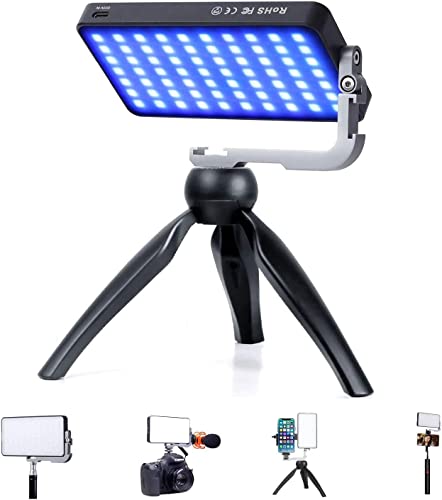
IVISII G2 Pocket RGB Camera Light, 7200mAh Battery, 2600-10000K

NEEWER Basics NL-60AI Selfie Light, 60 LED, CRI95+, Clip-On

Yarrashop Desk Ring Light with Stand, 10.5″ 120 LED
Yarrashop Desk Ring Light, Nano Diffuse Cover, 120 LED

LitONES Video Conference Lighting, Edge-Lit, CRI 95+
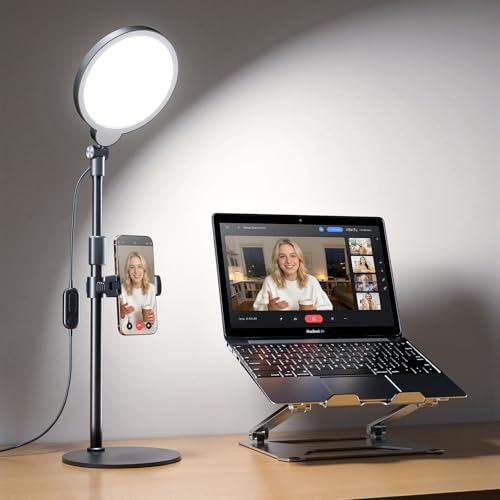
Yarrashop Desk Ring Light, 30 Modes, CRI 97.8
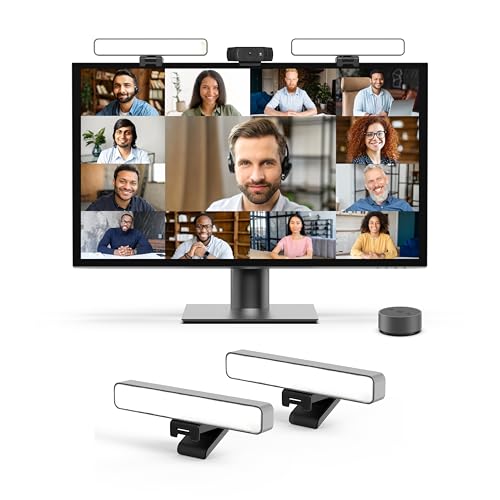
HumanCentric HighBeam Pro Video Conference Lighting Kit
A Deeper Look At The Lineup
The IVISII G2 lands first because it solves more than the meeting problem. Inside its aluminum shell sits a panel that swings from a warm 2600K to a cool 10000K and pulls double duty as a creative RGB light. You can slide it into a camera hot shoe, mount it on the included tripod, or hold it on a coffee-shop table when the laptop is your only office.
It’s heavier than the clip-on lights further down this list, so it isn’t a “toss in a bag and forget” kind of product. For someone whose work spans client calls, YouTube shorts, and the occasional product shoot, the G2 covers all three without buying three panels.
Notable Gains
- The 7200mAh battery means a full day of calls on a single charge for most users.
- Bi-color plus RGB coverage means warmer skin tones for morning meetings and colored gels for creative work.
- Aluminum body dissipates heat well, so the panel stays cool across long sessions.
- Tripod stand included out of the box, no extra accessory order needed.
- Compact pocket size fits in a jacket pocket or small backpack sleeve.
Worth Noting
- The 150-LED count is bright, but the beam is concentrated, so close-range softening through a wall or diffuser helps in tight spaces.
- Owners commonly report the control buttons feel small for users with larger hands.
Right Fit For
Content creators who run client calls on weekday mornings and film on weekend afternoons, and want one panel that handles both without swapping gear.
Consider Something Else When
The NEEWER Basics NL-60AI is a better clip-on choice for someone who bounces between the kitchen table and the couch and wants the lightest possible setup.
The NL-60AI is what I’d hand someone who works from a laptop one day, a tablet the next, and a phone the day after. It clips onto screens as thin as a MacBook lid or as chunky as a desktop monitor, and the front-and-back clip design means you can flip the light toward yourself for calls or away for product demos.
CRI95+ is a color-rendering spec, and a higher number means skin tones look closer to real life under the light. That matters when you’re a makeup artist on video or anyone whose work gets judged on color. The 60 SMD LEDs push out a clean, flicker-free beam that holds up under most webcams.
What Makes Sense
- Three color modes and a 10-step dimmer cover most lighting situations without menu diving.
- The 2000mAh battery lasts a typical workday of intermittent calls.
- Flicker-free output reads well on webcams that compress video heavily.
Honest Caveats
- The clip works best on thin bezels; very thick desktop monitor frames can feel loose.
- Charging via the built-in port means planning ahead if you forget to top off the night before.
Best Suited To
Mobile professionals who need a light that disappears into a laptop sleeve and pulls out for hotel-room calls on the road.
Skip It When
The HumanCentric HighBeam Pro is a stronger fit for someone whose desk is permanent and who values a clean, mounted look over portability.
This 10.5-inch Yarrashop ring light leans into the “set it and forget it” zone. The curved lamp head sets it apart from flatter desk lamps, and the 120-piece LED array spreads light evenly around the face, which is what kills most unflattering webcam footage in the first place.
Compared to the IVISII G2 above, this is a fixed-position product. It doesn’t travel well, but it doesn’t need to. If your desk is your office and your calls happen from the same chair every morning, the stand-and-forget approach saves real mental energy.
The Upside
- The large lamp head eliminates the harsh shadows small clip-on lights leave behind.
- Thicker lampshade coating reduces direct glare, which matters during long meetings.
- The stand design lifts the light above the screen, mimicking natural overhead lighting.
Small Caveats
- The 10.5″ footprint takes up real desk space, so tight keyboard trays may feel crowded.
- Adjustment controls are basic compared to the 30-mode ring light further down.
Who Should Grab It
Anyone whose daily schedule revolves around a permanent home office and who wants light that flatters without setup drama every morning.
Another Choice May Suit
The LitONES Video Conference Lighting is a flatter, edge-lit alternative that takes up less desk depth for someone working from a narrow surface.
This ring light focuses on a problem most users feel but few products name: eye strain. The Nano Diffuse Cover is a frosted layer that softens the LED output before it reaches your eyes, and paired with 120 high-reflection LED beads, the result is a wash of light that doesn’t punish you after a four-hour meeting marathon.
It looks similar to the previous Yarrashop ring light at first glance, but the priority shifts from raw brightness to comfortable brightness. For late-shift remote workers and online teachers, that difference shows up at hour three, not minute one.
Useful Strengths
- Soft, even illumination flatters skin tones without the harsh “ring reflection” in glasses some lights cause.
- The diffused cover reduces eye fatigue across back-to-back meetings.
- Ring shape produces the classic catchlight in eyes that flatters everyone on camera.
Points To Keep In Mind
- The diffuse layer dims the output slightly compared to non-coated ring lights, so dim rooms may need both the ring and a window.
- Cleaning the frosted cover requires a microfiber cloth; paper towels can leave lint that catches on camera.
Built With In Mind
Remote workers and educators who sit in front of the screen for three or more hours straight and care about ending the day without a headache.
Where A Sibling Pick Shines
The Yarrashop 30-mode ring light is the better choice for someone who wants more granular brightness control and a higher CRI rating.
Edge-lit panels are how monitor makers get slim screens with bright, even output, and LitONES borrowed the idea for video calls. The light fires from the sides and bounces through a diffuser, so what hits your face is soft and uniform rather than a tight LED spot.
CRI95+ lands again here, the same color-accuracy promise NEEWER makes. Where the LitONES pulls ahead is the wider, panel-style illumination that wraps more naturally around the face. For podcast hosts who record video alongside audio, the even falloff looks more “studio” than “desk lamp.”
What Pays Off
- Edge-lit diffusion produces softer shadows than direct-LED designs.
- CRI95+ delivers accurate color rendering for video and photo work.
- Panel form factor clips onto monitors without crowding the desk surface.
Trade Offs
- Edge-lit panels tend to be thinner and may feel less sturdy than aluminum-bodied alternatives if bumped.
- Mount compatibility depends on bezel thickness; ultra-thin bezels sometimes need an extra adapter.
Key Specs
Made For
Remote workers and podcasters who want flattering, color-accurate light without a stand eating desk space.
Not Your Match When
The NEEWER Basics NL-60AI is a more affordable clip-on option for someone whose lighting needs stop at “look alive on Zoom.”
For someone who treats their video setup like a hobby, 30 lighting modes sounds like overkill until you actually use them. This Yarrashop desk ring light splits the difference between color temperatures, brightness levels, and effect presets, so you can dial in a midday warm glow for client calls and a cooler, brighter setting for streaming at night without swapping gear.
CRI97.8 is on the high end for the category, edging past most competitors and inching toward broadcast-grade color accuracy. If your webcam does any color grading or your recordings feed into a larger project, that bump shows up in the final image.
Useful Highlights
- High CRI 97.8 rating produces natural-looking color reproduction.
- Edge-lit technology softens the output for glare-free illumination.
- Fully adjustable brightness covers everything from subtle fill to a brighter streaming setup.
- 30 mode combinations let you match light to room, time of day, and camera.
Some Limits To Know
- The mode count creates a learning curve; expect a few meetings of trial-and-error dialing in presets.
- More modes usually mean more buttons, and this unit’s controls are denser than simpler ring lights.
Feature Snapshot
Who Will Love This
Tinkerers, streamers, and side-hustle creators who love fine-tuning their setup and want the most adjustable ring light in this list.
Reach For A Different Pick When
The Yarrashop Nano Diffuse ring light is a calmer choice for someone who wants fewer buttons and just wants their eyes to feel good after a long day.
HumanCentric built the HighBeam Pro as a kit rather than a single light, which is part of why it lands last on this list but highest for a specific kind of buyer. The mounting system clips above a webcam or laptop without dominating the desk, and the light itself tucks out of the way until you switch it on.
This is the pick for someone whose home office has a dedicated corner, a real chair, and a background that took thought. It won’t make a cluttered kitchen counter look like a newsroom, but a tidy workspace with a neutral wall becomes a credible broadcast backdrop.
Everyday Perks
- Space-saving mount keeps the desk surface free for keyboards and notebooks.
- Kit design includes everything needed to install above a webcam or laptop.
- Tuned color temperature suits professional video calls and streaming alike.
Worth Bearing In Mind
- The mount works best on monitors or laptops with a stable top edge; ultralight lids may flex.
- Positioning matters more here than with smaller lights, since the beam direction shapes your whole on-camera look.
Whose Shelf It Belongs On
Professionals who run client-facing calls from a dedicated home-office setup and want a polished, mounted solution rather than a portable clip-on.
Where Another Pick Suits Better
The IVISII G2 Pocket RGB Camera Light is the smarter buy for someone who switches locations often and wants battery-powered flexibility over a mounted kit.
What Matters Most Before Choosing Lightings For Zoom Meetings
Brightness And Color Temperature
The first thing to dial in is how bright the light gets and what color temperature it produces. Color temperature, measured in Kelvin, runs from warm orange around 2700K to cool blue around 6500K. Most video calls look most natural in the 4000K to 5500K range, which mimics a cloudy sky and renders skin tones accurately. Dimming matters too, because rooms change through the day and a fixed-brightness light ends up either too weak at noon or too harsh at dusk.
Form Factor And Mounting Style
Clip-on lights hug laptops and monitors, ring lights with stands anchor to a desk, and panel lights mount above a webcam. The right choice depends on whether you move around or stay put. Travelers and couch workers tend to prefer clip-ons; fixed desk setups benefit from stands and mounts that free up hands and screen real estate.
Eye Comfort Over Long Sessions
Back-to-back calls punish the eyes, especially under bright LED panels. Look for diffusers, frosted covers, or edge-lit designs that soften the beam before it hits your face. Eye comfort shows up at hour three, not minute one, and lights that look fine in a quick demo can feel harsh after a full workday.
Color Accuracy For Skin Tones
CRI, or Color Rendering Index, scores how accurately a light reveals true colors. Higher numbers, ideally above 95, mean skin looks like skin rather than a greenish or magenta version of you. For client-facing professionals, makeup artists on video, or anyone whose work depends on color, CRI matters more than raw brightness.
Where Shoppers Go Wrong
Mistaking Brightness For Quality
A blindingly bright light can flatter a face or scorch it, depending on diffusion and beam angle. The honest read is that a softer light with a CRI above 95 beats a powerful lamp that washes everyone out. Buyers often chase the brightest spec without checking how the light feels on the receiving end.
Ignoring The Mount
A beautiful light that won’t stay clipped to your monitor, or a stand that wobbles every time you reach for your coffee, ends up in a drawer. Check the mounting style against your actual screen, desk, and chair height before committing.
What Separates Premium From Basic
Higher-tier models in this category usually pay for better color accuracy, sturdier mounts, and quieter controls. Where the extra money goes is the difference between a light that flatters a face under any condition and one that only works in a perfectly dimmed room. For daily professional use, the upgrade tends to pay for itself in fewer “sorry, can you repeat that, my camera looked weird” moments.
Frequently Asked Questions
What Color Temperature Looks Best On Zoom?
The 4000K to 5500K range tends to look the most natural on webcam, mimicking overcast daylight and rendering skin tones accurately without going orange or blue.
Do Clip-On Lights Work On Any Laptop?
Most clip-on lights fit standard laptop lids and monitors, but very thick bezels or ultralight screens can cause loose fits or wobble. Measure your lid thickness if your device is on the extreme ends.
Is A Ring Light Or A Panel Light Better?
Ring lights create even, wraparound illumination with a flattering eye catchlight, while panel lights offer more directional control and often higher CRI. Ring lights suit round, centered framing; panel lights suit off-center or creative setups.
How Important Is CRI For Video Calls?
CRI matters most for skin tone accuracy. Anything above 95 reads natural on most webcams, while lower values can leave faces looking pale or oddly colored depending on the camera’s processing.
Can These Lights Replace A Window?
A bright window beats most artificial lights, but the lights in this list hold up well in windowless rooms or evening calls when daylight isn’t an option. Pairing a window with a fill light produces the most balanced result.
Wrap Up
The right light turns video calls from a chore into something you stop thinking about. Clip-on lights win for portability, ring lights win for everyday desk use, and premium kits win for dedicated home offices. Match the form factor to your room, prioritize a CRI above 95 if skin tone matters to your work, and don’t underestimate how much eye comfort adds up across a long week.