

A webcam can only do so much. I learned that the hard way when my face looked perpetually tired on screen, no matter how much sleep I logged. The fix wasn’t a new camera: it was a small light pointed at me, dialing in color temperature and softening the shadows that overhead fluorescents created. That’s the whole point of this list. I’ve narrowed down seven solid options for people who spend real hours on video calls, stream for work, or just want to look more awake on Tuesday morning.
How The Shortlist Stacks Up
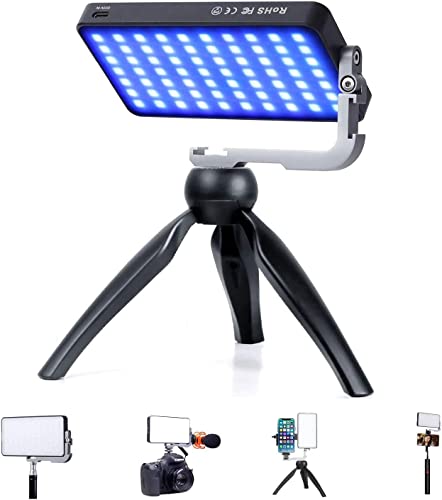
IVISII G2 Pocket RGB Camera Light 7200mAh 2600-10000K

NEEWER Basics NL-60AI Selfie Light 60 LED CRI95+

NEEWER 9″ LED Video Light Panel NL-116AI USB-C

Yarrashop Desk Ring Light with Stand 10.5″
Yarrashop Desk Ring Light with Stand Nano Diffuse

Yarrashop 8″ Ring Light with Stand for Desk
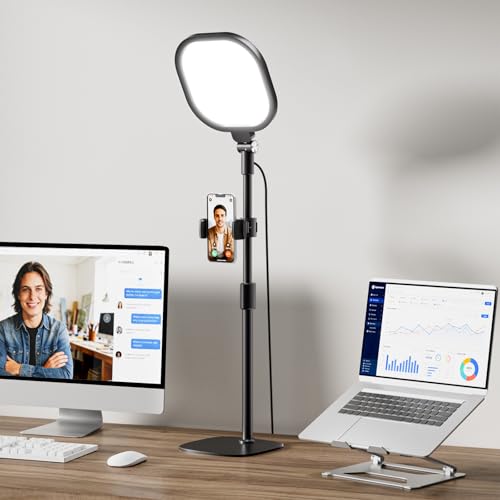
LitONES Video Conference Lighting 30 Modes CRI>98
What Each Pick Brings To The Table
The IVISII G2 Pocket is the most ambitious panel on this list, and it earns that label by doing several jobs at once. It pulls from bi-color and RGB LEDs, runs cool and quiet, and ships with an aluminum body that feels closer to a pro photo accessory than a webcam add-on. Color temperature stretches from a warm 2600K to a daylight-leaning 10000K, which is a wider range than most folks will ever need.
A built-in 7200mAh battery is the quiet hero here. Pulling the light off the tripod and walking around the room, no cable trailing behind, genuinely changes how a content creator works. Compared with the clip-on NEEWER Basics NL-60AI later in this list, the G2 trades portability for sheer output and creative flexibility, which is the right trade for someone who actually uses RGB and effects.
The Practical Payoff
- Full RGB plus bi-color output, so you can dial in warm tungsten looks, daylight, or accent hues without gels.
- 7200mAh onboard battery means cable-free use for long stretches, depending on output level.
- Aluminum body stays cooler than plastic panels during marathon streaming sessions.
- Wide 2600K to 10000K range covers early-morning daylight, moody interiors, and everything between.
- Tripod stand included, so it works as a freestanding desk fixture or a handheld key light.
Points To Keep In Mind
- Menu-based controls on a small panel take a learning curve for first-time RGB users.
- Pocket-sized but not clip-on, so it asks for desk space or tripod clearance.
- The 9 built-in effects are fun, but most Zoom-only users will leave them untouched.
Built With In Mind
Creators who want RGB flexibility and battery independence for on-location shoots or hybrid setups.
Reach For A Different Pick When
The NEEWER Basics NL-60AI is a better fit for someone who just needs a clip-on fill light for travel and never plans to touch RGB.
The NEEWER Basics NL-60AI is built around one job: clipping onto a phone, tablet, or laptop and quietly making your face look better. It carries 60 SMD LEDs in a thin rectangular housing, runs on a 2000mAh rechargeable battery, and clamps with both a front and back clip for different mounting scenarios.
A CRI95+ rating (CRI, or Color Rendering Index, measures how accurately a light reveals true colors compared to natural daylight) means skin tones look believable rather than washed out, which matters more for video calls than raw brightness. It also walks you through three color temperatures, so you can quickly dial warmer or cooler depending on the time of day.
Points In Its Favor
- Front and back clips give flexibility for laptops, tablets, and phones in either orientation.
- CRI95+ keeps skin tones natural, which is the whole point of a video-call light.
- Flicker-free output plays nicely with webcams and phone cameras.
- Three color modes with adjustable intensity suit quick calls and recorded content alike.
Honest Caveats
- Smaller footprint means narrower coverage, so it shines on solo calls rather than group rooms.
- Battery life drops fast at higher brightness, so a top-up before long days helps.
The Right Fit
Mobile professionals and content creators who jump between devices and want a single light that travels.
Swap It Out When
The Yarrashop 8-inch ring light is a better match for someone who wants a freestanding desk fixture with even, wraparound face light.
The NEEWER NL-116AI is a real panel-style light, not a clip-on, and that changes everything for a permanent desk setup. It pairs 58 warm and 58 cool LEDs inside a 9-inch housing, with USB-C ports powering the unit from a laptop or wall adapter.
CRI95+ keeps skin tones believable, and the color temperature dial spans 3200K to 5600K, which covers both warm tungsten rooms and bright daylight office lighting. A mini tripod and cold shoe adapter are included, so it drops right onto a desk without extra mounts.
Notable Gains
- USB-C power makes cable management simple, since the same charger can run the light and a laptop.
- CRI95+ output flatters skin tones on camera without that telltale blue LED wash.
- Mixed warm and cool LEDs let you tune output to match any room.
- Includes mini tripod and cold shoe adapter, so it works out of the box on most desks.
Some Limits To Know
- 10W max output is plenty for a desk, but it can feel underpowered across a large room.
- No battery built in, so it needs a wall or laptop USB-C port to run.
Made For
Home office workers and remote presenters who want a clean, dedicated video-call fixture on the desk.
Where Another Pick Suits Better
The IVISII G2 Pocket is a smarter pick for creators who want RGB effects or battery-powered portability away from the desk.
Feature Snapshot
This Yarrashop ring light leans into the form factor that made desktop ring lights famous in the first place. A 10.5-inch curved lamp head holds 120 LEDs behind an upgraded thicker coating, so the light spreads evenly instead of flaring into the camera.
The curve is a meaningful design choice, since flat ring lights often dump hot spots straight into the webcam. A weighted stand keeps everything stable even during animated hand gestures, and the included clip turns it into a monitor-mounted option for cluttered desks.
Why It Works Well
- Curved shade spreads light evenly and avoids the hot spot that flat ring lights create.
- 120 LEDs throw enough output to kill facial shadows across a small room.
- Thicker coating on the shade reduces glare for people on camera and across the desk.
- Stand plus clip mount work for either freestanding or monitor-attached setups.
Practical Considerations
- 10.5-inch head takes more desk space than a clip-on panel, depending on your monitor size.
- No battery, so it stays tethered to a power outlet.
Best Suited To
Anyone running daily video calls from a fixed home office who wants soft, even face light without fiddling.
Not Your Match When
The LitONES Video Conference Lighting is a better fit for presenters who want more color modes and a higher CRI rating.
Quick Technical Notes
The Yarrashop Nano Diffuse ring light takes a different swing at the same problem: instead of cranking brightness, it tries to soften the glare that flat panels throw at your eyes. A Ring Nano Diffuse Cover sits in front of 120 high-reflection LED beads, which spreads output more gently across the room.
That matters during back-to-back calls, when staring at a hot LED panel for hours can genuinely fatigue your eyes. The diffusing layer keeps the light bright enough to eliminate facial shadows while keeping the source itself comfortable to look at.
Practical Advantages
- Nano Diffuse Cover spreads output for easier eyes during long sessions.
- 120 high-reflection LEDs throw enough light to remove most facial shadows.
- Built for late-night calls, online teaching, or extended screen time.
- Desk stand keeps the light steady during animated conversation.
Trade-Offs To Consider
- Diffused output reads softer on camera, which some viewers prefer and others find flat.
- Same ring-light footprint, so a compact monitor arm still helps in tighter desks.
Whose Shelf It Belongs On
Anyone who logs several hours of video calls a day and cares more about comfort than punchy studio output.
Look Elsewhere When
The Yarrashop 10.5-inch desk ring light is the better pick for someone who wants brighter, more contrasty face light for recorded content.
The Yarrashop 8-inch ring light is the smallest traditional ring on this list, and it earns that footprint honestly. It’s built for cluttered desks, small home offices, and the corner of a kitchen counter where the laptop sometimes lives.
An adjustable stand lets you angle the head to chase the light around the room, depending on where the window sits. Color and brightness controls are simple rather than layered, which is exactly what most people want from a desk fixture.
Good Reasons To Consider
- 8-inch head keeps the footprint manageable on small desks and tight corners.
- Adjustable height and angle make it forgiving in awkward room layouts.
- Simple controls, so non-technical users can dial it in without studying a manual.
Things To Weigh Up
- Smaller head means the catchlight in your eyes is tighter than on 10-inch rings.
- Less total output than the larger Yarrashop 10.5-inch model, depending on room brightness.
Who Should Grab It
Anyone working from a small desk, a kitchen counter, or a dorm setup with limited surface area.
Consider Something Else When
The NEEWER NL-116AI panel is the smarter buy for someone who prefers directional key-light shaping over wraparound ring light.
The LitONES Video Conference Lighting closes the list with the highest stated color accuracy of the group: a CRI above 98, which is the threshold where skin tones start to look truly camera-ready. The unit uses a 4-layer optical soft panel, layering diffusion with edge lighting to throw output that’s soft but still directional.
Thirty lighting modes sound like overkill on paper, but in practice they’re a way to skip straight to a look. The included stand makes it a drop-in fixture for desks, and the soft-panel design keeps eye strain lower during full workdays on camera.
Real-World Strengths
- CRI>98 produces natural skin tones, which is the metric that matters most on video calls.
- 4-layer optical soft panel spreads output evenly and reduces harsh glare.
- 30 modes let you skip the trial-and-error and land on a usable look quickly.
- Included stand turns it into a freestanding desk fixture with no extra mount.
Where It May Fall Short
- Higher-end positioning means it asks more of the budget than a basic ring light.
- Mode count adds a small learning curve for anyone who just wants on and off.
Perfect Match For
Professionals, executives, and frequent presenters who want the cleanest on-camera look without studio gear.
A Better Fit Elsewhere
The Yarrashop 10.5-inch desk ring light is the better choice for shoppers who want a larger face-lit look at a friendlier entry point.
Spec Overview
What To Weigh Before Choosing A Zoom Call Light
The first call is brightness, and the right answer depends on your room. A dim home office benefits from a panel with higher output, while a sunlit corner only needs a soft fill. Look at how much ambient light you already get before chasing raw lumens.
Color temperature is the second lever, and the honest truth is that most people want something in the 4000K to 5600K range for video calls. That window mimics natural daylight without pushing skin tones too cold. Some lights stretch from 3200K warm tungsten to 6500K cool daylight, which gives you room to react to the time of day.
CRI is the most underrated spec on the list. CRI (Color Rendering Index) measures how truthfully a light source shows colors compared to natural daylight. A rating above 95 is the threshold for skin that doesn’t look washed out or orange on camera. For on-camera work, CRI matters more than peak brightness.
Mounting and footprint matter more than spec sheets admit. A clip-on travels well but throws tight light. A freestanding panel or ring needs desk space and a power outlet. Match the form factor to where you’ll actually use it, not the photo on the listing.
Pitfalls Shoppers Hit And The Case For Spending Up
Common Shopping Slip Ups
The most common mistake is chasing peak output without checking color accuracy. A blinding light with poor CRI still makes skin look strange on camera. Buyers also tend to ignore mounting, then end up with a light that wobbles or takes up the entire desk. Battery life matters for anyone working away from outlets, but it’s irrelevant for a permanent desk fixture. Decide your use case first, then shop the specs that fit it.
The Upgrade Payoff
Higher-tier models in this category usually add three things that basic lights skip: a CRI above 95, a wider color temperature range, and softer diffusion layers. Those upgrades show up most on the screen, where your skin tone reads true and your eyes don’t fatigue during long calls. The extra spend is worth it for anyone on camera daily, less so for a once-a-week meeting.