

Bad conference lighting turns a polished presentation into a dim, washed-out mess, and most laptop webcams only make it worse. Anyone logging hours on Zoom, Google Meet, or Microsoft Teams for client calls, podcast recording, or remote instruction has likely fought shadows, glare from overhead fixtures, or that flat, yellow tint from a single window. The seven kits below cover three common setups: monitor-mounted or clip-on panels for laptop users, freestanding edge-lit lamps for home office desks, and full RGB camera lights for creators who want more control. Each picks a different lane, so matching the rig to the room matters more than chasing the flashiest spec sheet.
An Overview Of The Picks

LitONES Tall LED Desk Lamp Home Office (50 Light Modes)

LitONES Video Conference Lighting Desk Lamp (50 Modes)

NEEWER BASICS BS40C RGB Magnetic Camera Video Light (45W)

NEEWER Basics NL-60AI Clip-On Selfie Light (60 LEDs)

Dazzne D20 Bi-Color Video Light Panel (USB-C)
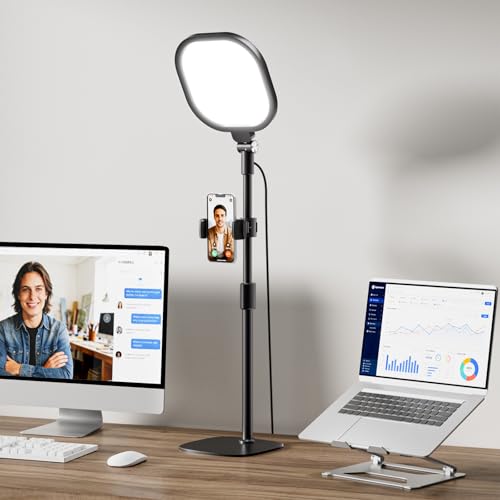
LitONES Video Conference Lighting for Zoom with Stand (CRI>98)

HumanCentric Video Conference Lighting LED Webcam Light
A Breakdown Of The Leading Choices
The LitONES tall desk lamp reads less like a webcam add-on and more like a real room fixture. Its edge-lit panel sits high enough to wash the face and the wall behind you in the same soft glow, which is exactly the trick a single monitor clip-on cannot pull off.
For a dedicated home office where the laptop lives in the same spot all day, that broad coverage means you stop worrying about angle and just sit down. Compared with the small clip-on picks later on this list, this one takes real desk space, but it gives back a calmer, less harsh field of view for whoever is on the other end of the call.
Useful Highlights
- Tall, freestanding design lights the face, the keyboard, and the wall behind you at once.
- Edge-lit diffusion softens harsh shadows so back-to-back meetings stop wearing out your eyes.
- Multiple light modes let you retune for late-night calls without flooding the whole room.
- Stays useful for reading and paperwork after the workday is done.
Things To Consider
- Occupies a chunk of desk real estate, which can crowd smaller setups.
- Heavier and less portable than the clip-on options further down the list.
Who It Suits Best
Remote workers who keep one home office and want calmer lighting that handles both calls and desk work.
Look Elsewhere When
The HumanCentric Video Conference Lighting LED Webcam Light suits hot-deskers who move between rooms and want a thin, monitor-mounted light they can pack away in seconds.
Where the tall LitONES reads as a desk fixture, this one leans more toward a purpose-built video call light. The same edge-lit panel concept shows up, but the form factor stays compact enough to keep right next to a monitor without dominating the surface.
For someone sitting through six or seven calls a day, that smaller footprint matters. Less clutter on the desk means less to readjust when a colleague wants to share their screen and the camera angle suddenly needs to change.
Standout Benefits
- Compact enough to live next to a laptop without eating the desk.
- Edge-lit diffusion keeps the face evenly lit from forehead to chin.
- Wide range of light modes handles warm late calls and bright morning stand-ups.
Worth Noting
- Won’t illuminate a wide background the way the taller LitONES can.
- Best positioned a specific distance from the face, so trial and error is part of setup.
Quick Facts
Right Fit For
Knowledge workers who take calls all day and want a dedicated video call light that stays out of the way.
Swap It Out When
The NEEWER BASICS BS40C RGB Magnetic Camera Video Light suits creators who need RGB color effects, brighter output, and tripod-mounted placement for streaming.
The BS40C is a different animal from the desk lamps above. This is a true camera light with a magnetic mount, full RGB control, and a 45W boost mode that pushes brightness well past what a soft desk panel can manage. CRI 95+ (a color accuracy rating where higher scores mean truer skin tones) means skin looks the way it actually looks.
For streamers, podcasters, and remote teachers who film against colored backdrops or want cinematic accents, the RGB layer is the draw. The 5000mAh battery also lets you run the light off-camera for a quick outdoor segment without scrambling for power.
Key Advantages
- Boost mode delivers real headroom for key light duty on a video shoot.
- Magnetic back lets it snap onto metal mounts in seconds.
- Full RGB plus 14 scenes opens creative options a desk lamp cannot touch.
- Built-in battery cuts the cord for short on-location shoots.
Room For Improvement
- Overkill for someone who only needs soft, even light for a basic Zoom call.
- Owners commonly report that the deeper scene menus take time to learn.
Feature Snapshot
Made For
Creators running a real streaming or recording setup who want color control and brighter output than a desk lamp offers.
Reach For A Different Pick When
The LitONES Tall LED Desk Lamp Home Office fits pure office workers who just want calm, even light for meetings with no scene menus to learn.
The NL-60AI is the smallest, lightest entry in this lineup, and that is exactly the point. A front and back clip design means it works on a laptop, a tablet, or a phone without swapping mounts. The 60 SMD LEDs (small surface-mounted diodes that pack many emitters into a tight panel) deliver consistent, flicker-free output even when the room is dim.
For people who take calls from hotel rooms, cafés, or co-working spaces, a full desk lamp is impractical. This little clip-on travels in a laptop sleeve and pulls double duty for TikToks and Zoom check-ins. Compared with the broader LitONES desk panels, the beam is narrower, but the convenience is hard to beat.
Real-World Strengths
- Front and back clip fits laptops, tablets, and phones with no extra hardware.
- Compact body slips into a bag pocket between uses.
- CRI 95+ keeps skin tones believable across the warm-to-cool color range.
Points To Note
- Battery life is sized for short calls rather than all-day marathons.
- The clip-style body is easy to misplace since it lives loose in your bag.
Best Suited To
Travelers, remote instructors, and casual content creators who need a pocketable light for any device.
A Better Fit Elsewhere
The Dazzne D20 Bi-Color Video Light Panel is the better match when you want a panel that mounts on a real tripod and runs from a USB-C battery, not just a clip.
The Dazzne D20 sits between the desk lamps and the bigger creator lights. It uses 118 LED beads arranged in a flat panel, runs off either a DC adapter or a USB-C rechargeable battery, and adjusts from 3200K to 5600K for warm and cool looks (measured in Kelvin, where lower numbers are amber and higher numbers are blue-white).
Vloggers shooting with Canon, Nikon, or Olympus bodies appreciate that the panel mounts to a standard shoe and tilts where it needs to. CRI 95+ means skin looks the way it should, even when the room lighting is unflattering.
A Few Highlights
- Bi-color range from 3200K to 5600K covers daylight and tungsten scenes.
- USB-C charging simplifies cable management for mobile setups.
- CRI 95+ keeps skin tones believable when the room light is poor.
- Lightweight panel mounts to a standard camera shoe.
Honest Caveats
- 16W output is modest compared with the 45W NEEWER boost mode.
- No RGB layer for accent colors, so it cannot double as a mood light.
Feature Rundown
Who Should Grab It
Solo creators shooting interviews, tutorials, or product clips who want a USB-C panel that fits in a camera bag.
Not Your Match When
The NEEWER Basics NL-60AI Clip-On Selfie Light is the easier call for someone who needs a quick clip-on light for phone calls and never touches a tripod.
The CRI 98+ rating on this LitONES model is its quiet superpower. CRI measures how faithfully a light source renders colors compared to natural daylight, so scores in the high 90s translate to skin that looks the way it actually does. The included stand also removes a step, since you are not rigging your own mount.
For someone running back-to-back client calls from a home setup, that combination of accurate color and a ready-to-use stand saves real setup time. It slots in next to the LitONES desk panels earlier in the list, but with a more call-focused design.
A Strong Showing
- CRI 98+ rendering keeps skin tones natural on camera.
- Included stand simplifies setup for non-technical users.
- 30 light modes handle warm and cool environments with simple controls.
Points To Keep In Mind
- The stand adds bulk compared with a simple desk panel.
- Not designed for RGB or scene effects, so creators will want the NEEWER BS40C instead.
Whose Shelf It Belongs On
Remote professionals who want strong color accuracy and a stand-mounted setup with zero rigging.
Consider Something Else When
The LitONES Tall LED Desk Lamp Home Office suits anyone who wants a single tall fixture to handle both screen lighting and broader room illumination.
The HumanCentric kit ships as two connected panels running off a single power cable, which is the kind of small detail that matters on a tidy desk. Mounting them above or beside a monitor creates the even front-light that webcams need but rarely get.
Streaming instructors and team leads who want a clean, low-profile setup will appreciate the dual-panel design. The trade-off versus single-panel kits is bulk, but the spread of light across the face is noticeably smoother.
The Upside
- Dual-panel design spreads light evenly across the face.
- Single power cable keeps the desk tidy.
- Slim profile mounts to most monitors without an arm or clamp.
Trade Offs
- Two connected panels take up more monitor edge than a single unit.
- Owners commonly report that positioning both panels at the right angle takes a few minutes of fiddling.
Feature Card
Perfect Match For
Hot-deskers and streamers who want clean, monitor-mounted lighting without adding gear to the desk surface.
Where A Sibling Pick Shines
The LitONES Video Conference Lighting Desk Lamp fits anyone who wants a single, smaller panel that lives on the desk rather than clamped to a monitor.
What Matters Most Before Choosing Lightings For Video Conferencing
Light Quality And Color Accuracy
CRI scores above 95 produce skin that looks natural on camera, while scores in the 80s tend to wash out warm tones. Anyone presenting to clients or recording training content benefits from chasing higher CRI numbers. For casual check-ins with coworkers, a mid-90s score is honestly plenty.
Mounting Style And Setup Location
Monitor-mounted and clip-on lights keep the desk surface clear, but they constrain the angle to wherever the screen sits. Freestanding desk lamps give more flexibility to reposition, though they take up room. Pick the mount based on whether the laptop stays put or moves around the day.
Brightness, Color Modes, And Diffusion
Edge-lit panels soften output by spreading light through a diffuser, which reduces the harsh shadows that single-point LEDs create. A color range from roughly 3200K to 5600K covers most warm and cool room conditions. Higher output (wattage and lux ratings) matters more for creators than for everyday callers.
Power And Portability
USB-C rechargeable panels travel well and skip the wall wart, while DC-powered units stay anchored to a desk. Creators who shoot on location benefit from built-in batteries. Office-only users rarely need to worry about this at all.
Key Considerations Across These Picks
Where Shoppers Go Wrong
Buying the brightest light without checking CRI is a frequent trap. A 45W panel with poor color rendering looks worse on camera than a softer 16W light with CRI 95+. Another common miss is ignoring mounting style, which leads to a light that technically works but never sits at the right angle. Measure the desk and the monitor before committing to a form factor.
The Upgrade Payoff
Higher-tier panels in this category earn their keep through better color rendering, RGB layers, and stronger mounting hardware. For daily office calls, a mid-range LitONES or HumanCentric kit is more than enough. For creators building a streaming rig, the jump to a 45W RGB panel like the NEEWER BS40C pays for itself in production flexibility.
Frequently Asked Questions
What CRI rating matters most for video calls?
CRI 95 or higher keeps skin tones believable on camera, and CRI 98+ is a noticeable upgrade for client-facing calls. Anything below CRI 90 tends to wash out warm tones and leave faces looking pale.
Do I need RGB lighting for video conferencing?
RGB helps mostly for content creators who want accent colors or scene effects. For standard Zoom or Teams calls, bi-color panels covering warm to cool white light are usually enough.
Can a clip-on light work for a laptop on the go?
Clip-on lights like the NEEWER Basics NL-60AI are built for exactly that, and they fit laptops, tablets, and phones. Battery life is sized for shorter calls, so plan to top up between longer sessions.
Where should the light sit relative to the camera?
Eye level or slightly above the monitor is the usual sweet spot, angled toward the face rather than over the shoulder. Avoid placing the light behind you, since backlit subjects look dim to the camera.
Is a desk lamp better than a monitor light for meetings?
Desk lamps cover the face, the keyboard, and the wall behind you in one wash, which works well for fixed home offices. Monitor-mounted lights stay out of the way and travel easily, making them a better fit for shared or shifting setups.
Closing Remarks
The right pick depends less on the spec sheet and more on where the calls actually happen. A tall LitONES or dual-panel HumanCentric rig handles a permanent home office. A clip-on NL-60AI or the Dazzne D20 covers the laptop-in-a-backpack life. For creators who want color, headroom, and a real on-camera feel, the NEEWER BASICS BS40C is the most flexible of the bunch. Match the form factor to the room first, then chase the CRI and brightness numbers.