

Harsh overhead lighting, dim laptop glow, and yellow window glare can all sabotage a video call. I pulled together seven lighting options that genuinely fix the unflattering-shadow problem, whether you hop on Zoom once a week or run a daily podcast from a home studio. Each pick below is matched to a specific setup, from compact clip-on lights for travelers to full LED panels for creators who need serious output.
The Choices Worth Comparing

LitONES Tall LED Desk Lamp with 50 Light Modes

LitONES Video Conference Lighting Desk Lamp

Pixel G1s RGB Video Light with App Control

NEEWER 18-Inch RL-18 Ring Light Kit

NEEWER Basics NL-60AI Selfie Light

Neewer 2-Pack 480 LED Bi-Color Panel Kit
LitONES Video Conference Lighting with Stand
Why These Options Stand Out
The LitONES Tall LED Desk Lamp stretches higher than the typical desk light, so it throws illumination across your face rather than just your keyboard. I like that the edge-lit panel (a design where LEDs fire sideways into a diffuser for softer output) spreads light evenly, which means fewer harsh shadows when a webcam catches you from below. For anyone working at a sit-stand desk, the height matters more than people expect.
The 15W LED panel uses a four-layer diffusion setup that mimics daylight tone without flicker, a real benefit during long sprint meetings. I think this works especially well for people whose cameras sit at chest height and need a wider spread than a clamp light can offer.
Reasons It Performs
- Edge-lit diffusion keeps skin tones natural on camera, even in dim rooms.
- 50 light modes give precise control over color temperature (warm-to-cool tone range) and brightness for any time of day.
- Tall stand clears monitor arms and headphones without casting shadows.
- Broad panel coverage lights both you and a second person in frame.
Trade-Offs Worth Knowing
- Takes up a meaningful footprint on smaller desks, so apartment dwellers may struggle to fit it next to a monitor.
- No rechargeable battery, meaning it needs a power outlet within reach at all times.
Best Suited To
Remote workers with a dedicated home office and a sit-stand desk who want soft, camera-ready light during back-to-back calls.
Consider Something Else When
If you take calls from a kitchen table or hotel desk, the NEEWER Basics NL-60AI Selfie Light clips on in seconds and travels better than this fixed-height lamp.
Where the tall LitONES lamp above targets standing desks, this model sits on a regular workstation and keeps your face evenly lit during marathon meeting days. The same four-layer optical diffusion panel design reappears here, so the soft, flicker-free field feels consistent across the lineup. I find this is the one most people in hybrid roles actually reach for.
The 50 light modes lean toward call-specific presets, meaning you can match overhead office lighting at home without guessing at color temperature. If you split time between screens all day, the eye-care angle becomes a real selling point rather than marketing fluff.
What Earns Its Place
- Built specifically for video calls, so the diffusion panel is tuned for webcam color rather than reading light.
- Wide mode range covers warm evening calls and bright morning standups from the same lamp.
- Low-flicker output helps reduce eye fatigue during all-day screen time.
Honest Caveats
- Wired-only operation, so placement depends on where your outlet sits.
- Single-panel coverage means wide two-person shots may look uneven at the edges.
Made For
Knowledge workers who sit through three or more video calls a day and want a single desk lamp that handles every meeting window.
Look Elsewhere When
If you film talking-head YouTube content rather than attend calls, the Neewer 2-Pack 480 LED Bi-Color Panel Kit gives you adjustable key-and-fill lighting that this single-panel lamp can’t match.
The Pixel G1s trades the warm desk-lamp feel of the LitONES picks for raw creative flexibility. It is a 12W RGB panel (capable of producing red, green, and blue hues for any color of light) wrapped in an aluminum body, with 150 individual LEDs behind a CRI≥97 panel. CRI, or Color Rendering Index, measures how accurately a light reveals true colors, and anything above 95 is considered strong for skin tones. That matters if you sell products on camera or stream regularly.
The companion app controls hue, saturation, brightness, and a 2500K–8500K color temperature range (the Kelvin scale used to describe warm-to-cool light), which is wider than most desk lamps offer. The built-in rechargeable battery runs around 210 minutes, so you can step away from the outlet during location shoots.
A Strong Showing
- RGB plus bi-color modes let you match ambient room light or stage a creative backdrop on the fly.
- CRI≥97 keeps colors faithful, which content creators selling physical products rely on.
- Aluminum body holds up to repeated travel in a camera bag.
- App control removes the need to physically reach the light mid-recording.
Where It May Fall Short
- App pairing adds a small learning curve compared to a plug-and-play desk lamp.
- 210-minute battery life means long event coverage requires a USB-C top-up.
The Right Fit
Mobile creators and streamers who film on location, want creative color control, and already own a phone or camera rig to mount it on.
Swap It Out When
Anyone whose only goal is a clean, neutral video call should pick the LitONES Video Conference Lighting Desk Lamp instead, since the Pixel G1s adds features most meeting attendees don’t need.
The NEEWER RL-18 ring light is the classic answer for anyone whose camera sits inside the ring, putting the light source directly behind the lens. That geometry kills the under-eye shadows you get from overhead bulbs. The kit comes with a 61-inch stand, phone holder, soft tube, and a carrying bag, so it works as a one-box studio setup.
The 55W 5600K panel is daylight-balanced, which means a clean, slightly cool tone that flatters makeup and product photography. In my view, ring lights earn their reputation specifically for beauty, lash, and tutorial content where even fill across the face matters most.
What Works In Its Favor
- Even, wraparound illumination eliminates harsh facial shadows during close-up shots.
- Phone holder plus stand means you can set up a full shoot on a tabletop without extra gear.
- Daylight color temperature keeps products and makeup looking accurate on camera.
Things To Consider
- The 18-inch diameter eats more room than a flat panel, which is tough for cramped desks.
- Single color temperature means warm-toned interior scenes need gels or digital correction.
- Setup takes longer than clip-on or desk lamps, since the stand and ring both need assembly.
Who Should Grab It
Beauty creators, lash and tattoo artists, and anyone filming close-up tutorials who wants that signature ring catchlight in their eyes.
Reach For A Different Pick When
If your camera stays fixed on a laptop for work calls, the LitONES Video Conference Lighting Desk Lamp delivers call-quality light without the ring-light footprint.
The NL-60AI is the smallest item in this roundup, and it solves a different problem than the panel-style picks above. It clips to a phone, tablet, or laptop and runs on a 2000mAh rechargeable battery, so there is no cable to wrestle with on a hotel desk. For travelers and remote workers who hop between cafés, that portability alone is reason enough to consider it.
The 60 SMD LEDs (small surface-mounted diodes that pack densely for a smoother beam) deliver CRI95+ output, which is genuinely impressive for a light this compact. I think this is the right answer for TikTok creators and anyone whose work calls happen on whatever device is in front of them.
A Favorable Mix
- Front and back clip design fits phones, tablets, and thin laptop lids without slipping.
- CRI95+ rating means skin tones stay natural even at lower brightness levels.
- Three color modes and ten-step dimming let you tune output without an app.
- Battery-powered setup frees you from outlet hunting.
Points To Keep In Mind
- Small panel size means it lights one face well but won’t fill a wider two-shot.
- Plastic clip hardware is the part most likely to wear with daily transport.
Who Will Love This
Frequent travelers, students, and laptop-first remote workers who need call-quality light they can toss in a bag.
Where A Sibling Pick Shines
For a permanent home office where you want a single fixed lamp, the LitONES Tall LED Desk Lamp offers wider coverage without the battery and clip-on trade-offs.
Two 480 LED panels, two 75-inch stands, two U-brackets, and one carrying case. This kit is the most ambitious option in the roundup, and it shows up on creator gear lists for good reason. Each panel blends 240 white and 240 yellow LEDs (a “bi-color” design that mixes two diode types for adjustable warmth), so you can dial in any color temperature between 3200K and 5600K.
CRI 96+ output means the lights render skin and product colors faithfully, which is the kind of detail that separates polished YouTube channels from amateur ones. I find this kit ideal when one panel acts as a key light (the main light source on your face) and the second fills shadows from the opposite side.
The Good Stuff
- Dual-panel setup creates classic key-and-fill lighting that flatters every face shape.
- Bi-color range covers warm indoor tones and cooler daylight scenes with the same panel.
- CRI 96+ keeps on-camera colors honest, which is crucial for product reviews and tutorials.
- 75-inch stands clear seated and standing framing without repositioning.
Practical Compromises
- Two stands and two panels take real floor space, so small apartments may struggle to store them.
- Setup time runs longer than a single desk lamp, which can feel heavy for casual calls.
Built With In Mind
YouTubers, podcasters, and streamers who want a real studio-grade look without paying for professional rental gear.
Not Your Match When
For one-person calls from a kitchen counter, the LitONES Video Conference Lighting Desk Lamp is simpler, smaller, and far easier to move around.
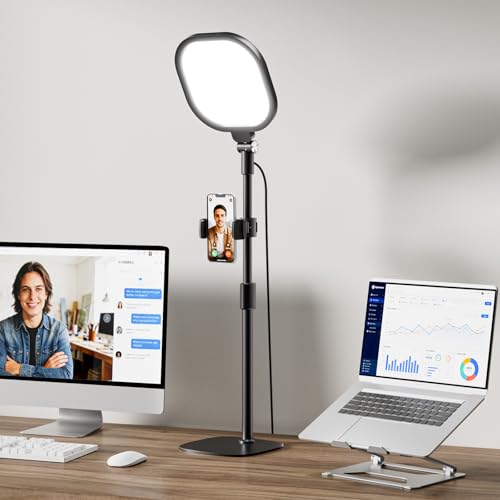
This LitONES model ships with its own stand, which makes it the easiest all-in-one answer for rooms without a spare desk corner. The CRI>98 panel renders skin tones with notable accuracy, which is meaningful for people who host client-facing calls and care how they appear. In my view, that color accuracy is the strongest argument for this pick over the panel-free RL-18 ring light above.
Thirty light modes cover the practical spectrum of warm-to-cool color temperatures most home offices need, and the included stand lets you place the light independently of your desk. That flexibility matters more than people expect when the only available outlet sits behind the sofa.
Practical Pluses
- Stand-mounted design frees up desk space for laptops, notebooks, and coffee.
- CRI>98 rating is among the highest in this roundup for true-to-life skin tones.
- Four-layer diffusion panel keeps light soft and flicker-free during long meetings.
- 30 modes cover the full warm-to-cool range without overwhelming mode menus.
Worth Bearing In Mind
- Stand adds bulk during storage compared to a flat desk lamp base.
- Wired power keeps it tied to an outlet, so placement depends on cable reach.
Perfect Match For
Home offices where the desk is already crowded or where the camera sits across the room from a power outlet.
A Better Fit Elsewhere
Creators who want full RGB color control should look at the Pixel G1s RGB Video Light, since this LitONES model focuses on accurate white tones rather than creative colors.
Picking The Right Lighting For Your Call Setup
Match The Light To Your Camera Position
Webcams built into laptops sit at face height, while external monitors push the camera above eye level. The further your light sits from the camera axis, the harder you fight shadows. Edge-lit panels mounted at or slightly above eye level tend to deliver the cleanest results for desktop calls, which is why most picks in this roundup use that design. Ring lights flip the equation and place the camera inside the light, which works beautifully for handheld phone filming but feels awkward for a fixed workstation.
Understand Color Temperature And CRI
Color temperature, measured in Kelvin (K), tells you whether a light leans warm (around 2700K–3200K, like a living room bulb) or cool (5500K–6500K, like a window). Most video calls look natural in the 4000K–5000K range, so a panel with adjustable modes gives you flexibility across day and night calls. CRI, the Color Rendering Index, measures how truthfully a light renders colors, and anything above 95 is considered strong for skin tones. The LitONES, NEEWER ring light, and Pixel G1s options all meet that bar.
Decide Between Fixed And Portable
A wired desk lamp makes sense for permanent home offices, where the outlet never moves. Clip-on battery lights, like the NEEWER Basics NL-60AI, shine for travelers and hybrid workers who never know where the next call will happen. Rechargeable RGB panels, like the Pixel G1s, fall in the middle: portable enough to travel, but designed for creators who want extra creative control beyond a simple warm/cool toggle.
Size Up Your Frame
Solo desk calls only need a single compact panel to look clean. Two-person calls, podcast setups, or wider tutorials benefit from dual-panel kits, which is where the Neewer 2-Pack earns its place. The wider the scene, the more you need either a bigger panel or multiple light sources to keep shadows from creeping in.
What To Know Before You Add A Light
Common Shopping Slip Ups
Many shoppers grab the brightest panel they can find and end up with blown-out highlights on their forehead. A dimmable panel with adjustable color temperature solves more problems than raw wattage. Another trap is buying a battery-powered RGB light for plain Zoom calls, where the extra color modes go unused and the price feels steep. Match the feature set to your actual workflow, not the spec sheet.
What The Higher Tier Buys
Premium lights in this category earn their higher cost through stronger CRI ratings, more uniform diffusion layers, and sturdier bodies. The LitONES panels and Neewer bi-color kit sit at the higher tier partly because their diffusion panels spread light more evenly, which is the difference between looking lit and looking washed out. For most work-from-home setups, mid-tier picks handle daily calls perfectly. The upgrade makes sense when you appear on camera for a living and need color accuracy or creative modes to justify the spend.
Frequently Asked Questions
How Many Lumens Do I Need For Video Calls?
For a single face at desk distance, around 800 to 1500 lumens is the practical sweet spot. Higher output becomes useful when you light a wider frame or bounce light off a wall for indirect fill.
Is A Ring Light Or LED Panel Better For Video Calls?
Ring lights flatter close-up beauty shots with that signature catchlight, while flat LED panels give you more even coverage for desk-distance calls. For most work meetings, a panel tends to look more natural than a ring.
Can I Use A Desk Lamp Instead Of A Dedicated Video Light?
A bright daylight desk lamp works in a pinch, but most aren’t tuned for camera color and often create harsh hot spots. Dedicated video lights offer adjustable color temperature and softer diffusion, which is what gives faces that even, camera-ready look.
Do I Need Color Temperature Control For Zoom Calls?
Adjustable color temperature helps you match your room’s ambient light, which stops your face from looking orange under warm bulbs or blue under cool LEDs. A single fixed color temperature can work, but you may notice skin tones shift depending on the time of day.
Where Should I Place The Light Relative To My Camera?
The most flattering position is slightly above eye level and roughly 45 degrees to either side of the camera. Pure front-on lighting flattens features, while lighting from below creates unflattering shadows under the eyes and chin.
Final Take
The right lighting choice comes down to where you take calls and how often. Desk-bound remote workers get the most out of soft edge-lit panels like the LitONES lineup, while mobile callers and travelers should start with the NEEWER Basics NL-60AI. Creators filming daily content will appreciate the dual-panel flexibility of the Neewer bi-color kit or the creative RGB control of the Pixel G1s. Pick the option that matches your actual workspace, and your camera will reward you every time you hit join.