

Corners kill LED projects. A strip that runs beautifully along a flat wall suddenly looks broken when it hits a 90-degree turn, and that’s where the right connector or strip matters most. I put together this roundup for anyone tired of dark gaps, jagged angles, or strips that refuse to bend the way their room demands.
This list pulls together the strips and solderless corner connectors that genuinely make 90-degree runs possible. Some are full RGB strips with tunable white. Others are tiny linkers designed to keep the light continuous around a corner. Mix and match based on what your project actually needs.
The Choices Worth Comparing

Govee LED Strip Light 2 RGBWWIC WiFi

Govee 16.4ft RGBIC LED Strip Lights

BTF-LIGHTING WS2812B RGB Strip 300LED
BTF-LIGHTING WS2812B RGB Strip 150LED

BTF-LIGHTING WS2812B RGB Strip 144LED 3.28ft

MJJC 6Pcs 4Pin 10mm COB Corner Connectors

HUALAND 10pcs L-Shape 4-Pin Connectors 10mm
SUPERNIGHT 4 Pin 10mm Connector Kit 10M
Amefil L Shape 3-Pin 8mm Corner Connector
The Picks, Examined More Closely
The Govee LED Strip Light 2 stretches a generous 65.6 feet, which is long enough to wrap a full bedroom, behind a couch, or under most ceiling coves without splicing. RGBWWIC means each segment carries dedicated warm and cool white LEDs alongside RGB, so the same strip can throw party colors at night and behave like a real reading lamp in the morning.
White tuning spans from 1000K (a candle-like glow) to 10000K (crisp daylight), and the WiFi connection ties it into the Govee app without needing a hub. For anyone renting or redecorating, that app control avoids extra hardware clutter and makes scheduling painless.
Notable Upsides
- Tunable white from 1000K to 10000K covers both cozy evenings and task lighting in one strip
- 65.6 feet of length handles most room perimeters without buying a second roll
- WiFi app control removes the need for a separate hub or bridge
- RGBWWIC design keeps whites looking like actual white, not a washed-out pastel
Things To Consider
- Owners commonly report that the adhesive struggles on textured or matte walls, so a mounting channel helps
- The app unlocks most of the fun features, which adds a small learning curve for anyone used to a plain remote
Key Product Details
Right Fit For
Renters and homeowners who want one strip that handles mood lighting, accent walls, and everyday white light without swapping products.
Swap It Out When
Pixel-precise animation projects call for the BTF-LIGHTING WS2812B RGB Strip 300LED, which addresses each LED individually for custom effects.
The Govee 16.4ft RGBIC strip is the friendly middle child of the Govee lineup. RGBIC (as opposed to plain RGB) lets multiple colors show on a single strip at the same time, which turns an accent wall into flowing color rather than one static shade. The 16.4-foot length fits a headboard, a desk back edge, or a small media center without leftovers.
Setup leans on the Govee Home app, so customization happens through the phone instead of an old-school remote. For a first RGB project where the goal is visual impact more than technical control, this strip delivers a lot for the price.
A Few Strong Suits
- RGBIC multi-color display adds motion and depth versus single-color RGB strips
- 16.4-foot length suits bedrooms, desks, and small media centers
- App-based control unlocks scene presets and music sync modes
- Sticky-back mounting makes temporary installs renter-friendly
Honest Caveats
- WiFi-less app control means the phone must be on the same network for full features
- No dedicated warm/cool white LEDs, so plain white looks slightly tinted compared to higher-end strips
- Adhesive can lift on dusty surfaces, so a quick wipe-down before mounting helps
Made For
Bedroom accent walls, gaming desks, and renters who want bold RGB without the cost or complexity of a full smart-home hub.
Consider Something Else When
Cinematic-grade tunable white calls for the Govee LED Strip Light 2 RGBWWIC WiFi, which handles both daylight reading and candle-warm evenings.
The BTF-LIGHTING WS2812B 300LED strip is a maker’s favorite for a reason. It runs on 5V DC and packs 300 individually addressable WS2812B LEDs across 16.4 feet, which is dense enough for smooth gradients, scrolling text, or reactive audio visuals without visible pixel gaps.
Each LED carries its own WS2812B IC chip (a tiny controller that lets every bulb accept a separate color command), and 24-bit color depth (roughly 16.7 million shades per LED) gives animations a film-like smoothness. Compared to the plug-and-play Govee strips above, this one asks for a microcontroller and a bit of code, but the payoff is total creative freedom.
A Strong Showing
- 300 LEDs across 16.4 feet keeps pixel density high for smooth gradients
- Each LED is independently programmable for animations, scrolling text, and reactive effects
- 5V DC input works with common USB power supplies and Arduino, Raspberry Pi, or ESP32 boards
- UL listing adds a layer of safety review that DIY strips often skip
Points To Note
- Requires a separate controller, power supply, and code, so it’s less friendly than app-based strips
- 5V input means voltage drop shows up on long runs without power injection at both ends
- IP30 rating means no moisture protection, so kitchens and outdoor builds need a different strip
Key Product Details
Best Suited To
Makers, tinkerers, and creators building custom animations, scrolling signs, or reactive art installations who already own or plan to buy a microcontroller.
A Better Fit Elsewhere
Anyone who wants a tap-and-go strip with no coding should reach for the Govee 16.4ft RGBIC LED Strip Lights instead.
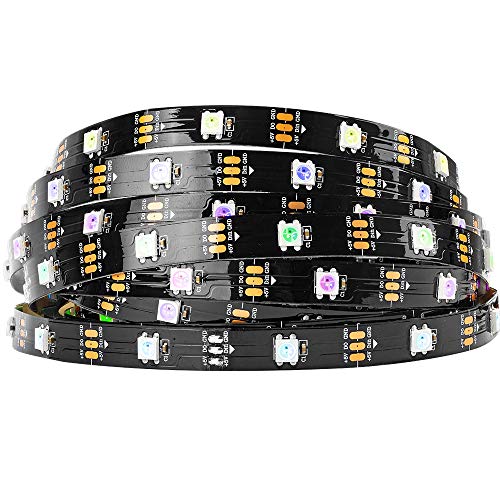
The 150LED variant of the BTF-LIGHTING WS2812B cuts the pixel count in half but keeps everything else. Same 5V DC power, same individually addressable WS2812B IC chips, same UL listing, just fewer pixels per foot. For a first-time maker, fewer pixels means easier code, fewer timing headaches, and a lighter power budget.
It’s also a more forgiving choice for learning how to inject power and avoid the dreaded “rainbow at one end, dim at the other” effect that plagues long 5V strips. Think of it as a training-wheel version of the 300LED model reviewed just above.
What Works In Its Favor
- 150 LEDs across 16.4 feet keeps the pixel map manageable for new programmers
- Lower total current draw compared to denser strips simplifies power supply choices
- Same UL-listed WS2812B IC chips as the 300LED version for consistent behavior
- 5V DC input works with standard Arduino and Raspberry Pi setups
Worth Bearing In Mind
- Lower LED density shows visible spacing between pixels for fine text and detailed animations
- Still demands a microcontroller and code, so absolute beginners face a real learning curve
- IP30 rating means it stays indoors and away from any splash zones
Who It Suits Best
First-time makers learning addressable LEDs who want to test code and wiring without fighting voltage drop or pixel-heavy timing.
Look Elsewhere When
Smooth, high-density animations on the same 5V platform call for the BTF-LIGHTING WS2812B RGB Strip 300LED.
For projects that don’t need 16 feet of strip, this short BTF-LIGHTING WS2812B roll crams 144 individually addressable LEDs into just 3.28 feet. That works out to roughly 44 LEDs per inch, which is the kind of density that makes small text readable and gradients buttery on a desktop scale.
The short length also dodges the 5V voltage-drop problem entirely for most setups, so a single power injection point at one end is usually enough. It’s the right pick for matrix panels, PC interior mods, or any build where density matters more than coverage.
Bright Spots
- 144 LEDs across 3.28 feet creates near-seamless pixel density for small builds
- Short length avoids voltage drop without extra power injection
- Same WS2812B IC chips for consistent animation behavior across the BTF lineup
- 5V DC input works with a basic USB power supply for quick desktop testing
Trade-Offs To Consider
- Only 3.28 feet of coverage, so longer runs need multiple rolls plus extra wiring
- 144 LEDs at full white pull meaningful current, so a beefy 5V supply matters
- No weatherproofing (IP30), so this stays an indoor, dry-environment strip
Feature Snapshot
Whose Shelf It Belongs On
Desktop builders, PC modders, and anyone building a small addressable matrix or accent piece where pixel density is the priority.
Reach For A Different Pick When
A full-room or wall-length run is the goal, in which case the longer BTF-LIGHTING WS2812B RGB Strip 300LED makes more sense.
COB (Chip-on-Board) LED strips produce a smooth, dotless line of light, but bending one around a sharp corner usually breaks that smooth look. The MJJC 6-pack of L-shaped 4-pin 10mm connectors is built specifically to keep COB strips gapless at 90-degree turns, with an ultra-thin mini profile that disappears under most furniture edges.
Installation is press-and-buckle, no soldering or special tools required. For anyone running COB strips under cabinets, around room corners, or inside furniture reveals, these little connectors solve the one problem COB strips create on their own.
What Stands Out
- Solderless buckle design needs no iron, no tools, no special skills
- Designed specifically for 10mm COB strips to preserve a gapless light line
- Ultra-thin profile tucks under cabinet lips and trim without bulging
- Six connectors per pack covers most room-scale corner counts
Smaller Limitations
- Only fits 10mm COB strips, so measure strip width before ordering
- Buckled connections can loosen if the strip gets tugged repeatedly, so route cable strain away from the joint
Who Should Grab It
Anyone installing COB LED strips around cabinets, ceilings, or furniture where a clean dotless corner is non-negotiable.
Not Your Match When
Standard 5050 RGB strips call for the HUALAND 10pcs L-Shape 4-Pin Connectors 10mm, which match that strip’s width and pin layout.
The HUALAND 10-pack is the workhorse option for anyone running classic 10mm 5050 RGB strips. Each connector handles four pins, which is the standard RGB layout (red, green, blue, plus a shared positive or data line), and the L-shape lets two strips meet at a clean right angle without splicing wire.
Ten connectors plus twenty included male plugs mean even a moderately ambitious room layout stays in budget. The trade-off is no extra cables or extension wires; this pack is purely about corners.
Everyday Wins
- Ten connectors per pack handles multiple room corners from a single order
- Standard 4-pin layout matches common 3528 and 5050 RGB strips
- Snap-in design needs no soldering for quick installs
- L-shape keeps strip direction tidy around furniture and ceiling lines
Points To Keep In Mind
- Designed for 10mm-wide strips only, so narrower COB or specialty strips won’t fit
- Basic plastic connectors can crack if forced, so strip insertion should feel snug, not forced
Built With In Mind
DIYers running standard 5050 RGB strips who need a stockpile of corners for ceiling coves, under-cabinet runs, or entertainment centers.
A Better Fit Elsewhere
Long runs that need both corners and extension cables fit the SUPERNIGHT 4 Pin 10mm Connector Kit 10M better, since it bundles wire along with the connectors.
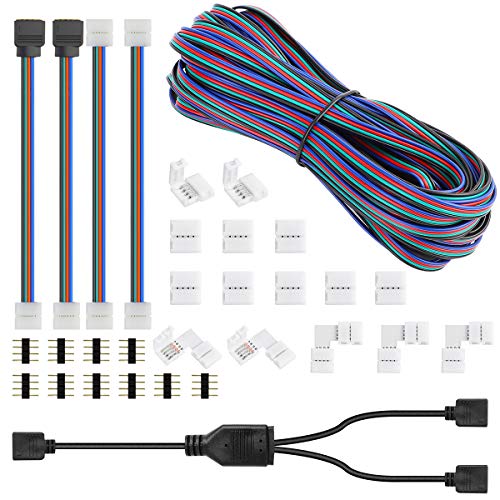
The SUPERNIGHT kit goes beyond corners by bundling L-shaped solderless connectors with both jumper wires and 4-pin extension cables. The included 10 meters of extension wire means a power supply or controller can live several feet away from the strip itself, which matters in ceiling coffers and under-counter layouts.
It’s built for 10mm PCBs (the printed circuit board base that the LEDs sit on), and works with both 5050 and 2835 RGB strips. For longer projects that need both corner joins and gap-bridging wire, this kit handles both in one purchase.
Everyday Advantages
- Includes extension cables along with L-shaped corner connectors
- 10 meters of wire covers longer runs between strips and power supplies
- Solderless design means faster installs and easier field repairs
- 90-degree connectors keep strip direction clean around architectural features
Trade-Offs To Consider
- Bulkier kit than pure corner packs, so storage takes a bit more drawer space
- Extension wire length should be planned before mounting, since trimming and rerouting is annoying after the strip is stuck
At A Glance
Who Will Love This
Installers tackling full-room layouts, ceiling coves, or under-cabinet runs where corners and wire extensions both come into play.
Where A Sibling Pick Shines
COB strips need the MJJC 6Pcs 4Pin 10mm COB Corner Connectors, which preserve a dotless look at the bend.
The Amefil L-Shape connector focuses on a narrow niche: 8mm-wide strips with a 3-pin layout. That covers WS2811, WS2812B, and many single-data 5050 setups where a fourth pin doesn’t exist. It’s the right part to reach for when the connector shelf at the hardware store doesn’t match what’s actually on the wall.
Heat resistance up to 100°C and operating range from -20°C to 100°C keeps the connector stable in tight, enclosed runs like PC cases and display cabinets. For narrow addressable strips, it solves a corner problem the wider 10mm connectors can’t touch.
Reasons It Performs
- Fits 8mm strips where standard 10mm connectors won’t seat properly
- 3-pin design works with WS2811, WS2812B, and similar single-data RGB strips
- Heat tolerance up to 100°C supports enclosed installs like PC interiors
- No welding or special tools needed for assembly
A Few Limitations
- Only works with 8mm-wide strips, so this isn’t a universal corner connector
- 3-pin layout doesn’t suit standard 4-pin 5050 RGB strips, so matching matters at order time
The Right Fit
WS2811, WS2812B, and other single-data addressable strip users running 8mm-wide tape who need a clean 90-degree turn without soldering.
Skip It When
Standard 10mm 5050 strips need the HUALAND 10pcs L-Shape 4-Pin Connectors 10mm, which match that strip’s pin count and width.
What To Weigh Before Choosing 90 Degree Rgb Strips
Start with the strip width and pin count. Most connectors on this list only fit one of two widths (8mm or 10mm) and one of two pin counts (3-pin for single-data addressable strips or 4-pin for RGB). Measure your existing strip’s PCB width with a caliper or ruler before ordering, since guessing is the most common reason a connector doesn’t snap shut.
Voltage matters just as much. BTF-LIGHTING WS2812B strips run on 5V DC, which means USB supplies and bench power work nicely but also means voltage drop shows up on long runs. If you’re pushing the 16-foot 300LED model across a ceiling, plan to inject power from both ends to keep the far end from dimming.
For room-scale mood lighting, RGBIC or RGBWWIC technology (which adds independent control over segments or dedicated white LEDs) matters more than raw LED count. RGBIC shows multiple colors at once on a single strip. RGBWWIC adds true tunable white. Plain RGB can only do one color across the whole run at a time.
Reading The 90 Degree Rgb Strips Aisle
Where Shoppers Go Wrong
The classic trap is buying 10mm connectors for an 8mm strip, or 4-pin connectors for a 3-pin data strip. Pins and widths have to match exactly, or the connection won’t seat and the strip won’t light. A second common slip is ignoring voltage drop on long 5V runs, which leaves the far end dim and rainbow-tinted. Plan power injection or step up to 12V strips for long ceiling layouts.
Where The Extra Money Goes
Higher-tier strips earn their keep with denser pixel counts, dedicated white LEDs for cleaner light, and stronger app ecosystems. Premium connectors buy you ultra-thin profiles and COB-specific design, which matters if you care about dotless light lines around corners. The honest read is that for a basic 5050 RGB project, a budget connector pack does the job. For tunable whites and custom animations, the upgrade pays off quickly.
Frequently Asked Questions
What does IP30 mean on an LED strip?
IP30 means the strip has no special protection against dust or moisture and is rated for dry indoor use only. It’s the standard rating for most maker-focused addressable strips, including the BTF-LIGHTING WS2812B models on this list.
Can I cut any of these strips to fit my space?
Most addressable strips cut at marked points between LED groups, usually every 3 LEDs for 5V WS2812B strips. RGBWWIC and RGBIC strips typically cut at marked intervals as well, but always cut only at the printed scissor marks to avoid breaking a circuit.
Do I need a hub for WiFi LED strips like the Govee models?
No hub is required for the Govee LED Strip Light 2 or the Govee 16.4ft RGBIC strip. Both connect directly to your home WiFi through the Govee Home app on a phone, which keeps the setup simple for renters and first-time users.
How do L-shaped connectors avoid dark spots at corners?
Quality L-shaped connectors seat the strip’s copper pads directly against internal contacts, so current and data pass through without a gap. The MJJC COB connectors go further by being designed for the wider contact pads on COB strips, which keeps the light line continuous around the bend.
Are solderless connectors reliable long term?
For most indoor, low-vibration installs, snap-in connectors hold up well over time. Owners commonly report that connectors stay solid as long as the strip isn’t repeatedly tugged at the joint. For high-vibration or outdoor use, soldering the connection adds a meaningful layer of durability.
Wrap Up
The cleanest 90-degree run comes from matching strip width, pin count, and connector style before anything is mounted. Once those line up, the strips and connectors in this list handle everything from a small desktop accent to a full-room WiFi setup. Pick the strip that fits your project, grab the connector that matches its width and pins, and the corner stops being the hard part.