LED strip lights for monitors have moved beyond simple accent lighting in 2026. The best options now balance color accuracy, easy mounting, and app or voice control, while some add gaming sync or eye-care features. Philips Hue, Govee, Quntis, and others each target a different kind of setup, from compact screens to wider battlestations. The differences are not subtle, and the right choice depends on more than color alone.


More Details on Our Top Picks
Philips Hue Gradient PC Lightstrip for 24-27″ Monitors
If you want a premium monitor backlight that can do more than just glow, the Philips Hue Gradient PC Lightstrip is a strong fit for you, especially if you use a 24″–27″ monitor. You get seamless gradient colors, millions of shades, and reactive lighting that shifts with on-screen content through the Hue Sync desktop app. You’ll need a Hue Bridge for full control, plus the Hue app for setup and voice commands. It mounts on the back of your display, bends around corners, and works with Alexa, Google Assistant, Apple HomeKit, and Matter.
- Power Source:Corded electric
- Light Type:LED
- Dimmable:Yes
- Indoor Use:Indoor
- Control Method:App control
- Color Output:Multicolor
- Additional Feature:Gradient color effects
- Additional Feature:Hue Sync reactive lighting
- Additional Feature:Requires Hue Bridge
Quntis Monitor Light Bar with Remote Eye-Care
The Quntis Monitor Light Bar with Remote is a strong pick for anyone who wants eye-care lighting with accurate color and flexible control. You get 84 LEDs, Ra95 color accuracy, and front-and-back lighting that cuts glare, softens shadows, and keeps your screen looking true. The remote lets you switch among Work, Immersive, and Design modes, while stepless dimming fine-tunes brightness and color temperature. Its patented weighted clip fits many monitor types without damage. You can also save your last settings with smart memory, and the USB-powered 16.1-inch bar suits home, office, or bedroom use.
- Power Source:Corded electric
- Light Type:LED
- Dimmable:Yes
- Indoor Use:Indoor
- Control Method:Remote control
- Color Output:White light
- Additional Feature:Ra95 color rendering
- Additional Feature:Smart memory recall
- Additional Feature:Sliding weighted clip
Ledagic RGB TV Backlight Strip with Remote/App Control
Ledagic’s RGB TV backlight strip stands out as a smart pick if you want easy, flexible ambient lighting for a 32–80 inch screen. You get a 20-foot USB-powered strip with 5050 LEDs, so you can run it from your TV, monitor, laptop, or a power bank. Control it through Bluetooth, the Mohuan app, or the 24-key remote, and adjust colors, brightness, timers, and auto on/off scheduling. Its music sensor adds dynamic sync modes for gaming or parties. Just mount it on clean, dry indoor surfaces, since it isn’t waterproof.
- Power Source:USB powered
- Light Type:LED
- Dimmable:Yes
- Indoor Use:Indoor
- Control Method:App/remote
- Color Output:RGB
- Additional Feature:Music sync sensor
- Additional Feature:App scheduling timer
- Additional Feature:21 dynamic modes
Govee Gaming Light for Monitor G1 (RGBIC)
Govee’s Gaming Light for Monitor G1 stands out if you want a monitor backlight that does more than glow—it reads pixel points on your screen with VibraMatch technology and syncs vivid RGBIC color to action, making it a smart pick for 27–34 inch PC monitors, including curved displays. You get 360° four-sided coverage, 108 LED sources, and even lighting that emphasizes explosions, lightning, and other game effects. Use the Govee Home app or desktop software to adjust scenes, music modes, and dimming. It also syncs with DreamView setups and Razer Chroma, though some protected streams won’t match.
- Power Source:AC/DC power
- Light Type:LED
- Dimmable:Yes
- Indoor Use:Indoor
- Control Method:App/software
- Color Output:RGBIC
- Additional Feature:VibraMatch color matching
- Additional Feature:360-degree screen coverage
- Additional Feature:Razer Chroma compatible
HOUHUI RGB LED Strip Lights for TV Backlight
HOUHUI’s RGB LED Strip Lights for TV Backlight are a smart pick if you want an easy, budget-friendly way to add soft ambient lighting behind a 40–60 inch TV or PC monitor. You get a 6.56-foot USB-powered strip with 60 SMD 5050 LEDs, 16 static colors, and four dynamic modes. Use the 24-key IR remote to change brightness and effects fast. The strong adhesive helps you mount it on dry, flat surfaces, and the cuttable design lets you fit your space. It’s ideal for gaming, movies, and reducing eye fatigue.
- Power Source:USB powered
- Light Type:LED
- Dimmable:Yes
- Indoor Use:Indoor
- Control Method:Remote control
- Color Output:RGB
- Additional Feature:24-key IR remote
- Additional Feature:Cuttable strip design
- Additional Feature:IP65 waterproof strip
HOUHUI RGB LED Strip Lights for TV
If you want a simple, budget-friendly RGB backlight for a 40–60 inch TV or a PC monitor, the HOUHUI RGB LED Strip Lights are a solid pick. You get two 6.56-foot strips with 60 SMD 5050 LEDs per strip, USB power, and plug-and-play setup. Use the 24-key IR remote to choose 16 static colors, 4 dynamic modes, and dim the brightness. The IP65 strip resists splashes, and you can cut it at marked points. It’s great for desks, game rooms, cabinets, and shelves, and it includes a one-year warranty.
- Power Source:USB powered
- Light Type:LED
- Dimmable:Yes
- Indoor Use:Indoor
- Control Method:Remote control
- Color Output:RGB
- Additional Feature:Dual-strip kit
- Additional Feature:Two remote controllers
- Additional Feature:Cuttable at marks
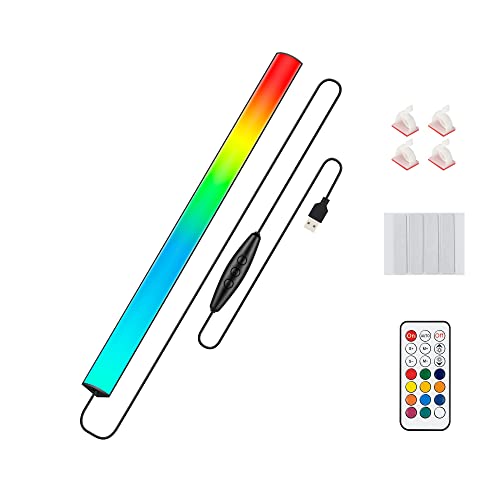
Under Monitor RGB Light Bar for Desk Gaming
The Under Monitor RGB Light Bar is a strong fit for desk gamers who want compact, USB-powered ambient lighting that sits neatly below or behind a monitor. You get a 12-inch LED bar with 353 dynamic modes, 12 static colors, and adjustable brightness and speed, so you can tailor the glow to your setup. It remembers your last setting, runs on 5V USB power, and stays cool with its aluminum housing. Use the remote or inline switch, mount it with adhesive pads, and light your keyboard, desk, or wall with ease indoors.
- Power Source:USB powered
- Light Type:LED
- Dimmable:Yes
- Indoor Use:Indoor
- Control Method:Remote/inline switch
- Color Output:RGB
- Additional Feature:353 dynamic modes
- Additional Feature:Memory function
- Additional Feature:Aluminum heat dissipation
Factors to Consider When Choosing Led Strip Lights For Monitor
Choosing LED strip lights for a monitor begins with checking size compatibility, since the strip should match the display’s dimensions without crowding the edges. Lighting effects, mounting method, power and control options, and overall durability and safety also shape how well the lights perform in daily use. A careful review of these factors helps guarantee a clean fit, reliable operation, and a balanced viewing experience.
Monitor Size Compatibility
When matching LED strip lights to a monitor, size is the first constraint to verify, since the strip must cover the full perimeter without leaving gaps. The monitor’s diagonal and back-edge dimensions should be measured, then compared with the strip’s fixed length before purchase. Larger displays, especially 27–34 inches and above, often need longer strips or multi-piece kits so every visible edge is reached evenly. Smaller 24–27 inch monitors can usually use shorter single-piece strips, though surplus length may need trimming at marked cut points. For curved or ultra-thin panels, flexibility matters as much as length, because the strip must follow corners and preserve uniform spacing. Products with multi-segment support can help maintain full coverage across wider screens without interruption.
Lighting Effects
Beyond size and fit, lighting effects shape how well monitor LED strip lights enhance the viewing experience. Multi-zone or gradient support matters because it lets several colors appear at once, producing smoother shifts and more immersive backlighting. Dynamic modes also add value; music sync, reactive lighting, and scene presets can align illumination with on-screen action or ambient audio. Color range should be checked carefully, since a broad palette or strong CRI helps deliver accurate hues and faithful skin tones. Dimming granularity is equally important for fine-tuning brightness, while memory functions preserve the preferred setting after power loss. Control options influence responsiveness, and app, remote, or desktop sync should be assessed for latency. Desktop software usually provides the lowest lag for real-time effects.
Mounting Method
Mounting method can determine whether monitor LED strip lights feel seamless or cumbersome. Adhesive tape, clip-on, weighted hanging, and slide-on mounts each suit different bezels, so the strip should match the monitor’s depth and curvature. If the design must turn corners or trace several edges, the mount should permit bending without lifting or kinking. For thin or delicate finishes, removable adhesive and non-marring clips are safer because they reduce residue and scratches. Compatibility also matters in multi-monitor setups, where larger arrays may need extra clips or extension brackets to stay aligned. Adequate spacing behind the strip is preferable, since tightly clamped mounts can trap heat and restrict airflow. A stable, damage-free mount keeps the installation neat and reliable.
Power And Control
Power and control should be matched to the monitor setup from the start, because the wrong voltage or underpowered adapter can limit performance or cause instability. A buyer should first check whether the strip uses USB 5V for simple plug-and-play use or a 12V DC adapter for higher-output models, then confirm that the monitor ports or power supply can support it. Total wattage and LED density matter as well; more LEDs usually demand a stronger adapter, and some setups need a separate power brick. Control preferences should also be considered. IR remotes suit basic adjustments, while app, Bluetooth, Zigbee, or Wi‑Fi options support scenes, voice commands, and smart-home use. Memory, sync, and controller boxes add convenience, but also complexity.
Durability And Safety
Regarding durability and safety, the strip should be chosen for more than just brightness or color effects. An IP65 or higher rating helps resist dust and occasional splashes, while many monitor-specific strips remain IP20 and offer no water resistance. The power rating should match the source exactly; using the proper 5 V USB or 12 V DC adapter reduces overheating and electrical strain. Heat management also matters, so aluminum backing, ventilated housings, and low wattage per meter are preferable behind a monitor. Adhesive pads and mounting clips should be non-damaging and suited to the screen surface to prevent slippage or residue. Safety-certified controllers, with short-circuit, overcurrent, and thermal protection, add further assurance, and a clear manufacturer warranty is a useful sign of product confidence.
Frequently Asked Questions
Can Monitor LED Strips Sync With Keyboard and Mouse Lighting?
Yes, monitor LED strips can sync with keyboard and mouse lighting if they all work with the same RGB software or lighting system. Some brands let you control everything through one app, while mixed devices may only allow basic manual matching.
Do LED Strips Affect Monitor Color Accuracy?
Yes. LED strips can alter how monitor colors look by adding colored light around the screen. Use a low brightness, neutral white bias light to keep color judgment more accurate.
Are Adhesive Strips Safe for Curved Monitors?
Adhesive strips can be safe for curved monitors when they are light, low heat, and made to remove cleanly. Strong adhesives may leave residue or affect delicate finishes, so use gentle options that are safe for monitors.
Can I Power Monitor LEDS From a USB Hub?
Yes, a USB hub can power monitor LEDs if the hub’s output voltage and current match the LED strip’s requirements. A powered hub works best. Unpowered or low power hubs may cause flickering, overload, or failure on longer strips.
How Do I Hide LED Strip Cables Neatly?
He routes the LED strips along monitor edges, secures them with adhesive clips or cable raceways, gathers extra length with Velcro ties, and hides the excess behind the desk for a tidy finish.