

A good Z-Wave dimmer switch can make smart lighting feel easy and natural.
It gives you smooth dimming, app control, and better wall-switch convenience.
Some models need a neutral wire, while others work better in multi-way setups.
This guide compares Enbrighten, Treatlife, and Leviton options for different home wiring needs.
| Enbrighten Z-Wave Light Dimmer Switch (58438) |  | Best Overall | Smart Protocol: Z-Wave | Hub Required: Required | Wall Mount: Wall-mounted in-wall | VIEW LATEST PRICE | Read Our Analysis |
| Enbrighten Add-On In-Wall Smart Lighting Switch (46199) | Best Add-On | Smart Protocol: Z-Wave add-on compatible | Hub Required: Required | Wall Mount: In-wall add-on | VIEW LATEST PRICE | Read Our Analysis | |
| Enbrighten Z-Wave Smart Motion Sensor Light Switch 26931 | 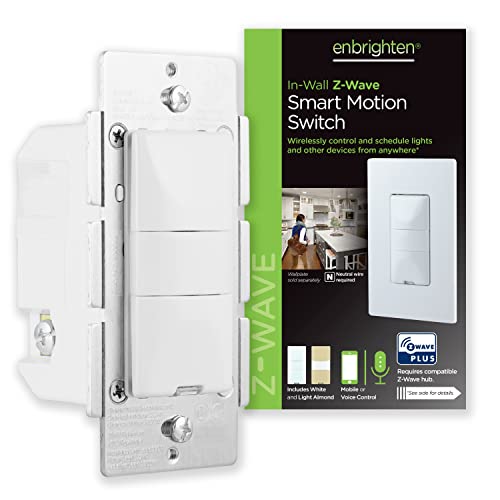 | Best for Motion Control | Smart Protocol: Z-Wave | Hub Required: Required | Wall Mount: Wall mount | VIEW LATEST PRICE | Read Our Analysis |
| TREATLIFE 3 Way Smart Dimmer Switch 2 Pack |  | Best Wi‑Fi Pick | Smart Protocol: Wi‑Fi smart switch | Hub Required: Not required | Wall Mount: Wall mount | VIEW LATEST PRICE | Read Our Analysis |
| Enbrighten Zigbee In-Wall Smart Paddle Dimmer |  | Best Zigbee Dimmer | Smart Protocol: Zigbee 3.0 | Hub Required: Required | Wall Mount: Wall mount | VIEW LATEST PRICE | Read Our Analysis |
| Enbrighten White Add-On Smart Light Switch (46200) | Best Add-On Switch | Smart Protocol: Z-Wave/Zigbee compatible | Hub Required: Required for smart control | Wall Mount: Wall mount | VIEW LATEST PRICE | Read Our Analysis | |
| Leviton Decora Smart Plug-in Dimmer (DZPD3-2BW) |  | Best Plug-In Option | Smart Protocol: Z-Wave | Hub Required: Required | Wall Mount: Plug-in | VIEW LATEST PRICE | Read Our Analysis |
More Details on Our Top Picks
Enbrighten Z-Wave Light Dimmer Switch (58438)
If you want a Z-Wave dimmer that’s easy to fit into a crowded box and works with major smart home hubs, the Enbrighten Z-Wave In-Wall Smart Dimmer (model 58438) is a strong choice. You get QuickFit design, a housing that’s 20% shallower, and SimpleWire terminals that make wiring easier. It supports Alexa, Google Assistant, and certified Z-Wave hubs like SmartThings, Ring Alarm, and HomeSeer. You can control lights by voice, schedule scenes, and use it in single-pole or 3-way setups. It also repeats Z-Wave signals and offers smooth 0–100% dimming.
- Smart Protocol:Z-Wave
- Hub Required:Required
- Wall Mount:Wall-mounted in-wall
- Dimming:Full dimming
- 3-Way Support:3-way ready
- Voice Control:Alexa/Google Assistant
- Additional Feature:QuickFit installation
- Additional Feature:SimpleWire technology
- Additional Feature:SmartStart QR pairing
Enbrighten Add-On In-Wall Smart Lighting Switch (46199)
The Enbrighten Add-On In-Wall Smart Lighting Switch (46199) is a smart choice for you when you need multi-location control without replacing every switch in the circuit. You can pair it with one primary smart switch or dimmer and add up to four companion switches, giving you control from as many as five spots. Its QuickFit + SimpleWire design makes installation easier, while the slimmer housing fits older boxes and tight multigang spaces. It works with Enbrighten and UltraPro systems, handles 120/277VAC, and suits traditional 3-way upgrades.
- Smart Protocol:Z-Wave add-on compatible
- Hub Required:Required
- Wall Mount:In-wall add-on
- Dimming:Not a dimmer
- 3-Way Support:3-way add-on
- Voice Control:Depends on primary switch
- Additional Feature:Up to 5 locations
- Additional Feature:Heat tabs eliminated
- Additional Feature:277VAC capable
Enbrighten Z-Wave Smart Motion Sensor Light Switch 26931
Enbrighten’s Z-Wave Smart Motion Sensor Light Switch 26931 is a strong pick for anyone who wants motion-activated lighting with more control than a basic switch. You can choose occupancy, vacancy, or manual mode, then fine-tune how it reacts with five time-out settings and three sensitivity levels. In occupancy mode, you can even set it to trigger only in low light. It fits hardwired single-pole or multi-switch setups, needs a neutral wire and Z-Wave hub, and works with SmartThings, Wink, Alexa, HomeSeer, and Vera. It also boosts range up to 150 feet.
- Smart Protocol:Z-Wave
- Hub Required:Required
- Wall Mount:Wall mount
- Dimming:Not a dimmer
- 3-Way Support:Multi-switch support
- Voice Control:Alexa-compatible
- Additional Feature:Occupancy/vacancy/manual modes
- Additional Feature:Motion sensitivity levels
- Additional Feature:Timeout up to 30 minutes
TREATLIFE 3 Way Smart Dimmer Switch 2 Pack
TREATLIFE’s 3 Way Smart Dimmer Switch 2 Pack is a strong pick for you if you want app, voice, and touch control without adding a hub, especially in homes with a neutral wire already in place. You get two master 3-way dimmers that work with Alexa, Google Home, and SmartThings over 2.4GHz Wi-Fi. You can slide your finger to set 1% to 100% brightness quietly, and it remembers your last level. Use schedules for security, but only with dimmable bulbs. It’s FCC certified, flame-retardant, and backed by a 2-year warranty.
- Smart Protocol:Wi‑Fi smart switch
- Hub Required:Not required
- Wall Mount:Wall mount
- Dimming:1%–100%
- 3-Way Support:3-way capable
- Voice Control:Alexa/Google Home/SmartThings
- Additional Feature:No hub required
- Additional Feature:Neutral wire required
- Additional Feature:1% brightness control
Enbrighten Zigbee In-Wall Smart Paddle Dimmer
If you want a hardwired smart dimmer that fits older and tight switch boxes without giving up Zigbee 3.0 control, the Enbrighten 43080 is a strong pick. You get auto-detecting line/load terminals, neutral-wire wiring, and a reduced-depth housing that helps in crowded multi-gang boxes. It supports dimmable LEDs, CFLs, incandescent, and halogen bulbs up to 600 watts. Pair it directly with select Echo devices or use a Zigbee hub for Alexa and Google Assistant voice control. You can also expand 3-way setups with add-on switches for flexible whole-room lighting.
- Smart Protocol:Zigbee 3.0
- Hub Required:Required
- Wall Mount:Wall mount
- Dimming:Full dimmer
- 3-Way Support:3-way support
- Voice Control:Alexa/Google Assistant
- Additional Feature:Zigbee 3.0
- Additional Feature:Auto-detecting terminals
- Additional Feature:Up to 150 ft
Enbrighten White Add-On Smart Light Switch (46200)
The Enbrighten White Add-On Smart Light Switch (46200) is a smart choice for multi-way setups, because it mirrors the functions of a primary Enbrighten in-wall controller without serving as a stand-alone switch. You can use it in 3-way layouts to control lights, fan speeds, and other ON/OFF functions from a second location. It works with Enbrighten smart switches, dimmers, and fan controls, plus Z-Wave and Zigbee systems. You’ll need neutral, traveler, and ground wires for indoor hardwired installation. Its slim, 2nd-generation design fits tight boxes, and it supports 120VAC or 277VAC setups.
- Smart Protocol:Z-Wave/Zigbee compatible
- Hub Required:Required for smart control
- Wall Mount:Wall mount
- Dimming:Add-on switch only
- 3-Way Support:3-way support
- Voice Control:Alexa/Google Assistant
- Additional Feature:No standalone use
- Additional Feature:Dual ground ports
- Additional Feature:UL listed
Leviton Decora Smart Plug-in Dimmer (DZPD3-2BW)
Leviton’s Decora Smart Plug-in Dimmer (DZPD3-2BW) is a strong pick if you want Z-Wave control for lamps without rewiring, especially for table, floor, and hanging plug-in lights. You can dim, schedule, and remotely manage lighting through a Z-Wave Plus hub like SmartThings, Wink, Ring Alarm, or Leviton Lumina. It also works with Alexa through a compatible hub. The white plug-in unit supports two-way status updates, protects settings through minor outages, and helps you run holiday lighting or scenes with less energy.
- Smart Protocol:Z-Wave
- Hub Required:Required
- Wall Mount:Plug-in
- Dimming:Plug-in dimmer
- 3-Way Support:2-way circuit
- Voice Control:Alexa via hub
- Additional Feature:Plug-in design
- Additional Feature:Two-way status updates
- Additional Feature:Maintains power memory
Factors to Consider When Choosing a Z Wave Dimmer Switch
When you choose a Z-Wave dimmer switch, make sure it works with your hub and matches your wiring setup. You’ll also want to check the load capacity, dimming range, and installation depth so the switch fits your lights and box. These details help you pick a dimmer that works smoothly and installs without surprises.
Hub Compatibility
Hub compatibility matters because a Z-Wave dimmer switch usually needs a compatible smart home hub to enable remote control, automations, scheduling, and voice assistant support. You should check that the dimmer works with your specific controller ecosystem, since support can differ across security systems, home automation platforms, and voice assistants. Choosing a Z-Wave Plus or 700 Series model can help you stay compatible with older hubs and devices. Some dimmers let you join them quickly with a SmartStart QR code, while others still need hub-based inclusion. If you want multi-location control, confirm that both the hub and dimmer support add-on switches or multi-switch setups. Hub compatibility alone doesn’t guarantee the full experience you want.
Wiring Requirements
Before you buy a Z-Wave dimmer switch, check the wiring requirements so the device will actually work in your home. You’ll need to confirm whether the switch needs a neutral wire, since many in-wall dimmers won’t operate without one. If you’re using add-on controls, verify any traveler and ground needs too. Next, match the device to your circuit layout: some switches work only for single-pole setups, while others support 3-way or multi-location control with several add-ons. Also, check the electrical box depth so the unit fits in crowded or older boxes. Finally, make sure the line/load terminals, wire type, and voltage match your installation. Some models auto-detect terminals, but others require specific wiring for proper operation.
Load Capacity
Once you’ve confirmed the wiring will work, the next step is making sure the dimmer can handle the electrical load. Check the dimmer’s wattage and current rating against your total connected fixtures. Many models support about 300 to 600 watts and 2.5 to 15 amps, but you should match the exact numbers to your setup. Also confirm the load type: LED, CFL, incandescent, fluorescent, halogen, and motor loads can each have different limits. If you’re mixing fixtures, use the lowest applicable rating to prevent overheating or failure. Verify whether the spec covers dimming only or also simple on/off switching. In multi-location setups, make sure the primary device still supports the full circuit after you add any companion switches.
Dimming Range
Dimming range shapes how useful a Z Wave dimmer feels in everyday use, so look for a model that lets you adjust brightness from 0% to 100% for full control over lighting. You’ll get better results when you can tailor light levels for reading, relaxing, or movie nights. Make sure the switch matches your bulb type, since some units only work with dimmable LEDs or CFLs, while others also handle incandescent or halogen loads. Check the load rating too; a dimmer that supports 150W may suit small LED setups, but larger fixtures may need 600W or more. If you want softer nighttime lighting, choose one that remembers the last setting. In multi-way setups, confirm every control point still gives you full dimming, not just on/off access.
Installation Depth
In tight electrical boxes, installation depth can make or break a Z Wave dimmer swap. You’ll want to check how much room sits behind the device before you buy. Some in-wall smart dimmers cut housing depth by up to 20%, which can help them fit older, crowded, or multi-gang boxes. That slimmer profile matters even more when rear clearance is limited or your wiring already fills the cavity. Look for designs without break-off tabs or heat tabs, since they can save space. Compact models with auto-detecting line/load terminals and daisy-chaining connections can also make installation easier without adding bulk. If your box is shallow or packed with conductors, a smaller dimmer may spare you from replacing the box entirely.
Multi-Way Support
Multi-way support can be the difference between a convenient upgrade and a frustrating one, so make sure the Z Wave dimmer matches how many locations you want to control. Check whether it gives you full dimming at every switch point or only basic on/off control from secondary locations. Some models handle a true 3-way setup and support up to four add-on switches, so you can control the lights from as many as five places. Remember, add-on switches aren’t standalone devices; they need a primary smart dimmer or switch in the same circuit. In 3-way wiring, confirm where the smart dimmer goes and whether the other switch stays mechanical. Always verify single-pole, 3-way, or multi-switch compatibility before you buy.
Voice Integration
Once you’ve sorted out how many switches you need, the next question is whether you can control the dimmer by voice as easily as by hand. Check that the Z-Wave dimmer works through your smart home hub, because many models rely on the hub for Alexa or Google Assistant support. Don’t assume your speaker pairs directly; verify your assistant is listed as compatible. You’ll want voice commands that handle both on/off and dimming, so you can fine-tune brightness without touching the wall. Also, make sure the dimmer supports automation and scheduling inside voice-enabled ecosystems, since that lets you trigger scenes with a simple command. If you want stronger reliability and wider support, choose a certified, backward-compatible model that plays well with supported hubs and assistants.
Frequently Asked Questions
How Do Z-Wave Dimmers Improve Energy Efficiency?
You cut energy use by setting lights to the right brightness, automating schedules, switching them off remotely, and tracking usage, which reduces wasted electricity and lowers costs over time.
Can Z-Wave Dimmers Work Without a Hub?
No, most Z Wave dimmers will not work fully without a hub because a hub is needed for remote control and automation. You can still dim the lights manually at the switch, but the smart features will not be available.
Are Z-Wave Dimmers Compatible With LED Bulbs?
Yes. Most Z Wave dimmers work with LED bulbs, but compatibility still matters because some LEDs may flicker or require a minimum load. Always check the dimmer and bulb specifications before installing.
What Wiring Skills Are Needed for Installation?
You’ll need to know how to shut off the circuit, identify the line, load, neutral, and ground wires, and make secure connections in the device. If anything is unclear, verify the circuit with a tester or hire a licensed electrician to handle the installation safely.
How Do I Reset a Z-Wave Dimmer Switch?
Usually, reset it by holding the paddle or config button for 5 to 20 seconds until the LED flashes. After that, pair it again with your hub.