

Wireless remote light switches make controlling your lights simple and fast.
They skip the rewiring and still give you flexible control from across the room.
In this guide, we look at 2026 picks for range, safety, and easy setup.
You also get a quick look at the features that matter most for everyday use.




More Details on Our Top Picks
WILAWELS Wireless Remote Outlet Switch (W02RC1106)
Should you want a simple way to control a lamp, fan, heater, or charger without getting up, the WILAWELS Wireless Remote Outlet Switch (W02RC1106) fits that need well, especially in case you’re helping an older family member or in case you need easier control because of limited movement. You just plug it in, press the remote, and the socket responds right away. Since it arrives pre-paired, you skip wiring and setup stress. The signal reaches about 100 feet and passes through walls, so you can stay comfy. It’s FCC listed, uses flame-retardant PC, and can handle 1875W.
- Control Type:Remote on/off
- Range:100 ft
- Plug-in:Yes
- Voltage:125V
- Current:15A
- Indoor Use:Home use
- Additional Feature:Pre-paired setup
- Additional Feature:Flame-retardant PC
- Additional Feature:23A battery included
TESSAN Wireless Remote Control Outlet Kit 1 Remote 3 Outlets
The TESSAN Wireless Remote Control Outlet Kit is a smart pick for anyone who wants easy control over lamps and small appliances without walking across the room, especially whenever the outlet is concealed behind furniture or hard to reach. You just plug it in, and you’re ready, with no extra pairing needed. The 100-foot RF range works through doors and walls, so you can use it in your bedroom, office, kitchen, or garage. It handles up to 15A and 1875W, and the remote’s magnetic back helps you keep it handy. After outages, it stays off for safer, smarter power control.
- Control Type:Remote on/off
- Range:100 ft
- Plug-in:Yes
- Voltage:120V
- Current:15A
- Indoor Use:Indoor use
- Additional Feature:Magnetic remote back
- Additional Feature:Sticky iron piece
- Additional Feature:Power-loss off mode
Zoiinet Remote Control Outlet Switch Wireless 300 ft 15A/1500W
Zoiinet’s Remote Control Outlet Switch is a smart pick for anyone who wants easy, no-fuss control over hard-to-reach lights and appliances without touching a wall switch or running new wires. You get plug-in setup, a removable wireless remote, and one-button use with 433 MHz control. It reaches up to 300 feet, even through walls and windows, so you can stay comfy on the couch. It handles 15 amps and 1500 watts for lamps, fans, heaters, and more. Plus, it supports multi-switch pairing, stays off after outages, and feels built to last.
- Control Type:One-button remote
- Range:300 ft
- Plug-in:Yes
- Voltage:125V
- Current:15A
- Indoor Use:Home use
- Additional Feature:433 MHz protocol
- Additional Feature:IP66 rated
- Additional Feature:10-year battery
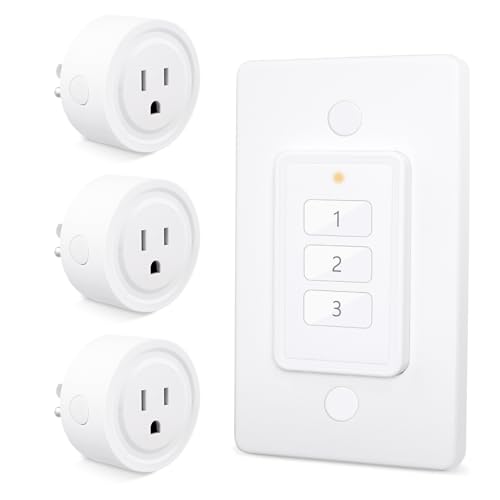
LoraTap Wireless Remote Control Outlet 3-Pack
LoraTap’s Wireless Remote Control Outlet 3-Pack is a smart pick for anyone who wants easy light control without rewiring, apps, or daily hassle. You get one remote for three plugs, so you can switch lamps, fans, routers, or small appliances from across the room. The portable wall switch sticks to a fridge or base plate, which feels handy while your hands are full. It works through walls, recalls settings after outages, and stays reliable with no signal clash. For you, that means simple control, fewer steps, and a calmer home.
- Control Type:Wall-switch remote
- Range:656 ft outdoor
- Plug-in:Yes
- Voltage:125V
- Current:10A
- Indoor Use:Indoor use
- Additional Feature:3-channel remote
- Additional Feature:Fridge-mount base
- Additional Feature:Memory restoration
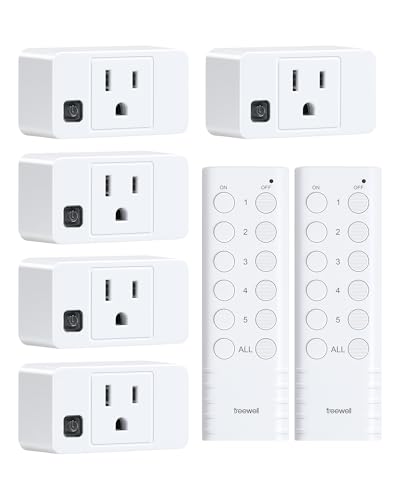
Wireless Remote Control Outlet with 2 Remotes
If you want a simple way to control lamps, lights, or hard-to-reach appliances, the treewell Wireless Remote Control Outlet with 2 Remotes is a smart fit for your home. You get five plug-in outlets, two remotes, and easy pairing, so setup feels calm, not confusing. The RF signal reaches up to 200 feet and works through walls, doors, and windows. You can turn devices on or off together or one by one. Its compact design saves wall space, fits behind furniture, and keeps 15-amp, ETL listed protection close at hand for everyday comfort.
- Control Type:Remote on/off
- Range:200 ft
- Plug-in:Yes
- Voltage:120V
- Current:15A
- Indoor Use:Household use
- Additional Feature:Two remotes included
- Additional Feature:Five outlets included
- Additional Feature:Label space buttons
TESSAN Remote Control Outlet with 3 Outlets
The TESSAN Remote Control Outlet with 3 Outlets is a smart fit for anyone who wants easy control without rewiring or hassle, especially in a bedroom, sitting room, dorm, or office where lamps, string lights, or small appliances keep residing in awkward spots. You get one remote and three plug-in outlets, so you can switch items on from up to 100 feet away. It works through doors and walls, and you can re-pair it whenever the remote stops responding. Its compact shape saves space, and the magnetic remote sticks neatly to metal surfaces.
- Control Type:Remote control
- Range:100 ft
- Plug-in:Yes
- Voltage:120V
- Current:10A
- Indoor Use:Indoor use
- Additional Feature:Re-pairing option
- Additional Feature:Magnetic remote
- Additional Feature:Compact size
Remote Control Outlet Switch 300ft RF Range
A remote control outlet switch with a 300 ft RF range is a smart pick for anyone who wants easy control without extra wiring or WiFi trouble. You can replace a wall switch fast, then mount the remote panel with adhesive strips or screws. Its removable buckle design also lets you carry it room to room. Because the signal works through doors and walls, you can turn on lights, fans, or coffee makers from anywhere at home. With 15A power, 4000V surge protection, and FCC, ROHS, and CE approval, it feels safe too.
- Control Type:Wireless remote
- Range:300 ft
- Plug-in:Yes
- Voltage:Not specified
- Current:15A
- Indoor Use:Home use
- Additional Feature:Anti-surge 4000V
- Additional Feature:Zero-crossing trigger
- Additional Feature:Screw mount option
Factors to Consider When Choosing a Wireless Remote Light Switch
Whenever you choose a wireless remote light switch, start with range and signal strength so it works where you need it, even through walls or across larger rooms. You should also check load capacity, device compatibility, and how easy it is to install, because a switch that looks simple can still cause headaches provided it doesn’t fit your setup. Then look at remote pairing options, since the right setup should make your life easier, not give you one more tiny puzzle to solve.
Range And Signal Strength
How far do you need your wireless remote light switch to reach? You should match the range to your space, since many RF models work about 100 feet indoors and 300 feet or more in open air. That sounds plenty, until walls, doors, and windows start trimming the signal. So, focus on strong signal penetration provided that you want fewer annoyances. A switch that uses a stable radio frequency, such as 433 MHz, often sends commands more reliably and misses fewer clicks. In the event that you plan to use several switches nearby, pick a system that resists interference so devices don’t fight each other. In short, the best choice is the one that stays dependable in your real room, not just on the box.
Load Capacity
Range matters, but so does the amount of power your switch can safely handle. You should check the maximum current rating first, because many wireless remote light switches handle only 10A to 15A. Then compare the wattage limit with what you want to run. At 120 to 125V, that often means about 1250W to 1875W.
Next, match the rating to the job. Lights, fans, chargers, and small devices can pull different loads, so don’t assume they all fit the same box. If you want to control more than one device, see whether the limit applies to each outlet or to the total load. Finally, pick a switch with some extra capacity. That little cushion helps cut heat, boosts reliability, and saves you from a warm surprise later.
Device Compatibility
Device compatibility can make or break your wireless remote light switch setup, so it’s worth checking the match before you buy. Initially, confirm the switch’s voltage, amperage, and wattage ratings fit your light or fixture, usually around 120 to 125V, 10 to 15A, and 1250 to 1875W. Next, make sure it supports the load you want, whether that’s indoor lighting, lamps, string lights, or small appliances. Then check the plug and connector style, including grounded 3-prong or NEMA-specific fit. Provided you want more flexibility, look for systems that let one remote control several outlets, or several remotes control one outlet. Finally, match the switch to the same environment, especially indoor use, so it works smoothly where you need it most.
Installation Ease
When you want a wireless remote light switch that feels easy from the start, begin with setup, because a simple install can save you a lot of hassle later. Choose a plug-and-play or pre-paired model whenever possible, so you skip wiring and extra steps. Also, look for a standard plug-in design that fits one wall socket neatly, since it installs faster and won’t crowd nearby outlets. Next, consider the remote itself. Magnetic backs, adhesive strips, and wall-mount options let you place it on a fridge, wall, or metal surface without drilling. Compact mini units help too, especially behind furniture or in tight spots. Finally, pick a system that lets you add or reset parts without tricky programming.
Remote Pairing Options
Before you settle on a wireless remote light switch, take a close look at how the pairing works, because that small detail can make the whole system feel easy or frustrating. You might get a unit that’s pre-paired and ready right away, or one that needs manual pairing before you flip the first light. That matters whenever you want fast setup.
Next, check flexibility. A good system can let one remote control several outlets, which helps you manage a whole room from one spot. Also, look for models that accept multiple remotes for one outlet, so family members can use the same light without a reset.
If you plan to grow, choose a system that lets you add extra sockets, remotes, or receivers. Lastly, unique device IDs or channel control can cut down interference nearby.
Safety Certifications
Safety certifications should be one of the earliest things you check, because they tell you far more than a slick product photo ever will. You want marks like FCC, UL, CE, ETL, or RoHS, since they show the switch met real compliance tests. Then check the label for voltage, current, and wattage, so you know it fits your load, such as 120 to 125V and up to 15A or 1875W in many models. Also, look for flame-retardant housing, often polycarbonate, because that adds another layer of peace of mind. Next, read the box or manual, not just the ad copy. For outdoor spots, confirm any environmental or protection rating too, since weather can be a sneaky troublemaker.
Power Outage Behavior
When the power flickers or goes out, the way a wireless remote light switch recovers can matter more than you perhaps expect. You should check whether it turns back off or returns to its last state after an outage. A default-off design can keep heaters, lamps, and other unattended loads from starting up by surprise. That gives you extra peace of mind and can cut wasted energy. Should you want less fuss, look for power-restoration memory so your light comes back the way it was before the blackout. Also, make sure the behavior stays the same across all paired outlets, since some systems leave every outlet off after a failure. That consistency saves you from walking room to room and resetting everything.
Control Channels
Should you’ve got more than one light, plug, or room to manage, the number of control channels can make a big difference in how easy the switch feels. You should choose a remote with enough channels for your setup, since some models give you 1, 3, or 5 independent controls. That way, you can run each light or outlet on its own, then turn everything on or off together when you want a simpler move.
Should you need more flexibility, look for systems that let one remote control several receivers, or let several remotes work with one receiver. This helps you stay organized, especially in different rooms or hard-to-reach spots. For bigger setups, a multi-channel remote keeps things neat, and it saves you from extra wiring or Wi-Fi hassles.
Frequently Asked Questions
Can These Switches Work Through Brick Walls?
Yes, many switches can work through brick walls, but the signal will drop. Brick absorbs and blocks radio waves, so range is shorter and reliability can vary. Put the receiver as close as possible, use RF or mesh models, and test the link in the exact location before depending on it.
Do They Require Wi-Fi or a Hub?
Not always. Need Wi-Fi or a hub? Many switches use RF pairing, so neither is needed. Some smart models do require Wi-Fi or a hub for app control and automation.
Are They Compatible With LED Bulbs?
Yes, they can usually be used with LED bulbs, and they often perform well. Check the switch load rating and dimmer compatibility, since some LEDs may flicker or buzz if the setup is not supported.
Can One Remote Control Multiple Switches?
Yes. One remote can usually control multiple switches when they are paired to the same system. You need compatible receivers, and you can assign them by zone, room, or channel to control them more easily.
Do They Remember Settings After a Power Outage?
Usually, yes. Many remote switches keep their previous setting after power is restored, but some reset to off, on, or pairing mode. Check the model to be sure.