

A good Z-Wave switch can make smart-home control feel much easier. It can handle lights, plugs, and outdoor gear with steady wireless range.
Certified hubs help these switches work more reliably. Some models dim lights, support motion control, or fit multi-way setups, and Z-Wave 800 versions offer stronger performance.
| Enbrighten Z-Wave Light Dimmer Switch (58438) |  | Best Dimming Control | Z-Wave Tech: Z-Wave Plus | Hub Required: Yes | Remote Control: App/hub control | VIEW LATEST PRICE | Read Our Analysis |
| Minoston Z-Wave Outdoor Smart Plug (MP22Z) |  | Best Outdoor Plug | Z-Wave Tech: Z-Wave 800 | Hub Required: Yes | Remote Control: App/hub control | VIEW LATEST PRICE | Read Our Analysis |
| Enbrighten Add-On Smart Lighting Switch (46199) | Best Add-On Switch | Z-Wave Tech: Z-Wave / ZigBee | Hub Required: Yes | Remote Control: Remote control | VIEW LATEST PRICE | Read Our Analysis | |
| Leviton Decora Smart Plug-in Outlet with Z-Wave |  | Best Plug-In Outlet | Z-Wave Tech: Z-Wave Plus | Hub Required: Yes | Remote Control: App/hub control | VIEW LATEST PRICE | Read Our Analysis |
| Enbrighten Z-Wave Smart Motion Sensor Light (26931) | 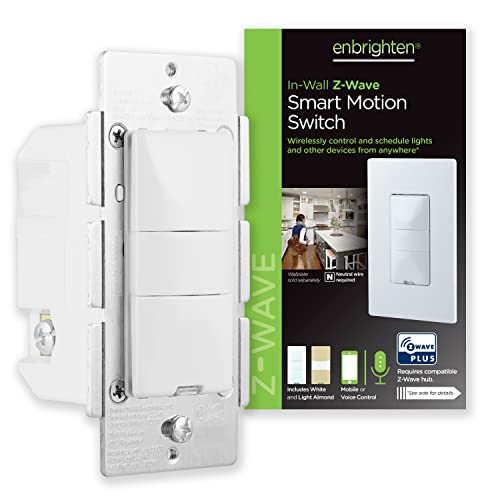 | Best Motion Sensor | Z-Wave Tech: Z-Wave Plus | Hub Required: Yes | Remote Control: App/hub control | VIEW LATEST PRICE | Read Our Analysis |
| Minoston Smart Plug Z-Wave 800 Series (MP21Z) |  | Best Mini Smart Plug | Z-Wave Tech: Z-Wave 800 | Hub Required: Yes | Remote Control: App/hub control | VIEW LATEST PRICE | Read Our Analysis |
| Zooz 800 Series Z-Wave Scene Controller ZEN34 |  | Best Scene Controller | Z-Wave Tech: Z-Wave 800 LR | Hub Required: Yes | Remote Control: Scene remote | VIEW LATEST PRICE | Read Our Analysis |
More Details on Our Top Picks
Enbrighten Z-Wave Light Dimmer Switch (58438)
If you want a Z-Wave dimmer that’s easy to wire and flexible enough for whole-home control, the Enbrighten Z-Wave Light Dimmer Switch (58438) is a strong fit. You can use it with Alexa or Google Assistant through a Z-Wave certified hub like SmartThings, Ring Alarm, or HomeSeer. Its QuickFit design and SimpleWire terminals cut guesswork, while the slimmer housing helps with tight boxes. You get 0-100% dimming, single-pole or multi-switch setups, and support for up to four add-ons. It also offers customizable paddles, LED colors, Z-Wave Plus range, and signal repeating up to 150 feet.
- Z-Wave Tech:Z-Wave Plus
- Hub Required:Yes
- Remote Control:App/hub control
- Installation:In-wall
- Smart Assistants:Alexa, Google
- Range:150 ft
- Additional Feature:0-100% dimming
- Additional Feature:4 add-on switches
- Additional Feature:8 LED colors
Minoston Z-Wave Outdoor Smart Plug (MP22Z)
The Minoston Z-Wave Outdoor Smart Plug (MP22Z) is a strong pick if you want a weather-resistant switch that works outdoors and reaches far beyond a typical plug, thanks to its Z-Wave 800 chip and LR support for up to 1,300 ft with a compatible hub. You can place it on a porch, patio, or garage, then control lights, pumps, sprinklers, or a grill from your hub. Its IP65 housing, built-in repeater, and 15A, 1,875W rating help it stay reliable. It works with major Z-Wave systems, plus Alexa and Google Assistant through a hub.
- Z-Wave Tech:Z-Wave 800
- Hub Required:Yes
- Remote Control:App/hub control
- Installation:Plug-in
- Smart Assistants:Alexa, Google
- Range:1300 ft
- Additional Feature:IP65 weatherproof
- Additional Feature:1300 ft LR
- Additional Feature:15A 1875W
Enbrighten Add-On Smart Lighting Switch (46199)
When you need to add multi-location control without replacing your whole setup, the Enbrighten Add-On Smart Lighting Switch (46199) is a strong fit for you. You get a QuickFit, SimpleWire in-wall rocker that works with Z-Wave or Zigbee systems, but it isn’t a standalone switch. Pair it with an Enbrighten or UltraPro smart switch, dimmer, or fan control, then link up to four add-ons for five total control points. Its slimmer housing helps in tight or older boxes, and it supports 120/277VAC, 15 amps, Alexa, Google Assistant, and SmartThings.
- Z-Wave Tech:Z-Wave / ZigBee
- Hub Required:Yes
- Remote Control:Remote control
- Installation:In-wall
- Smart Assistants:Alexa, Google
- Range:Not stated
- Additional Feature:Not standalone switch
- Additional Feature:5-way circuit
- Additional Feature:277VAC compatible
Leviton Decora Smart Plug-in Outlet with Z-Wave
Leviton’s Decora Smart Plug-in Outlet with Z-Wave is a strong fit for anyone who wants easy smart control without rewiring. You just plug it in, enroll it to a Z-Wave hub like SmartThings or Wink, and start controlling lamps, fans, appliances, and holiday lights. It’s Z-Wave Plus certified, works with Alexa through your hub, and sends two-way status updates so you always know its state. It also acts as a repeater to strengthen your mesh. With 15A, 120V support and a 5-year warranty, it handles everyday loads reliably.
- Z-Wave Tech:Z-Wave Plus
- Hub Required:Yes
- Remote Control:App/hub control
- Installation:Plug-in
- Smart Assistants:Alexa
- Range:Repeater
- Additional Feature:Two-way status updating
- Additional Feature:1/2 HP motors
- Additional Feature:5-year warranty
Enbrighten Z-Wave Smart Motion Sensor Light (26931)
Enbrighten’s Z-Wave Smart Motion Sensor Light (26931) is a solid pick if you want a hardwired in-wall switch that can automate lighting based on movement and room activity. You get occupancy, vacancy, and manual modes, plus five timeout settings and three sensitivity levels, so you can tune it for busy halls or quiet rooms. It needs a neutral wire and a Z-Wave hub, but it works with SmartThings, Alexa, HomeSeer, Vera, and more. Add up to four companion switches, and use low-light sensing when you want smarter control.
- Z-Wave Tech:Z-Wave Plus
- Hub Required:Yes
- Remote Control:App/hub control
- Installation:In-wall
- Smart Assistants:Alexa
- Range:150 ft
- Additional Feature:Occupancy vacancy manual
- Additional Feature:5 time-out options
- Additional Feature:3 sensitivity levels
Minoston Smart Plug Z-Wave 800 Series (MP21Z)
Minoston’s MP21Z smart plug is a strong pick if you want a compact Z-Wave switch that can do more than just turn devices on and off. You get 800 series performance, faster communication, better coverage, and a built-in repeater that can help extend your network. It handles up to 15A and 1875W, and you can automate lamps or appliances with schedules, timers, and custom names. With S2 security, SmartStart, and hub-based Alexa or Google Assistant support, it’s flexible. It’s tiny, ETL/FCC listed, and fits easily.
- Z-Wave Tech:Z-Wave 800
- Hub Required:Yes
- Remote Control:App/hub control
- Installation:Plug-in
- Smart Assistants:Alexa, Google
- Range:1300 ft
- Additional Feature:SmartStart pairing
- Additional Feature:S2 authenticated security
- Additional Feature:Device name customization
Zooz 800 Series Z-Wave Scene Controller ZEN34
The Zooz 800 Series Z-Wave Scene Controller ZEN34 is a strong pick if you want wireless switch-style control without rewiring, since its battery-powered, magnetic design lets you place it in a switch box or on a flat surface. You get five buttons and paddle-style control that can trigger scenes or turn devices on and off. It runs on two included CR2 batteries, works with a Z-Wave hub, and supports Z-Wave Long Range, S2 security, and SmartStart. It’s compatible with Home Assistant, Hubitat, HomeSeer, and Z-Box Hub. No electrician’s needed.
- Z-Wave Tech:Z-Wave 800 LR
- Hub Required:Yes
- Remote Control:Scene remote
- Installation:Battery/portable
- Smart Assistants:Smart speaker compatible
- Range:1300 ft
- Additional Feature:Battery powered
- Additional Feature:5 buttons
- Additional Feature:Magnetic base
Factors to Consider When Choosing a Z-Wave Switch
When you choose a Z-Wave switch, make sure it works with your hub and matches your home’s wiring requirements. You’ll also want to check the load capacity and decide whether you need dimming features or multi-location control. Picking the right switch up front helps you avoid installation issues and get the control you want.
Hub Compatibility
Before you buy a Z-Wave switch, make sure your hub can actually support it: most Z-Wave switches need a Z-Wave certified hub to work, and many also rely on that hub for Alexa, Google Assistant, scenes, schedules, timers, and other advanced features. Check that your hub matches the switch’s Z-Wave generation, whether that’s Z-Wave Plus, 800 series, or Long Range, so you get the range and security you expect. Also confirm that the hub supports the automations you want, since some functions stay locked behind hub-based setup. If you’re planning multi-location control, verify that your system can handle companion devices. For whole-home reliability, choose a hub that can use repeater and range-extending features to strengthen your Z-Wave mesh.
Wiring Requirements
Wiring requirements can make or break your Z-Wave switch install, so check them early. You’ll want to confirm whether the switch needs a neutral wire, since many in-wall models do, and older boxes may not have one. Choose between plug-in units and hardwired in-wall switches: plug-ins avoid new wiring, while in-wall options must connect to your existing line and load circuit. To keep installation simpler, look for switches with auto-detecting line/load terminals or SimpleWire-style layouts, which cut down on guesswork. You should also verify support for single-pole, 3-way, or multi-location setups if you need control from more than one spot. Finally, measure the wall box depth, because slimmer devices fit better in older, crowded, or multigang boxes.
Load Capacity
Load capacity is one of the first specs you should check, because your Z-Wave switch has to handle both the circuit’s voltage and the total current it will control. Match the switch’s amp and watt ratings to the load you’re controlling, such as 15 amps at 120 volts on many homes’ circuits. Check the maximum wattage for each load type, since some switches handle about 600 watts for LED or CFL fixtures, while others support up to 1800 watts for incandescent, fluorescent, or halogen lights. If you’re switching a motorized device, confirm the motor rating separately. When you control multiple fixtures, add their wattages together and stay under the switch’s total capacity, often 1800 or 1875 watts. Also verify the voltage, usually 120 VAC, or 277 VAC in light-commercial settings.
Dimming Features
Once you’ve confirmed the switch can handle the load, the next thing to look at is how well it dims. You’ll want a switch that gives you a true 0–100% range, so you can set the light exactly where you want it instead of settling for a few preset steps. Check that it matches your bulb type, too, because LED, CFL, incandescent, halogen, and fluorescent bulbs can behave differently and have different limits. If you use automations, choose a dimmer that works with scenes, schedules, or hub routines so brightness changes happen automatically. Clear status lights or customizable indicators also help you see the current level at a glance and make daily adjustments easier without guessing.
Multi-Location Control
For hallways, stairways, and rooms with more than one entrance, you’ll want a Z-Wave switch that handles multi-location control well. Look for models that support add-on companions or scene controllers, because some systems let you link up to four add-ons for five total control points. That gives you true control from every entrance, not just basic on/off wiring like a standard 3-way setup. You should also choose a switch that supports both single-pole and multi-switch use, so you can match different layouts without replacing hardware later. Hub-based Z-Wave systems can keep every switch synced for on/off or dimming changes. If you’re planning ahead, pick a Z-Wave Plus or Long Range device so you can expand your setup more easily later.
Range And Reliability
When you’re choosing a Z-Wave switch, range and reliability should be high on your list. You’ll usually get better performance from Z-Wave Plus or 800-series models, since they tend to hold connections more steadily than older devices. If your home is large, has thick walls, or includes outdoor spaces, look for long-range support and a clear signal path. Some switches can reach about 150 feet, and long-range systems can extend far beyond that with the right hub. Built-in repeater or range-extender features also help because they pass commands through the mesh instead of depending on one direct hop. S2 security and SmartStart pairing can reduce setup hiccups, too, so your switch stays responsive and dependable every day.
Installation Ease
Installation ease can make or break your Z-Wave switch choice, especially if you want a quick DIY job instead of an electrician visit. You’ll save time if you pick a model with auto-detecting line/load terminals or a slimmer housing, since both cut wiring guesswork and fit better in tight boxes. If you’re swapping a standard wall switch, check whether it supports single-pole and multi-way setups; some homes need up to four add-on switches for five control points. Also confirm neutral-wire requirements before you buy, especially in older homes. If you want the simplest path, choose a plug-in smart outlet or a battery-powered scene controller, because neither needs hardwiring, and both pair quickly with your hub after setup.
Frequently Asked Questions
How Far Can Z-Wave Switches Communicate in a Typical Home?
You can usually expect Z Wave switches to communicate about 50 to 100 feet indoors. Thick walls, floors, and signal interference can reduce that range. Range often improves in a mesh network because powered devices can pass signals along to other devices.
Do Z-Wave Switches Work Without a Neutral Wire?
Yes, some Z Wave switches work without a neutral wire, but you need a model designed for no neutral wiring. Check the switch wiring carefully, because many standard Z Wave switches still need a neutral for reliable operation and full features.
Can One Z-Wave Hub Control Multiple Switch Brands?
Yes, a single Z Wave hub can usually control switches from different brands if they support the same Z Wave version. You pair each switch on its own, then use one app to handle schedules, scenes, and automations.
Are Z-Wave Switches Compatible With Voice Assistants?
Yes, Z Wave switches can work with voice assistants, but they need a compatible hub or bridge first. After setup, you can control your lights with Alexa, Google Assistant, or Siri using voice commands.
How Secure Is a Z-Wave Smart Home Network?
You can make a Z Wave smart home network fairly secure because devices use encrypted communication, and you can limit access with strong passwords, regular firmware updates, and network segmentation, although weak hub security or a bad setup can still leave gaps.