

A HomeKit LED strip can brighten a room and set the mood fast.
The best option depends on your space, your lighting needs, and how you want it to work with Apple Home.
Some strips deliver strong brightness for practical use.
Others focus on color, flexible placement, or smoother app and voice control.
| SYLVANIA Smart Bluetooth Mesh LED Flex Light Strip Kit |  | Best Outdoor Pick | Length: 16.4 ft | Smart Control: Alexa, Google, HomeKit | Connectivity: Bluetooth Mesh | VIEW LATEST PRICE | Read Our Analysis |
| Govee RGBIC LED Strip Lights with Covers |  | Best for Effects | Length: 32.8 ft | Smart Control: Alexa, Google | Connectivity: Wi-Fi, Bluetooth | VIEW LATEST PRICE | Read Our Analysis |
| LIFX Color Zones Wi-Fi Smart LED Light Strip | 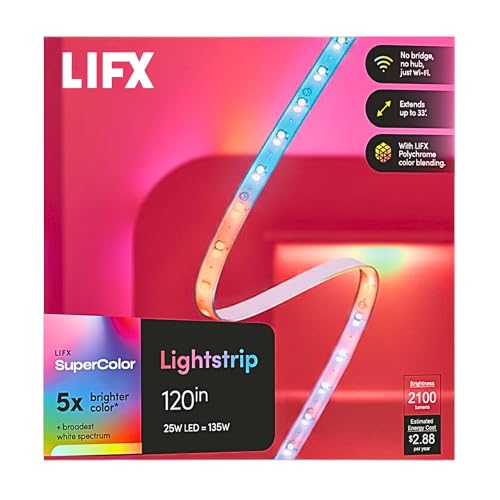 | Best for HomeKit | Length: 10 ft | Smart Control: Alexa, Google, HomeKit, Siri | Connectivity: Wi-Fi | VIEW LATEST PRICE | Read Our Analysis |
| Nanoleaf Essentials Matter Smart Multicolor LED Lightstrip Kit |  | Best Matter Option | Length: 16.4 ft | Smart Control: Alexa, Google, Apple Home, SmartThings | Connectivity: Wi-Fi, Bluetooth, Matter | VIEW LATEST PRICE | Read Our Analysis |
| Govee COB LED Strip Light Pro Smart RGBICW Strip | 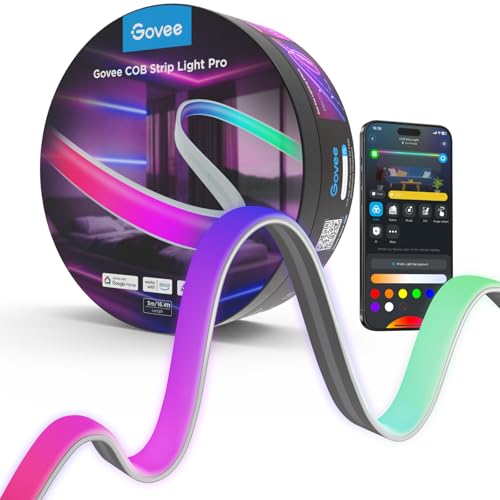 | Best Smooth Lighting | Length: 9.8 ft | Smart Control: Alexa, Google, HomeKit, Matter | Connectivity: Matter-compatible smart home | VIEW LATEST PRICE | Read Our Analysis |
| Govee COB LED Strip Light Pro RGBICW Smart Strip |  | Best Premium Pick | Length: 9.8 ft | Smart Control: Alexa, Google, HomeKit, Matter | Connectivity: Bluetooth, Wi-Fi, Matter | VIEW LATEST PRICE | Read Our Analysis |
| Philips Hue Smart RGBWW LED Lightstrip Base Kit |  | Best Overall | Length: 10 ft | Smart Control: Alexa, Google, HomeKit | Connectivity: Zigbee, Ethernet | VIEW LATEST PRICE | Read Our Analysis |
More Details on Our Top Picks
SYLVANIA Smart Bluetooth Mesh LED Flex Light Strip Kit
If you want a HomeKit-compatible LED strip that’s ready for outdoor use, the SYLVANIA Smart Bluetooth Mesh LED Flex Light Strip Kit is a strong fit. You get a 16.4-foot outdoor-rated strip with waterproof, weather-resistant construction, so you can mount it on patios, decks, gazebos, or walkways. It works with Apple HomeKit, Alexa, and Google Assistant, and you can control it through Bluetooth Mesh without a hub. You can dim it, change colors, and tune white light to 2700K. It includes clips, screws, and an end cap, and you can expand it to 65.4 feet.
- Length:16.4 ft
- Smart Control:Alexa, Google, HomeKit
- Connectivity:Bluetooth Mesh
- Color Type:RGBTW
- Dimmable:Yes
- Cuttable:Yes
- Additional Feature:Outdoor waterproof rating
- Additional Feature:Bluetooth Mesh expansion
- Additional Feature:Includes clips and screws
Govee RGBIC LED Strip Lights with Covers
Govee RGBIC LED Strip Lights with Covers are a strong pick when you want bright, even accent lighting that looks cleaner than a bare strip, thanks to the included diffuser channel and 60 LEDs per meter. You get 32.8 feet of RGBIC lighting with 50 customizable segments, 64 scene modes, DIY options, and music sync for lively rooms. Control it through Wi-Fi, Bluetooth, the Govee Home app, Alexa, or Google Assistant. It’s indoor-only, cuttable for custom layouts, and works well along ceilings, cabinets, and skirting lines.
- Length:32.8 ft
- Smart Control:Alexa, Google
- Connectivity:Wi-Fi, Bluetooth
- Color Type:RGBIC
- Dimmable:Yes
- Cuttable:Yes
- Additional Feature:50 customizable segments
- Additional Feature:LED diffuser channel
- Additional Feature:Music sync mode
LIFX Color Zones Wi-Fi Smart LED Light Strip
The LIFX Color Zones Wi-Fi Smart LED Light Strip is a strong pick for you if you want a HomeKit-compatible strip that connects directly to your 2.4GHz Wi-Fi without needing a hub. You can control it with the LIFX app, Siri, Alexa, or Google Assistant, then adjust brightness, colors, schedules, and scenes from your phone. Its 120-inch bendable, cut-to-size design fits cabinets, TVs, shelves, and ceilings. Polychrome zones let you show multiple colors at once with smooth gradients. Keep it within 30 feet of your router for the best connection and setup.
- Length:10 ft
- Smart Control:Alexa, Google, HomeKit, Siri
- Connectivity:Wi-Fi
- Color Type:Polychrome zones
- Dimmable:Yes
- Cuttable:Yes
- Additional Feature:Polychrome color zones
- Additional Feature:No bridge required
- Additional Feature:Custom scenes support
Nanoleaf Essentials Matter Smart Multicolor LED Lightstrip Kit
Need a HomeKit-friendly strip that plays nicely with Apple Home and still works across your other smart platforms? You can pick Nanoleaf’s 5 m Essentials Matter Smart Multicolor LED Lightstrip Kit for broad compatibility and vivid effects. It gives you 300 addressable LEDs, 60 color zones, RGB plus whites, and 16M+ colors for smooth gradients and dynamic animations. You can control it with Siri, the Nanoleaf app, or the inline button, and it also works with Google Home, Alexa, and SmartThings. It’s dimmable, music-reactive, trimmable, and ideal for indoor setup.
- Length:16.4 ft
- Smart Control:Alexa, Google, Apple Home, SmartThings
- Connectivity:Wi-Fi, Bluetooth, Matter
- Color Type:RGB + whites
- Dimmable:Yes
- Cuttable:Yes
- Additional Feature:300 addressable LEDs
- Additional Feature:Screen mirror support
- Additional Feature:Music reactive lighting
Govee COB LED Strip Light Pro Smart RGBICW Strip
If you want a HomeKit LED strip that delivers smoother, brighter, and more polished lighting than standard LED tape, the Govee COB LED Strip Light Pro is a strong pick. You get next-gen COB technology with 1,260 LEDs per meter, so the strip looks fluid and seamless instead of dotted. The soft silicone sleeve and RGBICW design give you vibrant color plus warm white and soft white light. It works with HomeKit, Alexa, Google Assistant, and Matter, and you can fine-tune scenes in the Govee Home app. Cut it every 8 cm for easy DIY fitting.
- Length:9.8 ft
- Smart Control:Alexa, Google, HomeKit, Matter
- Connectivity:Matter-compatible smart home
- Color Type:RGBICW
- Dimmable:Yes
- Cuttable:Yes
- Additional Feature:COB technology
- Additional Feature:1260 LEDs/m
- Additional Feature:Cut every 8 cm
Govee COB LED Strip Light Pro RGBICW Smart Strip
Govee’s COB LED Strip Light Pro stands out if you want a HomeKit-compatible strip that looks cleaner and more premium than standard LED tape. You get RGBICW lighting with 1,260 LEDs per meter, so the glow looks smooth, continuous, and spot-free. Its soft silicone sleeve and surface-mount design help it blend in neatly along shelves, desks, or bedroom walls. You can control it through Matter, HomeKit, Alexa, Google Assistant, or the Govee Home app. Use DIY Mode, 12 segments per meter, and cuttable 8 cm sections to match your space exactly.
- Length:9.8 ft
- Smart Control:Alexa, Google, HomeKit, Matter
- Connectivity:Bluetooth, Wi-Fi, Matter
- Color Type:RGBICW
- Dimmable:Yes
- Cuttable:Yes
- Additional Feature:1350 lumens brightness
- Additional Feature:12 segments per meter
- Additional Feature:Soft silicone sleeve
Philips Hue Smart RGBWW LED Lightstrip Base Kit
Philips Hue’s Smart RGBWW LED Lightstrip Base Kit is the best choice if you want a polished, HomeKit-friendly strip that delivers true white light alongside rich color effects. You get a 10-foot flexible strip with 1,700 lumens, so it easily brightens long surfaces, cabinets, beds, and hallways. The silicone sleeve softens glare and gives you a cleaner look. You can stick it, plug it in, and control it through the Hue app or voice assistants. Add a Hue Bridge for automations, remote access, and a steadier Zigbee connection. It’s cuttable, but you can’t reconnect pieces.
- Length:10 ft
- Smart Control:Alexa, Google, HomeKit
- Connectivity:Zigbee, Ethernet
- Color Type:RGBWW
- Dimmable:Yes
- Cuttable:Yes
- Additional Feature:1700 lumens output
- Additional Feature:Premium silicone sleeve
- Additional Feature:Hue Bridge automations
Factors to Consider When Choosing a Homekit Led Strip
When you choose a HomeKit LED strip, you’ll want to make sure it works smoothly with your Apple setup and supports the control options you prefer. You should also check the color range, whether you need an indoor or outdoor model, and how it connects to your network. Don’t forget to match the strip’s length and flexibility to the space you’re lighting.
HomeKit Compatibility
To get a HomeKit LED strip that actually fits your setup, you need to verify more than just smart features on the box. Check that it explicitly supports Apple HomeKit or Apple Home, because some strips only work with Alexa or Google Assistant. Next, see whether HomeKit control is native or if you’ll need a separate hub or bridge; extra hardware can complicate setup and automation. You should also confirm the connection type fits your home, whether that’s Wi‑Fi, Bluetooth, or Zigbee, since pairing and stability can vary. If you want Siri control, make sure the strip supports voice commands. Finally, look for HomeKit scheduling and automation support, so you can build routines instead of relying on manual app control alone.
Lighting Color Range
Once you’ve confirmed HomeKit support, the next big factor is how well the strip handles color and white light. You should look for a wide color gamut, ideally one that delivers millions of colors, so you can switch from soft mood lighting to bold accent effects without losing quality. If you want convincing white light too, choose RGBWW or RGBTW strips; they give you tunable warm-to-cool whites, often around 2700K, which feels much more natural. For richer scenes, pick individually addressable or zoned LEDs so different sections can show different colors at once. Higher LED density, such as 60 LEDs per meter or more, also helps create smoother gradients. Dimmability matters too, because it lets you fine-tune brightness and saturation for better ambiance.
Indoor Or Outdoor
Before you buy a HomeKit LED strip, decide where you’ll install it: inside a dry room or outdoors in weather-exposed areas. Indoor strips usually suit cabinets, ceilings, furniture, and other protected spots because they’re made for clean, dry surfaces and often offer no water resistance. If you want light on a patio, deck, gazebo, walkway, or landscape feature, choose an outdoor-rated strip instead. Look for weather-resistant or waterproof construction, plus mounting accessories that can handle exterior use, such as clips, screws, end caps, and a power supply meant for outside installation. Check the strip’s ingress or water-resistance rating before you buy. An indoor-rated product can fail, and it may even become unsafe, if you use it where moisture or temperature changes are common.
Connectivity Options
After you’ve picked the right indoor or outdoor location, the next big decision is how the strip connects to your home. You should check whether it uses Wi‑Fi, Bluetooth, Zigbee, Matter, or a mix, because that choice affects whether you need a hub or can connect straight to your network. If you want direct HomeKit-style control, choose a strip with Apple HomeKit or Matter support so you can use the Apple Home app and Siri. Bluetooth-only or Bluetooth mesh models can be simple to set up and work well nearby, but you should confirm mesh expansion for bigger installs. If you go with Wi‑Fi, make sure it supports 2.4 GHz, since that’s often the most reliable option. Also, verify whether voice and app control use the same path for automation and remote access.
Length And Flexibility
Getting the length right matters just as much as choosing the right smart features, so measure the full installation path first and match it to a strip that fits your space. You’ll usually see options like 10 ft, 16.4 ft, 32.8 ft, or 120 in, and the wrong size can complicate your layout. Choose a strip that bends easily so it can follow cabinets, shelves, ceilings, corners, stairs, and other curved surfaces without strain. Check for marked cut points if you need a trim-to-fit setup for tight or irregular areas. If your project might grow later, pick a system that supports expansion instead of a fixed length. For complex runs, diffuser covers or segmented zones can help the strip look continuous across turns and uneven surfaces.
Brightness And Dimming
Brightness and dimming matter because the right HomeKit LED strip should light the space the way you need, whether that means strong illumination for work areas or a softer glow for ambience. Look for enough total lumens or a dense LED layout so you can brighten a room without the strip feeling weak. A higher LED count usually spreads light more evenly, reducing dark spots and making dimming look smoother. You’ll also want clean, flicker-free dimming that doesn’t jump between levels, especially in bedrooms or media rooms. If you want both color and practical white light, choose a strip with separate white LEDs or tunable white support. Finally, make sure you can adjust brightness in small steps through the app or voice, so you can fine-tune the exact mood you want.
Installation Requirements
Installation matters just as much as lighting quality, because a HomeKit LED strip only works well when it fits your space and setup. You should first check whether it’s rated for indoor or outdoor use, since some strips handle weather while others need dry rooms. Next, measure your installation area carefully and confirm whether the strip is cuttable, trimmable, or expandable, so you can fit corners and edges without ruining performance. Also inspect the mounting surface; most strips stick best to smooth, clean, dry material with firm pressure. It helps to choose a kit with clips, screws, end caps, tracks, or corner pieces for a neater, sturdier install. Finally, plan where the controller, adapter, and power source will sit, because cord placement can limit flexibility.
App And Voice Control
Once your strip fits the space and setup, the next thing to check is how easily you can control it day to day. You should look for HomeKit LED strips that work with the iPhone or iPad app and let you use Siri for color, brightness, scenes, and schedules without reaching for a switch. Check whether the strip connects by Wi‑Fi, Bluetooth, or a hub, because that affects app speed and remote access. Make sure HomeKit support is explicit and current, since some products need extra setup for automations. For better voice control, confirm Siri can handle power, dimming, color, and presets, not just on/off. If you want simple routines, pick a strip with scenes and timers you can trigger through Siri shortcuts or Home automations.
Frequently Asked Questions
Can Homekit LED Strips Sync With Music Automatically?
Yes, but only with a HomeKit compatible strip or an app that includes music sync. You will usually need a built in microphone, a companion app, or a third party automation, since HomeKit on its own does not create audio reactive effects.
Do Homekit LED Strips Work During Wi-Fi Outages?
Yes. If your setup supports Bluetooth or local HomeKit control, the LED strip can still work during a Wi-Fi outage. Wi-Fi only features such as remote access, automations, and voice control usually stop until the connection comes back.
Can I Cut Homekit LED Strips to Fit Custom Spaces?
Yes, many HomeKit LED strips can be cut only at the marked cut lines in the strip itself, and the exact instructions depend on the manufacturer. After cutting, seal the exposed end properly to protect the strip and keep the warranty valid.
Are Homekit LED Strips Safe for Use Behind TVS?
Yes, HomeKit LED strips can be safe behind TVs when you place them away from ventilation openings, keep them from trapping heat, and follow the manufacturer’s mounting guidance. Proper placement can reduce glare, create ambient lighting, and help protect your TV’s components.
Do Homekit LED Strips Support Multiple Homekit Scenes?
Yes. You can include a HomeKit LED strip in more than one scene and set each scene to use different colors, brightness, or power states. Add the strip to each scene in the Home app, then activate the scene you want.