

Upgrading your light switches can make daily control easier and your setup more flexible. The best pick depends on your wiring, smart home platform, and room layout.
Some models work without a hub, while others fit HomeKit, Alexa, or Google well.
This guide covers single-pole switches, no-neutral options, and compact relays for tighter spaces.
| Kasa Smart Switch 2-Gang HS200-2 for Alexa and Google Home |  | Best Dual Switch | Smart Control: App control | Voice Assistants: Alexa, Google Home | Wi‑Fi: 2.4GHz | VIEW LATEST PRICE | Read Our Analysis |
| TP-Link Tapo Smart Light Switch 4-Pack |  | Best Value Pack | Smart Control: App control | Voice Assistants: Alexa, Google Assistant, Bixby | Wi‑Fi: 2.4GHz | VIEW LATEST PRICE | Read Our Analysis |
| TREATLIFE HomeKit Smart Light Switch for Lights | Best For Apple Home | Smart Control: App control | Voice Assistants: Siri, Alexa, Google Home | Wi‑Fi: 2.4GHz | VIEW LATEST PRICE | Read Our Analysis | |
| Aqara Smart Light Switch No Neutral Single Rocker | 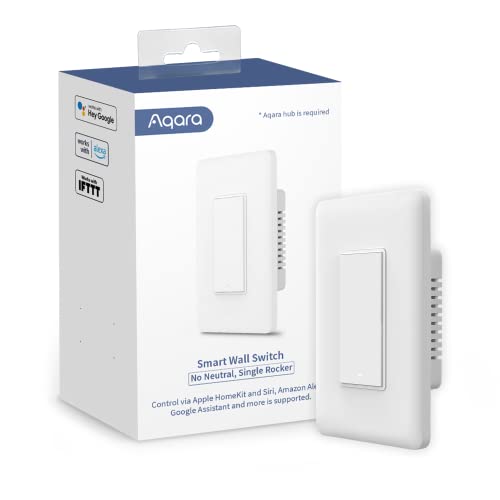 | Best No-Neutral Pick | Smart Control: App control | Voice Assistants: Alexa, Google Assistant, SmartThings | Wi‑Fi: 2.4GHz | VIEW LATEST PRICE | Read Our Analysis |
| TP-Link Tapo Smart Switch (Tapo S515) | Best Multi-Way Switch | Smart Control: App control | Voice Assistants: Alexa, Siri, Google Home, Bixby | Wi‑Fi: 2.4GHz | VIEW LATEST PRICE | Read Our Analysis | |
| Shelly 1 Mini Gen4 Smart Relay Switch |  | Best Smart Relay | Smart Control: App control | Voice Assistants: Alexa, Google Home, HomeKit | Wi‑Fi: Wi‑Fi | VIEW LATEST PRICE | Read Our Analysis |
| Leviton Decora Smart Switch Wi-Fi 2nd Gen (D215S-1RW) |  | Best Premium Option | Smart Control: App control | Voice Assistants: Alexa, Google Assistant, Siri, SmartThings | Wi‑Fi: 2.4GHz | VIEW LATEST PRICE | Read Our Analysis |
More Details on Our Top Picks
Kasa Smart Switch 2-Gang HS200-2 for Alexa and Google Home
The Kasa Smart Switch 2-Gang HS200-2 is a strong pick if you want to control two light circuits from one clean, wall-mounted switch and already use Alexa, Google Assistant, or SmartThings. You get app-based control from anywhere, so you can check status and switch lights on or off at home, work, or away. It needs a neutral wire and 2.4GHz Wi‑Fi, but it doesn’t need a hub. The guided install, included plate, labels, and wire nuts help. Use timers, countdowns, and Away Mode for simple automation.
- Smart Control:App control
- Voice Assistants:Alexa, Google Home
- Wi‑Fi:2.4GHz
- Neutral Wire:Required
- Mount Type:Wall mount
- Automation:Schedules, away mode
- Additional Feature:2-gang flush design
- Additional Feature:Away Mode simulation
- Additional Feature:2-circuit control
TP-Link Tapo Smart Light Switch 4-Pack
If you want a reliable four-pack of smart switches for multiple rooms, the TP-Link Tapo Smart Light Switch S500 is a strong fit, especially since it works with voice assistants like Alexa, Google Assistant, and Bixby and lets you control lights from anywhere through the Tapo app. You’ll also get scheduling, timers, countdowns, and Away Mode for added convenience. Installation is app-guided, but you’ll need a neutral wire and 2.4 GHz Wi-Fi. Each white, UL-certified switch handles 15 amps and 600 watts, so you can use it for lights, fans, and more.
- Smart Control:App control
- Voice Assistants:Alexa, Google Assistant, Bixby
- Wi‑Fi:2.4GHz
- Neutral Wire:Required
- Mount Type:Wall mount
- Automation:Schedules, timer, away mode
- Additional Feature:4-switch value pack
- Additional Feature:Ceiling fan compatible
- Additional Feature:2-year warranty
TREATLIFE HomeKit Smart Light Switch for Lights
TREATLIFE’s HomeKit smart light switch is a strong fit for Apple users who want simple smart lighting without adding a hub, since it works with HomeKit, Siri, Alexa, and Google Assistant over 2.4GHz Wi‑Fi. You’ll need a neutral wire, so check that your electrical box has a white neutral wire before you buy. It fits standard wall plates and uses a single-pole design. With the Treatlife app, you can control lights remotely, set schedules, automate arrivals and departures, and group switches for easier whole-home control. Siri voice commands make hands-free control simple.
- Smart Control:App control
- Voice Assistants:Siri, Alexa, Google Home
- Wi‑Fi:2.4GHz
- Neutral Wire:Required
- Mount Type:Wall plate fit
- Automation:Scheduling, timer, arrival/leave
- Additional Feature:Apple HomeKit support
- Additional Feature:Requires Apple home hub
- Additional Feature:Group switch control
Aqara Smart Light Switch No Neutral Single Rocker
Aqara’s Smart Light Switch, No Neutral, Single Rocker, is a strong fit for homes that lack a neutral wire but still want app-based and voice-controlled lighting. You’ll need an Aqara Hub, sold separately, to activate Zigbee control, HomeKit, Alexa, Google Assistant, and SmartThings support. Use the Aqara Home app to manage schedules, timers, scenes, and remote access. It handles 120V circuits, supports up to 600W incandescent or 200W LED/CFL, and includes temperature protection. Its white rocker design mounts cleanly on the wall. It’s ETL and FCC listed, too.
- Smart Control:App control
- Voice Assistants:Alexa, Google Assistant, SmartThings
- Wi‑Fi:2.4GHz
- Neutral Wire:Not required
- Mount Type:Wall mount
- Automation:Schedule, timer, scenes
- Additional Feature:No-neutral installation
- Additional Feature:Zigbee hub required
- Additional Feature:Flame-retardant panel
TP-Link Tapo Smart Switch (Tapo S515)
The TP-Link Tapo Smart Switch (Tapo S515) is a strong fit if you want one light controlled from multiple locations, since it supports single-pole, 3-way, and 4-way setups for spaces like hallways, staircases, bedrooms, and living rooms. You also get Matter support, so it works with Alexa, Siri, Google Home, SmartThings, and IFTTT. Use the app for remote control, schedules, energy monitoring, and Away Mode. It needs a neutral wire and 2.4GHz Wi-Fi, but the guided install helps. UL certification and flame-retardant materials add peace of mind.
- Smart Control:App control
- Voice Assistants:Alexa, Siri, Google Home, Bixby
- Wi‑Fi:2.4GHz
- Neutral Wire:Required
- Mount Type:Wall mount
- Automation:Schedules, energy monitoring, away mode
- Additional Feature:Matter-certified compatibility
- Additional Feature:Energy monitoring
- Additional Feature:Multi-way control
Shelly 1 Mini Gen4 Smart Relay Switch
If you want a compact retrofit relay that turns small appliances or a garage door opener into a smart device without needing a hub, the Shelly 1 Mini Gen4 is a strong fit. You get a 1-channel dry-contact switch with Wi‑Fi, Zigbee, and Matter support, plus Alexa, Google Home, SmartThings, and Apple HomeKit compatibility. It handles up to 8A and 2000 watts, and its upgraded processor with 8 MB memory keeps it responsive. The tiny body fits standard boxes, appliance cases, or near a motor, while the Shelly app gives you remote control, alerts, and automation.
- Smart Control:App control
- Voice Assistants:Alexa, Google Home, HomeKit
- Wi‑Fi:Wi‑Fi
- Neutral Wire:Not stated
- Mount Type:Wall mount
- Automation:Scenes, automation actions
- Additional Feature:Ultra-compact relay
- Additional Feature:Garage door control
- Additional Feature:8MB memory
Leviton Decora Smart Switch Wi-Fi 2nd Gen (D215S-1RW)
Leviton’s Decora Smart Switch, Wi‑Fi 2nd Gen (D215S-1RW) fits you best when you want a reliable smart switch that doesn’t need a separate hub and still plays nicely with Alexa, Google Assistant, Siri/Home, SmartThings, and Matter through a My Leviton firmware update. You can control lights, fans, and small appliances from the app, your voice, or local platforms, then set schedules, sunset scenes, random-on security, and auto-shutoff. It needs a neutral wire and 2.4 GHz Wi‑Fi, but its slim design, guided setup, and 3-way support make replacement easy.
- Smart Control:App control
- Voice Assistants:Alexa, Google Assistant, Siri, SmartThings
- Wi‑Fi:2.4GHz
- Neutral Wire:Required
- Mount Type:Wall mount
- Automation:Scheduling, sunset, away mode
- Additional Feature:Matter firmware update
- Additional Feature:Sunset lighting mode
- Additional Feature:Companion switch support
Factors to Consider When Choosing Home Automation Light Switches
When you choose a home automation light switch, check the wiring requirements first so it fits your setup. You should also confirm Wi‑Fi compatibility, smart platform support, and load capacity to make sure the switch works with your devices and lights. If you want a smooth upgrade, consider installation complexity so you know whether you can handle it yourself or need help.
Wiring Requirements
Before you choose a home automation light switch, check the wiring in the wall box so you know what the device can support. You’ll need to confirm whether the switch needs a neutral wire, because many smart models use one for power and app features, while no-neutral options work better in older homes. Next, verify the circuit type: some switches handle only single-pole wiring, but others support 3-way or 4-way control from multiple locations. Also match the voltage and amperage ratings to your existing load, such as common 120V, 15A circuits. Finally, if the box is cramped or the wiring looks unfamiliar, follow the installation guide closely and call an electrician when needed.
Wi-Fi Compatibility
Once you’ve confirmed the wiring in your wall box, the next thing to check is Wi‑Fi compatibility, since many home automation light switches rely on a solid 2.4 GHz connection. You should verify that your router broadcasts 2.4 GHz, because plenty of switches won’t join a 5 GHz-only network. Some models connect directly, while others need a hub or smart home bridge, so your setup may be simpler or more involved. Check whether the switch works on a single band or through a hub that handles 2.4 GHz or dual-band 2.4/5 GHz access. A compatible switch should pair through the app smoothly and stay connected for remote control, scheduling, and status updates. Stable Wi‑Fi makes everyday use dependable.
Smart Platform Support
Smart platform support is just as important as wiring and Wi‑Fi, because the switch needs to work with the ecosystem you already use, whether that’s Alexa, Google Home, Apple HomeKit, SmartThings, or Matter. Check compatibility first, since a switch that fits your current platform will be easier to set up and use. If you want flexibility, choose one that works with more than one app or assistant, not just a single ecosystem. Also confirm whether you’ll need a hub or bridge, because some switches connect directly while others don’t. Finally, see whether control is local or cloud-based, and look for support for scenes, schedules, timers, and status monitoring if you want smooth automation across your home.
Load Capacity
After you’ve confirmed platform support, the next thing to check is load capacity, since the switch has to handle the electrical demands of the circuit you plan to control. Check the switch’s maximum current and wattage ratings, which often fall between 5 A and 15 A and roughly 600 W to 1800 W. Match the load type to the device’s specs: some models suit only lighting, while others can also run ceiling fans, motors, pumps, or small appliances. Verify the exact breakdown for incandescent, LED/CFL, fluorescent, and horsepower loads, because limits can vary sharply. Also keep voltage within the rated operating range, usually 120 V AC. If you’re using a multi-gang or multi-channel switch, confirm each channel’s individual limit.
Installation Complexity
Installation can be the deciding factor when you’re choosing a home automation light switch, especially if your wiring setup isn’t straightforward. You should check whether your electrical box has a neutral wire, because many smart switches need one to work correctly. Next, verify your home network requirements before you buy; some switches only support 2.4 GHz Wi‑Fi and won’t connect on 5 GHz. You also need to compare your wiring style and circuit type. A single-pole switch is usually simpler, while 3-way or 4-way control adds complexity. Look for models with guided app setup, wire labels, included wire nuts, and interchangeable terminals. If the layout feels unfamiliar, hire a professional so you can handle line, load, neutral, and grounding connections safely.
Automation Features
Automation features can make a light switch far more useful, so you should look beyond basic on/off control and think about how it fits your daily routine. Prioritize scheduling tools like timers, countdowns, sunrise and sunset routines, and automatic on/off events, because they let your lights run without constant attention. If you travel often, choose away or randomization modes that make occupancy look natural and help deter intruders. You should also check for scene and group support, since it lets several lights or devices react together from one command. Presence-based automation, such as actions tied to arriving or leaving home, adds convenience. If you care about energy use, pick switches with usage monitoring and load tracking so you can see patterns and manage lighting more effectively over time.
Safety Certifications
When you’re choosing a home automation light switch, safety certifications should be high on your checklist, because labels like UL, ETL, FCC, cULus, and RoHS show the product has been evaluated against recognized electrical and material standards. Check that the listed certification matches your region, local code, and whether you’ll install it indoors or outdoors. You should also review the switch’s voltage, current rating, and load capacity, since pushing past them can cause overheating or failure. Look for flame-retardant housing and over-temperature protection to lower fire risk in tight boxes. If you’re mounting the switch in a damp or exposed area, confirm its IP rating for dust and moisture resistance.
Frequently Asked Questions
Can I Install Smart Switches Without Rewiring My Home?
Yes, often you can. Check whether your switch box has a neutral wire first. If it does not, use a no neutral smart switch or smart bulb to add control without rewiring.
Do Smart Light Switches Work During Wi-Fi Outages?
Yes, you can usually still operate them by hand during a Wi Fi outage, but app control, automations, and voice commands will stop working. Hub based or local control switches keep more functions available without internet access.
Are Smart Switches Compatible With Dimmable LED Bulbs?
Yes, you can use smart switches with dimmable LED bulbs, but they need to be matched carefully. If the switch and bulb are not compatible, you may notice flickering, buzzing, or uneven dimming.
Can Multiple Users Control the Same Switch Remotely?
Yes, multiple users can usually control the same switch remotely by sharing the app or setting up household access. You will need compatible hardware, an account, and permission settings in the app to manage access.
How Much Energy Do Smart Switches Use Annually?
You’ll usually use about 1 to 3 watts, which can add roughly 9 to 26 kilowatt hours per year. That is a small cost, and efficient lighting can help offset it.