

Harsh overhead lighting, a dim home office, or a webcam that fights shadows: any of those can turn a Zoom call into a guessing game. I put together this list of desk lights that help your face look clear and natural on camera, whether you join a quick check-in or a long client presentation. A good light also doubles as a reading lamp for late-night work, so the right pick keeps paying off between calls.
A Fast Comparison Of The Options

LitONES Tall LED Desk Lamp Edge-Lit Eye-Care

LitONES Video Conference Lighting Edge-Lit Desk Lamp

BenQ ScreenBar Pro LED Monitor Light Bar

LitONES LED Desk Lamp Eye-Caring Diffused Light

LitONES Remote LED Desk Lamp with Clamp CRI 97.8
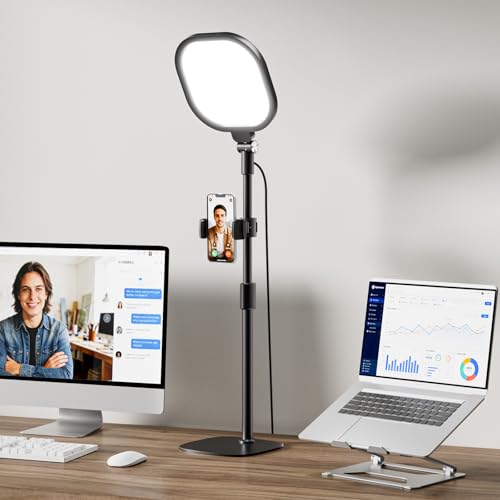
LitONES Video Conference Lighting with Stand CRI>98

JHPGEOE Cordless Metal Desk Lamp Touch Sensor Gold
JHPGEOE Cordless Metal Desk Lamp Rose Gold
Taking A Closer Look At The Options
This tall LitONES panel rises above your monitor on a slim base, which means light lands on your face rather than scattering behind the screen. The edge-lit, four-layer optical panel spreads brightness across a wide field, so I find it useful when colleagues join from a sunny window behind them and need soft fill from the front.
The 50 light modes cover color temperature and brightness combinations, so a quick swipe on the base sets the mood for a serious client call versus a casual check-in. For most home offices, this lamp covers daily video work without dominating desk space.
What Helps Most
- Edge-lit panel fills the face evenly during video calls, reducing harsh under-eye shadows
- 50 combined modes let me match warm evening light to cool daylight between calls
- Tall tower design clears the webcam frame for head-and-shoulders framing
- Anti-glare diffusion keeps eyes comfortable across long meetings
- Stable base holds steady when the desk vibrates from typing
Things To Consider
- The tower footprint uses vertical space, so small monitor arms may collide with it
- Owners commonly report the mode selector takes practice before it feels intuitive
Key Specs
Who It Suits Best
Remote workers who take several calls daily and want one lamp that doubles as evening reading light.
Look Elsewhere When
Anyone with a curved monitor and minimal desk depth should consider the BenQ ScreenBar Pro instead.
This LitONES conference light is built around webcam framing, so the panel sits at roughly eye level without crowding the lens. I find the edge-lit diffusion works well when I want a clean face tone on camera without losing the warmth of a wood desk underneath.
Like the previous tall lamp, it offers 50 modes, but the panel orientation makes it easier to angle toward the face from a short distance. For a small home office with one monitor and a fixed camera, the form factor solves the common problem of a lamp that lights the keyboard instead of the speaker.
Bright Spots
- Panel angle aims directly at face level for natural-looking on-camera color
- Soft diffusion handles close-up streams without blowing out skin tones
- 50 modes give quick swaps between warm client calls and cool screen-share sessions
- Compact base fits beside a laptop or single monitor
Honest Caveats
- Light is softer than the taller LitONES tower, so larger rooms may feel underlit
- Owners commonly report the mode dial requires a steady hand to change precisely mid-call
- No stand option, so desk height must match camera height
Best Suited To
Streamers, teachers, and stand-up hosts who need a dedicated light pointed at the face from the desk surface.
Reach For A Different Pick When
Creators who need color-accurate lighting for product shots should pick the LitONES Remote LED Desk Lamp with Clamp.
The BenQ ScreenBar Pro sits on top of your monitor rather than on the desk, which keeps the workspace clear for keyboards and notebooks. It uses an asymmetric optical design that throws light forward onto the desk and your face, while keeping glare off the screen behind it.
A built-in motion sensor powers the lamp on when I sit down and off when I step away, which is a small daily win. The light fits monitors between 0.17″ and 2.56″ thick, including many curved displays with curvature between 1000R and 1800R, so it covers most setups a remote worker owns.
Everyday Perks
- Clamp design frees the desk surface for cameras, mugs, and notebooks
- Motion sensor turns the light on automatically when you arrive
- Adjustable brightness and color temperature match room mood from morning to night
- Asymmetric optics cut screen glare, so video calls and spreadsheets share the same lamp
Points To Keep In Mind
- Light sits above the screen, so eye-level webcam framing may need extra fill from the side
- Requires USB-C power from the monitor or a separate adapter
- Owners commonly report the clamp needs a careful fit on very thick curved bezels
Quick Facts
Whose Shelf It Belongs On
Hybrid workers with curved or ultrawide monitors who want a clutter-free desk and clear, glare-free documents.
Swap It Out When
Anyone hosting frequent on-camera presentations should pick the LitONES Video Conference Lighting with Stand for stronger face fill.
This LitONES lamp shifts between desk work and webcam duty with a simple adjustment, so I see it as a hybrid pick for anyone splitting time between spreadsheets and stand-up calls. The diffused panel softens shadows across the face, which helps on a basic laptop webcam that struggles with bright overhead bulbs.
It carries the same eye-care diffusion design as the taller LitONES tower, but in a more compact arm-style form factor. Compared with the tower above, this version frees vertical space and slides closer to the laptop without blocking the camera.
What Earns Its Place
- Adjustable head pivots between keyboard light and webcam fill
- Even diffusion keeps eyes comfortable during back-to-back meetings
- Lower profile suits laptops and small monitors better than a tower
- Mimics natural daylight, which keeps skin tones believable on camera
Trade Offs
- Not as bright as the larger LitONES tower, so dim home corners still feel dim
- Arm style requires stable desk placement; bumping it mid-call can shift the aim
Right Fit For
Laptop-first hybrid workers who hop between typing, reading, and quick Zoom calls in the same chair.
A Better Fit Elsewhere
People running a multi-monitor command center should consider the BenQ ScreenBar Pro to keep each screen glare-free.
The clamp-on metal arm and included remote make this LitONES stand out for creators who tweak light between takes. CRI (Color Rendering Index) measures how accurately a light shows true colors; this lamp hits 97.8, which is well above standard LED ranges and gives on-camera color a clean, lifelike read.
With 30 modes and a remote, I can fine-tune warmth and brightness from across the desk without leaning into frame. The clamp design attaches to the back of a desk or shelf, so the base footprint stays close to zero, which is a real advantage on a small streaming setup.
Noteworthy Benefits
- CRI 97.8 keeps skin tones and fabric colors true on stream and on camera
- Remote control adjusts modes without reaching into frame
- Metal arm feels durable compared to plastic flex arms
- Clamp mount saves desk space for microphones and notebooks
- 30 modes cover warm evenings to crisp daytime reads
Softer Spots
- Clamp requires a flat edge at least a few centimeters thick
- Owners commonly report the metal arm stays put but adds visible weight to the desk
Feature Snapshot
Who Should Grab It
Content creators and presenters who need reliable color accuracy and a remote for mid-stream tweaks.
Consider Something Else When
Anyone who wants a free-standing lamp with no clamp should consider the LitONES Tall LED Desk Lamp above instead.
This is the lamp I reach for when a client demo or recorded presentation has to look polished. The included stand lifts the panel beside the camera at eye level, so light hits the face from a flattering angle instead of from above. The 4-layer diffusion and CRI above 98 give on-camera color a clean, broadcast-style read.
30 modes cover the range from cool office light to warmer after-hours tones, and the stand makes the whole setup portable between rooms. For anyone who treats video calls as part of the job, this one earns its spot through sheer on-camera performance.
Why It Works Well
- CRI above 98 renders true color for polished on-camera results
- Included stand places light at eye level for flattering face fill
- 4-layer diffusion softens shadows across the entire face
- 30 modes adapt to any time of day or call mood
- Stand setup moves easily between rooms and locations
Potential Drawbacks
- Stand takes up floor or desk space that a clamp lamp would spare
- Higher CRI typically costs more than entry-level lamps in this category
- Owners commonly report the stand base works best on a flat, stable surface
Perfect Match For
Professionals who host on-camera presentations, webinars, or sales demos where image quality matters.
Another Choice May Suit
Remote workers on a tight budget who mainly need face fill should consider the LitONES LED Desk Lamp for Home Office instead.
The cordless metal body and touch sensor make this lamp feel less like a desk fixture and more like a portable companion. The internal battery runs up to roughly 10 to 15 hours per charge, so a long travel day or a string of back-to-back meetings in a hotel room is no problem.
The 3 color modes cover most moods, and stepless dimming means a long press on the top of the lamp smoothly fades brightness up or down. Compared with the LitONES desk lights above, this one trades raw output and CRI numbers for true portability.
What Pays Off
- Battery-powered design removes cable clutter from the desk
- Touch sensor responds instantly for quiet mode changes during calls
- Stepless dimming slides between soft and bright without preset steps
- Metal body feels solid for a portable lamp at this size
- Gold finish pairs well with warm wood and brass desks
Some Limits To Know
- Output is lower than plug-in LitONES lamps, so large rooms feel underlit
- Owners commonly report the battery needs regular top-ups with daily use
- Touch sensor can be sensitive enough to trigger from a stray elbow
At A Glance
Built With In Mind
Frequent travelers, dorm dwellers, and anyone running video calls from a kitchen table or hotel desk.
Not Your Match When
Studio creators who need high CRI for product shots should pick the LitONES Remote LED Desk Lamp with Clamp.
The rose gold version of the JHPGEOE cordless lamp shares the same 10 to 15 hour battery and 3-color stepless dimming as its gold sibling, wrapped in a softer pink-toned finish. I think of it as the same lamp wearing a different outfit, which is useful when matching a styled home office or bedroom desk.
The touch sensor on top keeps adjustments silent, so it works in shared spaces without click sounds bleeding into a microphone. It still trades raw output for portability, so it suits accent lighting and on-camera fill more than full-room illumination.
Well-Handled Touches
- Rose gold finish pairs with neutral, blush, and white desks better than the gold version
- Silent touch control keeps adjustments off the microphone
- Stepless dimming slides smoothly without visible step jumps on camera
- Compact cordless build suits small desks and nightstands
Room For Improvement
- Same battery life as the gold version, so heavy daily use still needs frequent charging
- Light output remains modest, which limits its role in larger rooms
- Finish may show fingerprints on the metal body over time
Made For
Home offices and bedrooms where a soft, stylish finish matters as much as practical on-camera fill.
Where A Sibling Pick Shines
People who need a more neutral finish should consider the JHPGEOE Cordless Metal Desk Lamp in gold from the same line.
Choosing The Right Setup For Better Video Calls
The right desk light depends on where your webcam sits and how much room you have. Monitor-mounted bars like the BenQ ScreenBar Pro save desk space and cut screen glare, while freestanding or stand-mounted lights fill the face more directly for close-up frames. The trick is matching the light’s position to the camera’s position: a webcam above the screen needs a light that reaches downward, while a webcam at eye level wants fill from the side or front.
CRI matters when accurate skin tone and color are non-negotiable. A CRI above 95 reads as natural on stream and during recorded presentations. For casual check-ins, the softer diffusion of any LitONES panel still looks better than a bare overhead bulb, even at standard CRI. Consider battery life and clamp mounting when desk depth is tight or when calls happen in different rooms.
Brightness, color temperature, and mode count all shape how a lamp feels during a long day. Stepless dimming gives the smoothest on-camera transitions, while fixed presets are easier to swap between calls. For shared spaces, silent touch or remote controls keep adjustments from landing on the microphone.
Key Considerations Across These Picks
Where Shoppers Go Wrong
The biggest mistake is picking a lamp that lights the keyboard instead of the face. Position the panel above or beside the webcam, never behind it, so the camera sees a lit face rather than a backlit silhouette. Another common slip is ignoring monitor thickness and curvature, which leaves a clamp-style bar wobbling or failing to sit flat.
What The Higher Tier Buys
Higher-tier lamps in this category earn their keep through better CRI, smoother diffusion, and sturdier arms. A CRI above 95 keeps skin tones believable on recorded video, and a metal arm stays put when bumped. For anyone presenting on camera regularly, those upgrades show up in every frame, which is where the extra cost lives.
Frequently Asked Questions
What brightness level works best for video calls?
A panel that delivers soft, even fill across the face tends to look more flattering than a single bright spot. Edge-lit and diffused designs hold up well across most home webcams without overexposing skin tones.
Do monitor light bars help during video calls?
Yes, when the camera sits above or below the screen. A monitor bar spreads light across the desk and the face, while its asymmetric optics keep glare off the screen itself.
How important is CRI for video calls?
CRI matters most when accurate color is critical, like recorded presentations or product demos. For casual meetings, any well-diffused panel still improves on standard overhead lighting.
Can a single desk light work for both work and video calls?
Most lamps on this list double as reading or task lights once the call ends. Adjustable color temperature and stepless dimming help a lamp move smoothly between roles.
What is the easiest way to reduce facial shadows on camera?
Place the light at or slightly above eye level and angle it toward the face from the front. Diffused panels spread the light more evenly, which softens the under-eye shadows that overhead bulbs leave behind.
Wrap Up
A good desk light solves more than a dim webcam; it makes long calls easier on the eyes and helps the room feel more professional between meetings. The right pick comes down to where your camera sits, how much desk space you have, and how much color accuracy you need on camera. Start with one lamp that fits your main use case, and the rest of the setup usually falls into place.