

HomeKit switches make your lights easier to control and can add smart features without a full rewiring project.
The best picks for 2026 include easy options like Kasa’s Matter and HS200P3 models. meross also offers dimmers and fan controls for rooms with more going on.
The right switch depends on your wiring, Wi‑Fi, and daily habits.
| Kasa Matter Smart Light Switch 3-Pack |  | Best Overall | Switch Type: Smart light switch | HomeKit Support: Matter / HomeKit compatible | Wi‑Fi Band: 2.4 GHz | VIEW LATEST PRICE | Read Our Analysis |
| Kasa Smart Light Switch HS200P3 3 Count White |  | Best Value | Switch Type: Smart light switch | HomeKit Support: HomeKit compatible via ecosystem apps | Wi‑Fi Band: 2.4 GHz | VIEW LATEST PRICE | Read Our Analysis |
| meross Smart Ceiling Fan Control & Dimmer Switch |  | Best for Fans | Switch Type: Smart fan/dimmer switch | HomeKit Support: HomeKit compatible | Wi‑Fi Band: 2.4G only | VIEW LATEST PRICE | Read Our Analysis |
| Kasa Matter Smart Dimmer Switch 3-Pack |  | Best Dimmer | Switch Type: Smart dimmer switch | HomeKit Support: Matter / HomeKit compatible | Wi‑Fi Band: 2.4 GHz | VIEW LATEST PRICE | Read Our Analysis |
| Kasa Smart Dimmer Switch HS220P3 3-Pack |  | Easiest Setup | Switch Type: Smart dimmer switch | HomeKit Support: HomeKit compatible | Wi‑Fi Band: 2.4 GHz | VIEW LATEST PRICE | Read Our Analysis |
| meross 4 Pack Smart Dimmer Switch |  | Best Smart Dimmer | Switch Type: Smart dimmer switch | HomeKit Support: HomeKit compatible | Wi‑Fi Band: 2.4 GHz only | VIEW LATEST PRICE | Read Our Analysis |
| Meross 3-Way Smart Light Switch 2-Pack | 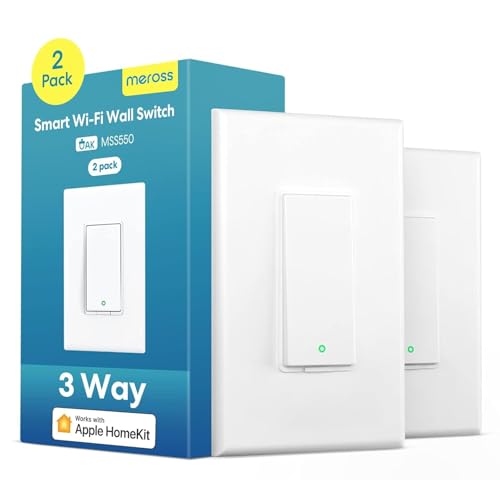 | Best for 3-Way | Switch Type: Smart 3-way switch | HomeKit Support: HomeKit compatible | Wi‑Fi Band: 2.4 GHz only | VIEW LATEST PRICE | Read Our Analysis |
More Details on Our Top Picks
Kasa Matter Smart Light Switch 3-Pack
If you want a HomeKit-ready switch that also plays nicely with the rest of your smart home, the Kasa Matter Smart Light Switch 3-Pack is a strong pick because it gives you broad cross-platform support without making setup feel like a headache. You can use Apple Home, Alexa, Google Home, or SmartThings, and Siri voice control feels natural. Because it supports LAN control, your lights can still work offline. You also get app remote control, scheduling, countdowns, Away Mode, and touch control. Just note that you need a neutral wire and a 2.4GHz Wi-Fi network.
- Switch Type:Smart light switch
- HomeKit Support:Matter / HomeKit compatible
- Wi‑Fi Band:2.4 GHz
- Neutral Wire:Required
- Remote Control:App / voice control
- Automation:Timer, countdown, away mode
- Additional Feature:Matter certification
- Additional Feature:Multi-Admin support
- Additional Feature:LAN offline control
Kasa Smart Light Switch HS200P3 3 Count White
The Kasa Smart Light Switch HS200P3 3-pack is a strong pick for homeowners who want reliable smart control without adding a hub. You need a neutral wire and 2.4 GHz Wi-Fi, but setup stays simple with the Kasa or Tapo app. Once installed, you can control lights from anywhere, check their status, and use Alexa or Google Assistant for hands-free help. You can also set schedules, countdowns, and Away Mode for extra peace of mind. With UL certification, a 15 amp rating, and a 2-year warranty, it feels solid and dependable.
- Switch Type:Smart light switch
- HomeKit Support:HomeKit compatible via ecosystem apps
- Wi‑Fi Band:2.4 GHz
- Neutral Wire:Required
- Remote Control:App / voice control
- Automation:Timer, countdown, away mode
- Additional Feature:IFTTT compatible
- Additional Feature:Vera compatible
- Additional Feature:IP54 rating
meross Smart Ceiling Fan Control & Dimmer Switch
meross Smart Ceiling Fan Control & Dimmer Switch is a strong pick for you whenever you want one HomeKit switch to handle both the fan and the light from the same wall spot. You get 2-in-1 control, plus Apple Home, Alexa, and Google support. It works with 2.4 GHz Wi-Fi, needs a neutral wire, and fits single-pole setups only. Since it handles dimmable LED, CFL, and incandescent bulbs, you can fine-tune the light from 1% to 100%. Schedules, timers, sunrise and sunset routines, and app control make daily use feel smooth and easy.
- Switch Type:Smart fan/dimmer switch
- HomeKit Support:HomeKit compatible
- Wi‑Fi Band:2.4G only
- Neutral Wire:Required
- Remote Control:App / voice control
- Automation:Schedules, sunrise/sunset, timers
- Additional Feature:Fan speed control
- Additional Feature:Sunset automation
- Additional Feature:Backlight LED customizable
Kasa Matter Smart Dimmer Switch 3-Pack
Kasa’s Matter Smart Dimmer Switch 3-Pack is a strong pick for anyone who wants a simple way to upgrade several lights at once without losing flexibility. You get Matter support, so it works with Apple Home, Alexa, Google Home, and SmartThings. That means you can use Siri, voice commands, or the Kasa app with ease. The dimming range goes from 1% to 100%, so you can set the mood fast. Because it also supports LAN control, your lights can keep working even though the internet drops. Installation is app-guided, but you’ll need a neutral wire and 2.4GHz Wi-Fi.
- Switch Type:Smart dimmer switch
- HomeKit Support:Matter / HomeKit compatible
- Wi‑Fi Band:2.4 GHz
- Neutral Wire:Required
- Remote Control:App / voice control
- Automation:Timer, countdown, away mode
- Additional Feature:1%–100% dimming
- Additional Feature:Touch control
- Additional Feature:Finger slide control
Kasa Smart Dimmer Switch HS220P3 3-Pack
Built for homes that need simple, app-guided dimming in a three-room or three-switch upgrade, the Kasa Smart Dimmer Switch HS220P3 3-Pack gives you an easy path should you want smarter lighting without adding a hub. You set it up with the Kasa or Tapo app, and it works over secured 2.4 GHz Wi-Fi. Since it needs a neutral wire, you should call an electrician if wiring feels tricky. Then you can dim from 0% to 100%, tap for instant light, double-click for fade-off, and use Alexa, Google Assistant, or remote access anywhere.
- Switch Type:Smart dimmer switch
- HomeKit Support:HomeKit compatible
- Wi‑Fi Band:2.4 GHz
- Neutral Wire:Required
- Remote Control:App / voice control
- Automation:Scheduling
- Additional Feature:0%–100% dimming
- Additional Feature:Double-click fade-off
- Additional Feature:Single-click instant light
meross 4 Pack Smart Dimmer Switch
If you want a smart dimmer that plays nicely with Apple HomeKit and still keeps setup simple, the meross MSS560 4 Pack Smart Dimmer Switch is a strong fit for you. You get four white single pole dimmers that work with HomeKit, Siri, Apple Watch, CarPlay, Alexa, Google Assistant, and SmartThings. Because it uses 2.4GHz Wi-Fi and needs no hub, you can move fast. It also supports app control, voice commands, schedules, sunrise and sunset settings, and 0% to 100% dimming. Just recall that you need a neutral wire and a HomePod or Apple TV for remote HomeKit access.
- Switch Type:Smart dimmer switch
- HomeKit Support:HomeKit compatible
- Wi‑Fi Band:2.4 GHz only
- Neutral Wire:Required
- Remote Control:App / voice control
- Automation:Schedule, sunrise/sunset
- Additional Feature:0%–100% dimming
- Additional Feature:Sunrise and sunset
- Additional Feature:Overload protection
Meross 3-Way Smart Light Switch 2-Pack
The Meross 3-Way Smart Light Switch 2-Pack is a smart pick for you whenever you want HomeKit control in two-location lighting without paying for a hub or dimmer features you may never use. You get two white switches, and one can replace a traditional 3-way switch fast. Because it needs a neutral wire and 2.4 GHz Wi-Fi, check your wiring initially. Then you can use the Meross app, Siri, Alexa, or Google Assistant to turn lights on, off, or set timers. It also helps in stairs, big rooms, and busy entries.
- Switch Type:Smart 3-way switch
- HomeKit Support:HomeKit compatible
- Wi‑Fi Band:2.4 GHz only
- Neutral Wire:Required
- Remote Control:App / voice control
- Automation:Timer, sunrise/sunset
- Additional Feature:3-way wiring support
- Additional Feature:Fits 4-gang plates
- Additional Feature:Fire-retardant housing
Factors to Consider When Choosing a Homekit Switch
When you choose a HomeKit switch, start by checking that it works smoothly with HomeKit so you won’t struggle with setup issues later. Next, look at the wiring in your wall, then decide whether you want a dimmer or a simple switch, plus voice assistant support and smart automation features that fit your routine.
HomeKit Compatibility
HomeKit compatibility matters most whenever you want your switch to feel easy, reliable, and truly part of your Apple setup. You should look for switches that clearly say they support Apple HomeKit, so you can use the Home app and Siri without fuss. Next, check whether support is native or needs a hub like a HomePod or Apple TV for remote control. A true HomeKit switch should also run on 2.4 GHz Wi-Fi and work without a proprietary hub for basic use. If other people need access, pick one with multi-admin or cross-platform support. Finally, confirm the exact HomeKit features you need, like on/off, dimming, scheduling, or automation, because “compatible” doesn’t always mean “fully featured.”
Wiring Requirements
Before you buy a HomeKit switch, you need to make sure your wall wiring can actually support it, because even the smartest switch in the world can feel useless when the box behind your wall is missing the right connections. First, check for a neutral wire, since many smart switches need one to work. Then, match the switch to your circuit type. Some units fit only single-pole wiring, while others also handle 3-way setups. Next, confirm your Wi-Fi is 2.4 GHz, because many models won’t join a 5 GHz network. Also, look at the wall plate size and the control style, whether screw terminals, push buttons, or rocker controls. Finally, verify the electrical rating, including volts, amps, and wattage, so you stay safe.
Dimmer Or Switch
A dimmer gives you more control whenever you want your lights to feel just right, while a standard switch keeps things simple with plain on and off control. If you like soft evening light, choose a dimmer. It lets you move from 0% to 100% brightness, so your room can feel calm, bright, or anywhere between. Just make sure your bulbs can dim. Dimmable LED, CFL, and incandescent lights work best. Also check the watt rating, since many dimmers handle only 150 W, 300 W, or 400 W. If you only want easy, universal control, a plain switch is often the better pick. It works well for non-dimmable fixtures and rooms where full brightness always wins. Bedrooms and households love dimmers; halls and utility spaces usually don’t.
Voice Assistant Support
At the time you talk to your lights, you want the command to work the initial time, every time. So, check that your HomeKit switch supports Siri in the way you use it. Some models listen on their own, while others need an Apple home hub for voice control when you’re away. That small detail can save you a lot of frustration.
Next, look beyond Apple. If you already use Alexa, Google Assistant, or SmartThings, wider support can make your setup feel smoother. Also, confirm that voice commands handle what you need, like turning lights on, dimming from 1% to 100%, and checking status. Finally, make sure the switch fits your home, including iOS support and any 2.4 GHz Wi-Fi or hub needs.
Automation Features
How do you make your lights work for you, even whenever you’re not considering about them? You choose HomeKit switches with strong automation features. Look for timers, countdowns, and daily schedules so your lights turn on and off without a tap. Then add sunrise and sunset routines, which help your rooms match natural light and can save energy. Whenever you want extra peace of mind, use away mode or random on and off patterns to make your home seem occupied. Also, check whether the switch runs automations locally or offline, since that keeps schedules working during an internet hiccup. Finally, dimming automation matters because a wide range, from 0% to 100% or 1% to 100%, lets you shift from bright task light to soft evening light with ease.
Installation And Fit
Before you buy a HomeKit switch, make sure it will actually fit your wall and your wiring, because this is where a lot of people get tripped up. First, check for a neutral wire in the box, since many smart switches need one to work right. Next, confirm the switch matches a single-pole, one-way circuit if you’re replacing a plain on and off switch. Then, compare the wall plate and gang size with the device, especially for standard Decora openings. Also, look closely at the wiring type and load rules, because some switches only work with certain fixtures or separate load wires. Finally, measure the physical size, mounting style, and depth. Some models are about 5 inches tall, so your box needs room.
Frequently Asked Questions
Which Homekit Switches Support Apple Home Automations?
You’ll want HomeKit switches that work with Apple Home automations, such as Eve Light Switch, Wemo Smart Light Switch, Lutron Caseta, Leviton Decora, and Inovelli Blue. Each one lets you create scenes, schedules, and triggers.
Do Homekit Switches Need a Neutral Wire?
No, a neutral wire is not always required. Many HomeKit switches need one, but certain models operate without it. Check your existing wiring first, then compare it with the switch requirements.
Can Homekit Switches Work With Siri Voice Commands?
Yes, you can control HomeKit switches with Siri voice commands after pairing them with Apple Home. For example, you can say, “Hey Siri, turn on the kitchen lights,” and Siri will act on the command quickly.
Are Homekit Switches Compatible With Existing Wall Dimmers?
Yes, HomeKit switches can often work with existing wall dimmers, but compatibility depends on the wiring and the specific switch model. Check the load type, whether a neutral wire is present, and whether the dimmer is supported before installation.
How Difficult Is Homekit Switch Installation for Beginners?
For a beginner, the task is usually manageable if the wiring is straightforward. You will shut off the circuit, remove the old switch, connect each wire to the matching terminal on the new switch, and secure it in the wall box. If you know how to handle basic electrical wiring safely, you can likely do it yourself. If not, it is smarter to hire a licensed electrician.