

A Z-Wave smart switch gives you app control, voice control, and automation for your lights and outlets. Enbrighten dimmers, Minoston outdoor plugs, and Leviton outlets each bring different strengths.
Some fit simple lamps, while others handle porch lights or multi-way circuits. The best choice depends on the space, wiring, and how much control you want.
| Enbrighten Z-Wave Light Dimmer Switch (58438) |  | Best Dimming Control | Product Type: Dimmer switch | Connectivity: Z-Wave | Hub Required: Yes | VIEW LATEST PRICE | Read Our Analysis |
| Minoston Z-Wave Outdoor Smart Plug (MP22Z) |  | Best Outdoor Plug | Product Type: Outdoor smart plug | Connectivity: Z-Wave 800 | Hub Required: Yes | VIEW LATEST PRICE | Read Our Analysis |
| Enbrighten Add-On Smart Lighting Switch (46199) | Best Add-On Switch | Product Type: Add-on switch | Connectivity: Wi-Fi/Z-Wave/Zigbee | Hub Required: Yes | VIEW LATEST PRICE | Read Our Analysis | |
| THIRDREALITY ZigBee Smart Plug 4 Pack Energy Monitoring |  | Best Energy Monitor | Product Type: Smart plug | Connectivity: Zigbee 3.0 | Hub Required: Yes | VIEW LATEST PRICE | Read Our Analysis |
| Leviton Decora Smart Plug-In Outlet with Z-Wave |  | Best Plug-In Outlet | Product Type: Plug-in outlet | Connectivity: Z-Wave Plus | Hub Required: Yes | VIEW LATEST PRICE | Read Our Analysis |
| Enbrighten Z-Wave Smart Motion Sensor Light Switch (26931) | 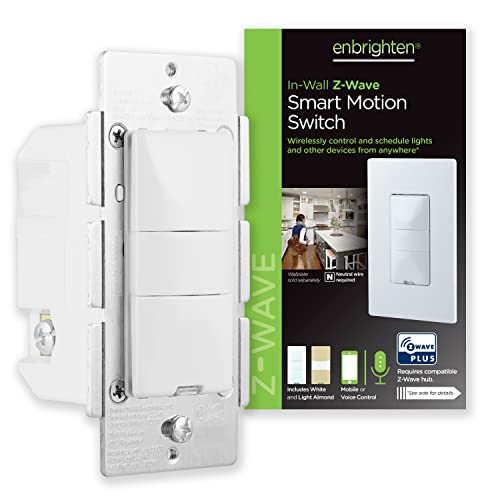 | Best Motion Sensor | Product Type: Motion sensor switch | Connectivity: Z-Wave Plus | Hub Required: Yes | VIEW LATEST PRICE | Read Our Analysis |
| Minoston Smart Plug Z-Wave 800 Series (MP21Z) |  | Best Compact Plug | Product Type: Smart plug | Connectivity: Z-Wave 800 | Hub Required: Yes | VIEW LATEST PRICE | Read Our Analysis |
More Details on Our Top Picks
Enbrighten Z-Wave Light Dimmer Switch (58438)
If you want a Z-Wave dimmer that’s built for flexible smart-home control, the Enbrighten Z-Wave Light Dimmer Switch (58438) is a strong fit. You get Alexa and Google Assistant support through a Z-Wave certified hub, plus SmartStart QR pairing for easier setup. Its QuickFit, SimpleWire design cuts wiring guesswork, fits crowded boxes, and supports 3-way or multi-switch setups. You can dim lights from 0-100% at up to 600 watts, and it works as a repeater too. White and light almond paddles ship in the box, and you can personalize the LED.
- Product Type:Dimmer switch
- Connectivity:Z-Wave
- Hub Required:Yes
- Voice Assistants:Alexa/Google
- Remote Control:App/hub control
- Repeater:Yes
- Additional Feature:QuickFit compact design
- Additional Feature:Auto-detect line/load
- Additional Feature:0-100% full dimming
Minoston Z-Wave Outdoor Smart Plug (MP22Z)
The Minoston Z-Wave Outdoor Smart Plug (MP22Z) is a strong pick if you want a rugged, app-controlled outlet for both indoor and outdoor gear, especially since it pairs an IP65 weather-resistant build with a Z-Wave 800 chip for faster, longer-range, and more secure performance. You can place it on a porch, in a garage, or beside patio lights, sprinklers, or a grill. It works with major Z-Wave hubs, supports Alexa and Google Assistant through your hub, and lets you set timers, countdowns, and routines. Its 15A, 1875W rating keeps everyday devices running.
- Product Type:Outdoor smart plug
- Connectivity:Z-Wave 800
- Hub Required:Yes
- Voice Assistants:Alexa/Google
- Remote Control:App control
- Repeater:Yes
- Additional Feature:IP65 weather resistance
- Additional Feature:1300 ft long range
- Additional Feature:15A, 1875W load
Enbrighten Add-On Smart Lighting Switch (46199)
Enbrighten’s Add-On Smart Lighting Switch (46199) is a smart choice for anyone who already has a primary Z-Wave, Wi-Fi, or Zigbee switch and wants to expand control to multiple locations without replacing the main device. You get an in-wall rocker paddle that mirrors the main switch’s functions for smart lighting, dimming, or fan control. Link up to four add-ons for five-location operation. QuickFit and SimpleWire simplify installation, while the slimmer housing fits older or crowded boxes better. It’s rated for 120/277VAC, supports Alexa, Google Assistant, SmartThings, and Vera, and includes a 2-year limited warranty.
- Product Type:Add-on switch
- Connectivity:Wi-Fi/Z-Wave/Zigbee
- Hub Required:Yes
- Voice Assistants:Alexa/Google
- Remote Control:Smart control
- Repeater:No
- Additional Feature:Not standalone switch
- Additional Feature:Up to 5 locations
- Additional Feature:277VAC light-commercial rating
THIRDREALITY ZigBee Smart Plug 4 Pack Energy Monitoring
THIRDREALITY’s ZigBee Smart Plug 4-pack is a smart pick for you if you want energy monitoring, compact outlets, and easy voice control in one affordable bundle. You can plug them into a Zigbee 3.0 hub, then start setup with Alexa by saying, “Alexa, discover my devices.” Their slim shape won’t block nearby sockets, and you can control them remotely or with voice through compatible Echo, Google Home, and smart hubs. Track real-time power use, automate coffee makers or toasters, restore previous status after outages, and even use each plug as a Zigbee repeater.
- Product Type:Smart plug
- Connectivity:Zigbee 3.0
- Hub Required:Yes
- Voice Assistants:Alexa/Google
- Remote Control:App/voice control
- Repeater:Yes
- Additional Feature:Real-time energy monitoring
- Additional Feature:Power-loss restore status
- Additional Feature:Compact socket-saving design
Leviton Decora Smart Plug-In Outlet with Z-Wave
Leviton’s Decora Smart Plug-In Outlet with Z-Wave is a strong pick if you want easy, no-wiring smart control for lamps, fans, holiday lights, or other plug-in devices. You just plug it in, connect it to a Z-Wave Plus hub like SmartThings or Wink, and start automating. It handles up to 15 amps at 120 volts, with support for LED and CFL loads up to 600W and incandescent loads up to 1800W. You can schedule on/off actions, use Alexa through your hub, and extend network range. It also keeps status through minor power fluctuations.
- Product Type:Plug-in outlet
- Connectivity:Z-Wave Plus
- Hub Required:Yes
- Voice Assistants:Alexa
- Remote Control:Z-Wave control
- Repeater:Yes
- Additional Feature:Plug-in installation
- Additional Feature:Two-way status updating
- Additional Feature:1/2 HP motor loads
Enbrighten Z-Wave Smart Motion Sensor Light Switch (26931)
If you want a Z-Wave in-wall switch that automates lighting based on movement, the Enbrighten Z-Wave Smart Motion Sensor Light Switch (26931) is a strong fit. You can set it to occupancy, vacancy, or manual mode, then fine-tune motion sensitivity, light sensing, and timeout settings from 5 seconds to 30 minutes. It needs a neutral wire and a Z-Wave hub, but it works with SmartThings, Wink, HomeSeer, Vera, American Standard, and Alexa. Z-Wave Plus boosts range up to 150 feet and adds repeater support. It’s also compatible with add-on switches for multiway control.
- Product Type:Motion sensor switch
- Connectivity:Z-Wave Plus
- Hub Required:Yes
- Voice Assistants:Alexa
- Remote Control:Z-Wave control
- Repeater:Yes
- Additional Feature:Occupancy and vacancy modes
- Additional Feature:Five timeout settings
- Additional Feature:Three sensitivity levels
Minoston Smart Plug Z-Wave 800 Series (MP21Z)
The Minoston Smart Plug Z-Wave 800 Series (MP21Z) is a strong pick if you want a compact, plug-in Z-Wave smart switch that doubles as a range extender. You get an 800 series chip for faster communication, stronger coverage, and S2 authenticated security with SmartStart pairing. With a Z-Wave hub, you can control lamps and appliances up to 15A and 1875W, set timers, and customize names. It works with SmartThings, Hubitat, Home Assistant, and more. At just 1.14 inches deep, it stays out of the way.
- Product Type:Smart plug
- Connectivity:Z-Wave 800
- Hub Required:Yes
- Voice Assistants:Alexa/Google
- Remote Control:Z-Wave control
- Repeater:Yes
- Additional Feature:SmartStart pairing
- Additional Feature:S2 authenticated security
- Additional Feature:Mini compact size
Factors to Consider When Choosing a Z Wave Smart Switch
When you choose a Z-Wave smart switch, you’ll want to check hub compatibility first so it works with your setup. You should also confirm the wiring requirements, load capacity, dimming features, and installation depth to make sure the switch fits your home and your lights. These details can help you avoid installation issues and choose a switch that performs the way you need.
Hub Compatibility
Hub compatibility is one of the first things you should check, since most Z-Wave smart switches need a Z-Wave certified hub to handle setup, automation, and remote control. You should verify both the hub generation and the ecosystem it supports, because some switches work with Z-Wave Plus and older Z-Wave versions, while others need 800-series or Long Range support. If you want voice control, remember that Alexa or Google Assistant usually connect through the hub, not straight to the switch. SmartStart QR pairing can make inclusion easier, but it still depends on a compatible hub. If you plan multi-location control, confirm that your hub supports the main switch and any add-on devices together for smooth operation and dependable automation.
Wiring Requirements
After you’ve confirmed hub compatibility, you’ll want to check the wiring requirements next, because not every Z-Wave smart switch fits every electrical setup. First, see whether your box needs a neutral wire; many in-wall switches do, while plug-in devices usually don’t. Next, match the switch to your circuit type, whether you’re wiring a single-pole, 3-way, 5-way, or another multi-switch setup. You should also look for clear screw labels and auto-detecting line/load terminals, since they help you avoid wiring mistakes. Confirm that the electrical rating fits your circuit, including voltage and any stated limits. If you’re working in a cramped or older box, choose a compact model with reduced depth so installation goes more smoothly and your wires stay manageable.
Load Capacity
Load capacity is one of the first things you should check, because a Z-Wave smart switch has to handle the full electrical load you plan to put on it. Check the rated wattage and amperage, and make sure they match what you’ll connect, whether that’s a 600 W dimming switch or a 15 A plug-in device. If you’re controlling several fixtures, add every bulb’s wattage and stay below the switch’s maximum rating. Also match the load type: LED and CFL circuits often need lower limits than incandescent, halogen, or fluorescent loads. If you’ll run a fan or other motorized device, choose a switch that explicitly supports motor loads. Finally, confirm voltage compatibility; many switches fit 120 VAC circuits, while some support 277 VAC too.
Dimming Features
Dimming features shape how well a Z-Wave smart switch fits your lighting needs, so check whether it offers true full-range dimming rather than simple on/off control. You’ll want smooth adjustment from 0% to 100% if you care about precise lighting levels. Next, confirm the wattage rating for dimming loads, since some switches handle only 600 watts while others support heavier loads, such as 1800 watts, depending on the bulb type. Also, make sure the dimmer responds from every control point in a multi-way setup. Compatibility matters too, because LED, CFL, incandescent, halogen, fluorescent, and mixed loads can behave differently. If you want more than brightness control, look for settings like motion-based lighting, timing, or scene automation.
Installation Depth
Along with brightness control, you should also check how much room a Z-Wave smart switch needs inside the wall box. If the switch has a deep body, it can be tough to fit in older boxes or crowded multi-gang setups. Look for models with a reduced housing depth, since even about 20% less depth can make wiring and mounting easier. Slimmer designs without break-off tabs usually slip into tight spaces better and leave more room for the conductors. You’ll also want shorter overall dimensions, around 2.6 to 3.1 inches wide and high, because they crowd the back of the plate less. Choosing a switch built for cramped electrical boxes helps prevent wire pinching and makes the installation more reliable.
Voice Control Support
Voice control support is worth checking before you buy, because many Z-Wave smart switches rely on a compatible hub rather than connecting directly to Alexa or Google Assistant. You should confirm whether the switch works with your voice assistant through the device itself or only through a hub, since that setup affects how you control it day to day. Check compatibility with Alexa, Google Assistant, or whichever platform you use, because support can vary by switch and controller. Some models handle both on/off and dimming by voice, while others only let you toggle power. If the switch uses SmartStart or hub-based pairing, setup may feel easier, but the hub still needs the right integration. For dependable hands-free control, make sure both devices share the same ecosystem.
Outdoor Rating
When you’re installing a Z-Wave smart switch or plug outdoors, look for an IP weather-resistance rating, since higher ratings like IP65 help protect against rain, dust, and damp conditions. If you’re placing it on a porch, patio, garden, or garage, make sure the device is explicitly rated for outdoor or wet-location use, not just indoor use. That rating matters because outdoor gear has to handle moisture, temperature swings, and exposure without losing safety certification or dependable performance. For landscape lighting, fountains, pumps, or holiday decorations, choose a weather-resistant housing that shields the electronics. Even then, check the load limits and mounting instructions carefully so the switch or plug matches your appliance or circuit and stays safe.
Frequently Asked Questions
How Do Z-Wave Switches Improve Whole-Home Automation?
Z Wave switches improve whole home automation by letting you control lights, scenes, and schedules from a central hub. They connect devices across multiple rooms, extend network range, and support dependable low power routines.
Can Z-Wave Smart Switches Work Without Internet Access?
Yes, Z Wave smart switches can work without internet access if you use a local hub. You can still control lights, scenes, and automations, but remote app access and cloud features will not work.
Do Z-Wave Switches Require a Hub for Setup?
Yes, you usually need a hub for setup. You pair the switch through a compatible hub, then control it locally even if your internet goes down.
How Far Can a Z-Wave Switch Communicate With Other Devices?
You can typically communicate up to 100 feet line of sight, but walls and interference can reduce that range. Range improves when nearby Z Wave devices repeat signals and strengthen your mesh network.
Are Z-Wave Smart Switches Compatible With Alexa and Google Home?
Yes, Z-Wave smart switches can work with Alexa and Google Home, but they need a compatible hub or bridge. Once connected, you can use voice commands, set up routines, and control your lights through your smart home system.