

The best Z-Wave light switch depends on your home and how you use your lights.
Some models offer dimming, while others add motion control or simple on-off switching.
Enbrighten, Minoston, and Leviton each bring different strengths to the table.
The right pick comes down to compatibility, control style, and the features you want most.
| Enbrighten Z-Wave Light Dimmer Switch (58438) |  | Best Dimming Control | Product Type: In-wall dimmer | Smart Protocol: Z-Wave | Installation: Hardwired in-wall | VIEW LATEST PRICE | Read Our Analysis |
| Enbrighten Add-On In-Wall Smart Lighting Switch (46199) | Best Add-On | Product Type: Add-on switch | Smart Protocol: Wi‑Fi/Z-Wave/ZigBee | Installation: Hardwired in-wall | VIEW LATEST PRICE | Read Our Analysis | |
| Enbrighten Z-Wave Smart Motion Sensor Light (26931) | 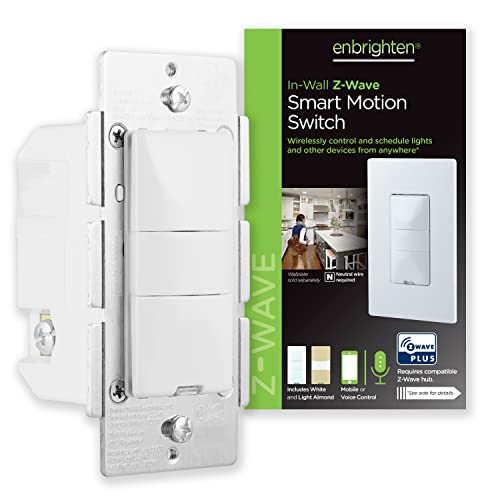 | Best Motion Sensor | Product Type: In-wall motion sensor switch | Smart Protocol: Z-Wave | Installation: Hardwired in-wall | VIEW LATEST PRICE | Read Our Analysis |
| Minoston Smart Plug Z-Wave 800 Series (MP21Z) |  | Best Smart Plug | Product Type: Smart plug | Smart Protocol: Z-Wave | Installation: Plug-in | VIEW LATEST PRICE | Read Our Analysis |
| Zooz 800 Series Z-Wave Scene Controller ZEN34 |  | Best Scene Controller | Product Type: Scene controller | Smart Protocol: Z-Wave | Installation: Battery-powered | VIEW LATEST PRICE | Read Our Analysis |
| Enbrighten White Add-On Smart Light Switch (46200) | Best Multi-Way Add-On | Product Type: Add-on switch | Smart Protocol: Z-Wave/ZigBee | Installation: Hardwired in-wall | VIEW LATEST PRICE | Read Our Analysis | |
| Leviton Decora Smart Plug-In Dimmer (Z-Wave DZPD3-2BW) |  | Best Plug-In Dimmer | Product Type: Plug-in dimmer | Smart Protocol: Z-Wave | Installation: Plug-in | VIEW LATEST PRICE | Read Our Analysis |
More Details on Our Top Picks
Enbrighten Z-Wave Light Dimmer Switch (58438)
If you want a hardwired smart dimmer that plays well with major voice assistants and Z-Wave hubs, the Enbrighten Z-Wave Light Dimmer Switch (58438) is a strong fit. You get Alexa and Google Assistant control through a compatible hub, plus broad support for SmartThings, Ring Alarm, Wink, ADT, Vivint, and more. Its QuickFit design, reduced-depth housing, and SimpleWire terminals make cramped boxes easier to handle. You can dim lights from 0–100% from any location, use up to four add-on switches, and rely on SmartStart pairing and 150-foot signal repeating for flexible whole-home control.
- Product Type:In-wall dimmer
- Smart Protocol:Z-Wave
- Installation:Hardwired in-wall
- Control Method:Voice
- Hub Required:Yes
- Color:White/Light Almond
- Additional Feature:Full-range dimming
- Additional Feature:SmartStart QR pairing
- Additional Feature:150-foot signal repeating
Enbrighten Add-On In-Wall Smart Lighting Switch (46199)
The Enbrighten Add-On In-Wall Smart Lighting Switch (46199) is a smart choice for you if you’re expanding an existing multi-switch setup, because it’s not a standalone switch and must pair with a compatible Wi‑Fi, Z-Wave, or Zigbee system. You can control the same light from up to five locations, and it works with Enbrighten and UltraPro smart switches, dimmers, and fan controls. Its QuickFit and SimpleWire design helps you fit older or tight boxes, while UL, ETL, and IP54 ratings add peace of mind indoors or outside.
- Product Type:Add-on switch
- Smart Protocol:Wi‑Fi/Z-Wave/ZigBee
- Installation:Hardwired in-wall
- Control Method:Touch
- Hub Required:Yes
- Color:White/Light Almond
- Additional Feature:Up to 5 locations
- Additional Feature:QuickFit SimpleWire design
- Additional Feature:277VAC support
Enbrighten Z-Wave Smart Motion Sensor Light (26931)
Enbrighten’s Z-Wave Smart Motion Sensor Light (model 26931) is a strong pick for rooms where you want lighting to react automatically or stay fully manual when needed. You can choose occupancy, vacancy, or manual mode, then fine-tune behavior with five timeout settings and three sensitivity levels. In occupancy mode, it can trigger on any motion or only in low light. It hardwires into standard in-wall setups, needs a Z-Wave hub, and works with SmartThings, Wink, Alexa, HomeSeer, Vera, and American Standard. You also get add-on switch support and a 2-year warranty.
- Product Type:In-wall motion sensor switch
- Smart Protocol:Z-Wave
- Installation:Hardwired in-wall
- Control Method:Motion
- Hub Required:Yes
- Color:White/Light Almond
- Additional Feature:Occupancy vacancy manual
- Additional Feature:Five timeout options
- Additional Feature:Adjustable motion sensitivity
Minoston Smart Plug Z-Wave 800 Series (MP21Z)
Minoston’s MP21Z smart plug is a strong pick when you want a compact, no-wiring Z-Wave switch that can handle everyday lamps and small appliances. You just plug it into a wall outlet, pair it with a Z-Wave hub, and start controlling devices from your phone. The 800 Series chip gives you better range, faster communication, SmartStart pairing, and S2 security. You can set schedules, build scenes, and use it with SmartThings, Hubitat, Alexa, or Google Assistant through a certified hub. It’s FCC and ETL listed, too.
- Product Type:Smart plug
- Smart Protocol:Z-Wave
- Installation:Plug-in
- Control Method:App/remote
- Hub Required:Yes
- Color:N/A
- Additional Feature:800 series chip
- Additional Feature:1300-foot long range
- Additional Feature:S2 authenticated security
Zooz 800 Series Z-Wave Scene Controller ZEN34
Zooz’s ZEN34 is a strong pick if you want a wireless Z-Wave scene controller that’s easy to place anywhere. You can mount it in a standard switch box or stick it on a flat surface with its magnetic base, and you won’t need an electrician. It runs on batteries, uses Z-Wave Long Range with an 800 series chip, and supports faster, secure S2 communication. Use the five buttons to trigger scenes or control devices through a compatible hub like Hubitat, Home Assistant, or HomeSeer. SmartStart pairing makes setup easier too.
- Product Type:Scene controller
- Smart Protocol:Z-Wave
- Installation:Battery-powered
- Control Method:Buttons
- Hub Required:Yes
- Color:White
- Additional Feature:Scene controller buttons
- Additional Feature:Battery powered
- Additional Feature:Magnetic base
Enbrighten White Add-On Smart Light Switch (46200)
If you need multi-location control for an Enbrighten smart in-wall setup, the White Add-On Smart Light Switch (46200) is a strong fit because it mirrors the primary device’s functions from a second location. You can use it with dimmers, fan controls, and on/off fixtures, but it isn’t a stand-alone switch. Its 2nd-gen design is slimmer, fits older or tight boxes, and skips breakoff tabs. Dual ground ports help with daisy-chaining. You’ll need neutral, traveler, and ground wires, plus a compatible Enbrighten Z-Wave or Zigbee device. It works with Alexa, Google Assistant, and 120VAC or 277VAC setups.
- Product Type:Add-on switch
- Smart Protocol:Z-Wave/ZigBee
- Installation:Hardwired in-wall
- Control Method:Remote control
- Hub Required:Yes
- Color:White
- Additional Feature:Dual ground ports
- Additional Feature:Daisy-chaining support
- Additional Feature:Neutral wire required
Leviton Decora Smart Plug-In Dimmer (Z-Wave DZPD3-2BW)
The Leviton Decora Smart Plug-In Dimmer (DZPD3-2BW) is a strong pick if you want easy Z-Wave control for lamps without rewiring your home. You just plug it in, pair it with a Z-Wave Plus hub like SmartThings, Wink, Ring Alarm, or Leviton Lumina, and you’re ready to schedule, dim, and automate table, floor, hanging, or holiday lights. It also supports voice control through Alexa via your hub. With two-way status updates, 300-watt capacity, and a limited 5-year warranty, you get flexible, reliable lighting control in a compact white design.
- Product Type:Plug-in dimmer
- Smart Protocol:Z-Wave
- Installation:Plug-in
- Control Method:Voice/app via hub
- Hub Required:Yes
- Color:White
- Additional Feature:Two-way status updating
- Additional Feature:½ HP motor loads
- Additional Feature:Plug-in mount design
Factors to Consider When Choosing a Z Wave Light Switch
When you choose a Z-Wave light switch, you’ll want to check hub compatibility first so it works with your setup. You should also confirm the wiring requirements, decide whether you need a dimmer or a standard switch, and see if you want multi-location control. Finally, make sure the switch matches your load and voltage needs so it can handle your lights safely and reliably.
Hub Compatibility
Before you buy a Z-Wave light switch, make sure your hub explicitly supports Z-Wave, since the switch usually won’t work on its own. Check that your ecosystem can actually pair with the model you want; many switches work with hubs from SmartThings, Ring, Wink, Hubitat, HomeSeer, or Vera. If you’re eyeing newer options with Z-Wave Plus, S2 security, SmartStart, or Long Range, confirm your hub supports those features too. Don’t assume Alexa or Google Assistant will connect directly to the switch; you usually need the hub to bridge that control. If you want multi-way or scene control, verify that your hub handles add-on switches, scene controllers, and the same Z-Wave generation as your device.
Wiring Requirements
Once you’ve confirmed hub compatibility, the next step is checking the wiring requirements, since even a supported Z-Wave switch won’t help if your home’s electrical setup doesn’t match. First, verify whether you need a neutral wire, a line/load distinction, or both. Some smart in-wall models auto-detect terminals, while others rely on standard neutral-based wiring. Next, confirm your circuit type: many switches fit single-pole or 3-way/multi-way setups, and some support up to four add-on switches for control from multiple locations. You should also measure your electrical box, because reduced-depth designs can fit cramped multigang boxes better. Finally, check voltage compatibility, usually 110–120 VAC, and look for installer-friendly details like dual ground connections, daisy-chaining support, and no break-off tabs.
Dimmer Versus Switch
The biggest choice is whether you need a dimmer or a standard switch, and that depends on how you use the light. A dimmer lets you set brightness from 0–100%, so you can soften glare, create mood lighting, or match the room to reading, movie night, or cleanup. A standard switch only gives you on/off control, but it’s often the safer pick for fixtures, fans, or bulbs that shouldn’t be dimmed. You’ll also want to check wattage limits and bulb compatibility before buying a dimmer, since it has more electrical constraints. If you want simple operation and broad compatibility, choose a switch. If you care more about atmosphere and using less light when full brightness isn’t needed, a dimmer makes more sense.
Multi-Location Control
If you want to control the same light from more than one wall location, choose a Z-Wave switch that explicitly supports multi-switch or 3-way/5-way setups. That way, you can operate one light from several spots without wiring headaches. Check whether every location supports full dimming, because some auxiliary switches only give you on/off control. If you’re covering a long hallway, stairwell, or large room, make sure the system can handle four or five add-on switches. In older homes or multi-gang boxes, look for reduced-depth designs, no break-off tabs, and daisy-chaining support to simplify installation. You’ll also need a compatible hub or paired primary device, since multi-location control usually works as part of a coordinated system, not as a stand-alone switch.
Load And Voltage
After you’ve figured out how many locations you want to control, check the switch’s voltage and load ratings so the setup actually matches your circuit. You should confirm the operating voltage first, because Z-Wave light switches may be rated for 120V AC, 110V AC, or 120/277VAC. Using the wrong one can cause failure or unsafe operation. Next, verify the maximum load in watts or amps. Many devices handle limits like 600W, 1800W, or 15A, but those numbers vary by model. Also match the switch to the load you want to control, whether that’s LED, CFL, incandescent, halogen, fans, lamps, or small appliances. If you’re dimming, check the lamp type and wattage range carefully.
Smart Features
Once you’ve matched the electrical specs, turn to the smart features that make a Z-Wave light switch easier to use every day. You’ll usually need a compatible hub to enable app control, voice commands, and automation, so check that first. If you want hands-free convenience, make sure the switch works with Alexa or Google Assistant for on, off, and dimming. For shared lighting, choose a model that supports multi-location control, ideally with full dimming from more than one spot. Scene, timer, and sunrise/sunset scheduling can fit your routine and save energy. For faster setup and stronger performance, look for SmartStart, S2 security, Z-Wave Plus, and long-range support, which can improve pairing, protection, and reliability throughout your home.
Frequently Asked Questions
What Is Z-Wave’s Typical Range Through Walls?
Z-Wave usually reaches about 100 feet indoors, but walls can reduce that to 30 to 50 feet. Range improves with repeaters, open paths without metal, and devices placed to pass the signal along.
Do Z-Wave Switches Require a Neutral Wire?
No, not all Z Wave switches need a neutral wire. Many newer smart switches do require one, but some models are made to work without it. Check the wiring in your wall box and the switch’s installation requirements before buying.
Can Z-Wave Switches Work Without a Hub?
No, Z-Wave switches generally need a hub or controller to pair and run automations. You can still turn them on and off manually at the switch.
Are Z-Wave Switches Compatible With Alexa or Google Home?
Yes, Z Wave switches can work with Alexa or Google Home, but only through a compatible hub because the devices need that bridge to connect and respond.
How Often Do Z-Wave Switches Need Firmware Updates?
Z Wave switch firmware usually needs updates only a few times a year or even less. Look for updates when you run into bugs, pairing problems, or want a new feature. If everything works well, you can leave it alone.