

Here’s a quick take on the best smart bulbs for Apple HomeKit: the top picks are the ones that connect fast and stay dependable.
Linkind Matter, meross, and Philips Hue all offer solid HomeKit support.
The real difference comes down to Wi‑Fi stability, bridge support, and dimmer compatibility. Pick the bulb that matches your setup, and daily use stays smooth.
| Linkind Matter Smart Light Bulb 2 Pack |  | Best For Matter | Base: E26 | Shape: A19 | Connectivity: Wi‑Fi | VIEW LATEST PRICE | Read Our Analysis |
| meross Smart WiFi LED Light Bulb Multicolor 1 Pack |  | Best Single Bulb | Base: E26 | Shape: A19 | Connectivity: Wi‑Fi | VIEW LATEST PRICE | Read Our Analysis |
| Meross Smart BR30 RGB Smart Bulbs (2 Pack) | 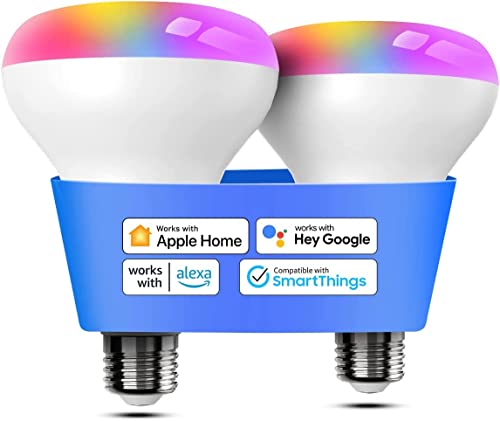 | Best Floodlight | Base: E26 | Shape: BR30 | Connectivity: Wi‑Fi | VIEW LATEST PRICE | Read Our Analysis |
| Linkind Matter Smart Light Bulb 4 Pack |  | Best Value Pack | Base: E26 | Shape: A19 | Connectivity: Wi‑Fi | VIEW LATEST PRICE | Read Our Analysis |
| Philips Hue Essential Smart LED A19 Bulb |  | Premium Pick | Base: E26 | Shape: A19 | Connectivity: Zigbee | VIEW LATEST PRICE | Read Our Analysis |
| Philips Hue White and Color Smart Bulb |  | Best Ecosystem Hubless | Base: E26 | Shape: A19 | Connectivity: Zigbee | VIEW LATEST PRICE | Read Our Analysis |
| Linkind Matter BR30 Smart Bulbs 4-Pack |  | Best Recessed Fit | Base: E26 | Shape: BR30 | Connectivity: Wi‑Fi | VIEW LATEST PRICE | Read Our Analysis |
More Details on Our Top Picks
Linkind Matter Smart Light Bulb 2 Pack
If you want an affordable way to add Apple HomeKit-compatible color bulbs to your setup, the Linkind Matter Smart Light Bulb 2-pack is a strong pick, especially if you already use a Matter hub like a HomePod. You get A19 E26 bulbs that work with Apple Home, Siri, Alexa, Google Home, and SmartThings through Matter, plus direct control in the AiDot app. Each 9W bulb delivers 800 lumens, millions of colors, and 1800K–6500K tuning. You can dim, schedule, sync music, and set scenes. Skip old dimmer switches. It’s an efficient, indoor-ready option with a two-year warranty.
- Base:E26
- Shape:A19
- Connectivity:Wi‑Fi
- Control:App/voice
- Dimmable:Yes
- Color:Color changing
- Additional Feature:800 lumens brightness
- Additional Feature:25,000 hour lifespan
- Additional Feature:Music sync scenes
meross Smart WiFi LED Light Bulb Multicolor 1 Pack
The meross Smart WiFi LED Light Bulb is a great fit if you want a HomeKit-friendly bulb that also plays well with Alexa, Google Assistant, and SmartThings, all without needing a hub. You can control it in the Apple Home app over stable 2.4GHz Wi‑Fi, or use the Meross app when you’re away. Siri handles on/off, dimming, and color changes, so you can say, “Hey Siri, set the bedroom light to green.” It’s a dimmable A19 bulb with warm-to-cool white, RGBWW color, 810 lumens, schedules, sunrise/sunset mode, and FCC/UL certification.
- Base:E26
- Shape:A19
- Connectivity:Wi‑Fi
- Control:App/voice
- Dimmable:Yes
- Color:Multicolor
- Additional Feature:No hub required
- Additional Feature:2.4GHz Wi‑Fi only
- Additional Feature:Sunrise/sunset automation
Meross Smart BR30 RGB Smart Bulbs (2 Pack)
Meross Smart BR30 RGB Smart Bulbs are a strong pick for you if you want bright, color-changing HomeKit lighting in a BR30 floodlight form. You get 1300 lumens, a 100W equivalent output, and dimmable RGBCW color with 16 million shades and a 2700K–6500K range. They work with HomeKit, Siri, Apple Watch, CarPlay, Alexa, Google Assistant, and SmartThings over 2.4GHz Wi‑Fi, so you don’t need a hub. Use the Meross or Home app for remote control, schedules, sunrise/sunset automation, and room-specific routines. A HomeKit hub enables off-home access.
- Base:E26
- Shape:BR30
- Connectivity:Wi‑Fi
- Control:App/voice
- Dimmable:Yes
- Color:Multicolor
- Additional Feature:1300 lumens max
- Additional Feature:CRI 100
- Additional Feature:Separate room schedules
Linkind Matter Smart Light Bulb 4 Pack
Linkind’s Matter A19 4-pack is a strong pick for Apple HomeKit users who want affordable, color-changing bulbs that also play nicely with Alexa, Google Home, and SmartThings. You get 800 lumens, 16 million colors, and tunable white light from 1800K to 6500K in a standard E26 A19 design. With Matter support, you’ll need a compatible hub for Apple Home control, but AiDot lets you run them directly over 2.4GHz Wi‑Fi. You can use scenes, schedules, music sync, and voice control. They’re indoor-only, don’t work with dimmer switches, and come with a 2-year warranty.
- Base:E26
- Shape:A19
- Connectivity:Wi‑Fi
- Control:App/voice
- Dimmable:Yes
- Color:Color changing
- Additional Feature:64 dynamic scenes
- Additional Feature:Microphone sound response
- Additional Feature:25,000 hour lifespan
Philips Hue Essential Smart LED A19 Bulb
If you want a HomeKit-friendly bulb that also gives you full-color lighting, the Philips Hue Essential Smart LED A19 Bulb is a strong pick, especially since it works with Apple Home, Alexa, and Google Assistant. You get an E26 LED bulb that delivers 800 lumens, uses just 8.8 watts, and dims smoothly from 2% to full brightness. Its 2200K to 6500K range lets you switch from warm cozy light to crisp white. Use the Hue app for scenes, colors, and remote control. Add a Hue Bridge later for more features, including music sync and home security.
- Base:E26
- Shape:A19
- Connectivity:Zigbee
- Control:App/voice
- Dimmable:Yes
- Color:Multicolor
- Additional Feature:Hue Bridge support
- Additional Feature:Music and movie sync
- Additional Feature:Expert-designed scenes
Philips Hue White and Color Smart Bulb
The Philips Hue White and Color Ambiance A19 is the best choice if you want a premium Apple HomeKit smart bulb that also delivers standout color performance, since it offers 16 million colors, 800 lumens, and full support for voice control and home automation through the Hue Bridge. You screw it into a standard socket, pair it with the Hue Bridge, and then manage it in the Hue app or with Siri. It also works with Alexa, Google Assistant, Nest, and SmartThings. You get dimming, 2700K soft white light, and reliable indoor performance backed by a 3-year warranty.
- Base:E26
- Shape:A19
- Connectivity:Zigbee
- Control:App/voice
- Dimmable:Yes
- Color:Multicolor
- Additional Feature:Zigbee connectivity
- Additional Feature:Hue Bridge required
- Additional Feature:Energy Star certified
Linkind Matter BR30 Smart Bulbs 4-Pack
Made for 5- or 6-inch recessed cans, these Linkind Matter BR30 bulbs are a solid pick if you want Apple HomeKit control without replacing your fixtures. You get Matter support, so you can use them with Apple HomeKit, Alexa, Google Home, and SmartThings, plus the AiDot app for remote access. They deliver 650 lumens, 8 watts, and RGBTW color changing with smart dimming. Use voice commands for brightness and color temperature, or sync them to music and scenes. Just avoid dimmer switches, and measure your can first.
- Base:E26
- Shape:BR30
- Connectivity:Wi‑Fi
- Control:App/voice
- Dimmable:Yes
- Color:Color changing
- Additional Feature:Fits 5-inch cans
- Additional Feature:Auto Rhythm mode
- Additional Feature:Microphone required sync
Factors to Consider When Choosing a Smart Bulb For Apple Homekit
When you choose a smart bulb for Apple HomeKit, make sure it’s fully compatible and doesn’t need extra hardware you don’t want. You should also check brightness, color options, and whether it works with Siri for easy voice control. Finally, look for smooth dimming and automation features so you can tailor your lighting to your routine.
HomeKit Compatibility
Before you buy, make sure the smart bulb explicitly supports Apple HomeKit or Apple Home so you can add it to the Home app and control it with Siri. Then check whether it works directly with your setup or needs a controller, bridge, or hub for full HomeKit features like remote access and automation. You should also confirm the bulb uses a compatible connection, usually 2.4 GHz Wi‑Fi or another supported smart-home protocol, since 5 GHz-only models won’t fit many HomeKit setups. Review the compatibility list for the functions you actually want, such as app control, voice commands, grouping, schedules, and automations. Finally, verify that the bulb matches your intended ecosystem so you don’t end up with lights that only work through extra hardware.
Hub Requirements
Hub requirements can make or break your Apple HomeKit setup, so check them early. You’ll find some bulbs connect directly to Apple Home, while others need a Matter-certified hub or controller. If you pick a Zigbee bulb, you’ll usually need a dedicated bridge before Apple Home can see it. That extra step can add cost and setup time, so it’s worth knowing upfront. Even hub-free bulbs still need a solid 2.4 GHz Wi‑Fi connection for setup and everyday use. If you want control when you’re away from home, you may also need an always-on home hub, like a compatible Apple home controller. Before you buy, confirm whether the bulb is hub-free, Matter-based, or bridge-dependent.
Brightness and Color
Brightness and color play a big role in how useful a smart bulb feels in everyday life. If you want a room to feel properly lit, choose a bulb with enough lumens for the space; many smart bulbs sit between 650 and 1,300 lumens. For softer mornings or focused work, look for dimming that moves smoothly from low light to full brightness. If you like changing the mood, a wide white range from about 1,800K to 6,500K lets you shift from warm, cozy light to crisp daylight-like white. For more expressive setups, pick bulbs with millions of colors, including full RGB support. If you care about how objects look, check CRI too, since 90+ usually renders colors more naturally than 80.
Voice Control Options
When you’re choosing a smart bulb for Apple HomeKit, voice control should go beyond simple on/off commands. You should confirm that the bulb supports Siri through an Apple Home-compatible setup, so you can ask for brightness changes, dimming, and color shifts without extra steps. If you use more than one smart ecosystem, pick a bulb that also works with Alexa or Google Assistant. That gives you more flexibility across devices. Check whether the bulb needs a hub or bridge, because some systems limit voice features without one. Others connect directly over Wi‑Fi and work right away. If you want true hands-free use, make sure you can speak specific colors or scenes, not just basic power commands.
Dimming and Automation**
Beyond voice commands, the real value of a HomeKit smart bulb shows up in how well it handles dimming and automation. You should choose one with smooth dimming and a wide range, ideally from about 2% to 100%, so you can fine-tune scenes instead of jumping between levels. Look for schedules, timers, sunrise and sunset triggers, and wake-up routines that let the bulb adjust itself automatically. If you want richer scenes, pick a bulb that supports preset and custom scenes plus dynamic color or brightness shifts. For reliable app and voice control, it should respond quickly to on/off, brightness, and color temperature commands over stable 2.4 GHz Wi‑Fi or a supported bridge. Avoid bulbs that don’t play well with traditional dimmer switches, since they can flicker or act unpredictably.
Frequently Asked Questions
Do All Homekit Smart Bulbs Require a Separate Hub?
No, not all HomeKit smart bulbs need a separate hub. Some connect directly, while others need a bridge or a HomePod, Apple TV, or iPad set up as a home hub for remote access and automations.
Can I Control These Bulbs When Away From Home?
Yes, you can control them from anywhere if you have a Home hub set up, such as an Apple TV, HomePod, or iPad. Without a Home hub, control stays local, so you will not be able to access them when you are away.
Are These Smart Bulbs Compatible With Siri Voice Commands?
Yes, you can use Siri commands. If your bulbs support HomeKit, you can control them hands free, set scenes, and adjust brightness with your voice.
Do Homekit Bulbs Work During Wi-Fi Outages?
Yes. If you have a HomePod, Apple TV, or iPad set up as your Home Hub, you can keep controlling HomeKit bulbs locally during a Wi Fi outage. Without a Home Hub, remote control usually stops.
Can I Schedule Automations With Apple Home App?
Yes, you can schedule automations in the Apple Home app. You can set lights, scenes, and accessories to run at a specific time, at sunrise, or at sunset, all from your iPhone.