

Should you want smart bulbs for Echo that feel almost boring in the best way, start with the ones that set up fast and stay connected. You can skip the headaches with SYLVANIA, Globe Electric, Sengled, Philips Hue, and THIRDREALITY, but the right pick depends on your Echo’s setup and how much local control you want. One choice here could save you from a lot of troubleshooting later.
| SYLVANIA WiFi Smart LED Light Bulb 4-Pack (75674) |  | Best All-Around | Smart Assistant: Alexa, Google, Siri | Bulb Shape: A19 | Base Type: E26 | VIEW LATEST PRICE | Read Our Analysis |
| Globe Electric Color-Changing A19 LED Smart Bulb | 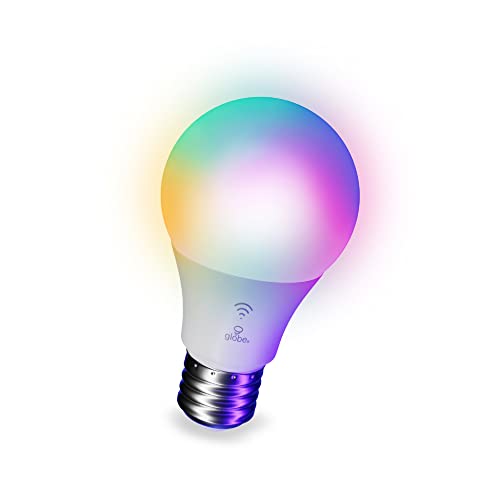 | Alexa Only | Smart Assistant: Alexa only | Bulb Shape: A19 | Base Type: E26 | VIEW LATEST PRICE | Read Our Analysis |
| Sengled Smart Light Bulb Alexa Compatible Dimmable LED |  | Easiest Setup | Smart Assistant: Alexa only | Bulb Shape: A19 | Base Type: E26 | VIEW LATEST PRICE | Read Our Analysis |
| Philips Hue Essential Smart LED A19 Bulb |  | Premium Pick | Smart Assistant: Alexa, Google, Apple Home | Bulb Shape: A19 | Base Type: E26 | VIEW LATEST PRICE | Read Our Analysis |
| THIRDREALITY Zigbee Smart Color Bulb 4-Pack (ZL1) |  | Best Mesh Option | Smart Assistant: Alexa-compatible Zigbee hubs | Bulb Shape: A19 | Base Type: E26 | VIEW LATEST PRICE | Read Our Analysis |
More Details on Our Top Picks
SYLVANIA WiFi Smart LED Light Bulb 4-Pack (75674)
Whenever you want colorful, voice-controlled bulbs that work right out of the box with Alexa, the SYLVANIA WiFi Smart LED Light Bulb 4-Pack (75674) is a strong fit. You get four A19 bulbs with E26 bases, no hub, and easy Wi-Fi setup on 2.4 GHz networks. Use the app or voice to dim, group, and change scenes across 16 million colors. You can also tune white light from 2700K to 6500K and get 800 lumens per bulb. They work with Google Assistant and Siri Shortcuts, but not Apple HomeKit. Indoor use only.
- Smart Assistant:Alexa, Google, Siri
- Bulb Shape:A19
- Base Type:E26
- Brightness:800 lumens
- Dimmable:Yes
- Color Control:Full color
- Additional Feature:4-pack value bundle
- Additional Feature:2.4 GHz Wi-Fi
- Additional Feature:2-year warranty
Globe Electric Color-Changing A19 LED Smart Bulb
The Globe Electric 50589 Color-Changing A19 LED Smart Bulb is a strong pick for Alexa users who want simple, no-hub smart lighting, since it works exclusively with Amazon Echo and sets up through your Amazon account with no third-party app or skill needed. You get 800 lumens, 60W-equivalent brightness, and RGB plus tunable white control in a standard A19 shape. Use Alexa to dim it, switch scenes, or schedule routines. It needs 2.4 GHz Wi‑Fi and doesn’t support Google, HomeKit, or SmartThings. Inside lamps and fixtures, it’ll give you reliable everyday color.
- Smart Assistant:Alexa only
- Bulb Shape:A19
- Base Type:E26
- Brightness:800 lumens
- Dimmable:Yes
- Color Control:RGB multicolor
- Additional Feature:Alexa-exclusive compatibility
- Additional Feature:Zero-touch setup
- Additional Feature:3-year limited warranty
Sengled Smart Light Bulb Alexa Compatible Dimmable LED
Sengled’s Smart Light Bulb is a strong pick for Echo owners who want a simple, Alexa-only setup with no extra account hassle, since it pairs directly through Bluetooth Mesh and supports voice control, dimming, and remote adjustments from the Alexa app. You get an 8.7W LED that replaces a 60W bulb, puts out 800 lumens, and delivers 5000K daylight white light. Dimming runs from 5% to 100%, so you can set the mood from morning to night. It’s Certified for Humans, supports offline local use, and includes a 3-year warranty plus U.S. live support.
- Smart Assistant:Alexa only
- Bulb Shape:A19
- Base Type:E26
- Brightness:800 lumens
- Dimmable:Yes
- Color Control:Daylight white only
- Additional Feature:Bluetooth Mesh connectivity
- Additional Feature:Local offline control
- Additional Feature:36-month warranty
Philips Hue Essential Smart LED A19 Bulb
Philips Hue Essential Smart LED A19 Bulb is a strong pick for you should you want a flexible Echo-compatible bulb that goes well beyond basic on/off control. You just screw it in, open the Hue app, and control it remotely. It gives you white and color ambiance from 2200K to 6500K, plus 800 lumens of brightness. You can dim it from 100% to 2% and choose from millions of colors or preset scenes. It works with Alexa, Google Assistant, and Apple Home, and you can expand later with a Hue Bridge and more Hue gear.
- Smart Assistant:Alexa, Google, Apple Home
- Bulb Shape:A19
- Base Type:E26
- Brightness:800 lumens
- Dimmable:Yes
- Color Control:White and color
- Additional Feature:Hue Bridge expandable
- Additional Feature:100% to 2% dimming
- Additional Feature:Scene presets included
THIRDREALITY Zigbee Smart Color Bulb 4-Pack (ZL1)
Whenever you already use Echo devices with a built-in Zigbee hub, the THIRDREALITY Zigbee Smart Color Bulb 4-Pack (ZL1) is a strong pick because it connects directly without needing a separate bridge. You get four A19, E26 RGBCW bulbs that support 800 lumens, dimming from 1% to 100%, and color temperatures from 2700K to 6500K. Zigbee 3.0 keeps your network efficient, and each bulb can also act as a repeater to help extend range. You can use Alexa voice control, routines, scheduling, and OTA updates. It’s ETL and FCC listed, with a one-year warranty.
- Smart Assistant:Alexa-compatible Zigbee hubs
- Bulb Shape:A19
- Base Type:E26
- Brightness:800 lumens
- Dimmable:Yes
- Color Control:RGBCW multicolor
- Additional Feature:Zigbee repeater function
- Additional Feature:Hub-required operation
- Additional Feature:OTA firmware updates
Factors to Consider When Choosing Smart Bulbs For Echo
When you choose smart bulbs for Echo, you’ll want to check Echo compatibility initially so everything works smoothly. You should also compare Wi-Fi and Zigbee options, since setup simplicity, brightness, and color range can affect how easy the bulbs are to use. Don’t forget voice control features, because they’ll shape how well you can manage your lights hands-free.
Echo Compatibility
Echo compatibility is the initial thing you should check, because not every smart bulb connects to Echo the same way. You’ll want to confirm whether the bulb pairs directly with your Echo or needs a bridge, hub, or extra gateway. Check that it supports Alexa voice commands and Alexa app control so you can switch it on, dim it, or change colors without hassle. Also verify the connection requirements, since some bulbs need a 2.4 GHz Wi‑Fi network or an Echo with built-in Zigbee support. Provided that you want the easiest setup, choose a bulb with direct pairing or zero-touch setup instead of one that asks for extra apps, accounts, or hardware. Finally, see whether it’s Alexa-only or also works with other assistants, in case you want more flexibility later.
Wi-Fi vs Zigbee
Wi‑Fi and Zigbee are the two main connection types to weigh for Echo smart bulbs, and each has a different tradeoff. Wi‑Fi bulbs connect straight to your 2.4 GHz network, so you won’t need a hub, and that makes them appealing provided you’re lighting a few rooms. They also handle voice control, dimming, scheduling, and remote access. But they add traffic to your router and depend on strong Wi‑Fi. Zigbee bulbs need a Zigbee hub or an Echo with one built in, yet they shine in bigger setups. They form a mesh network, extend range, and reduce dead spots. Should you want simple convenience, choose Wi‑Fi. Should you’re building a more sturdy multi-bulb system, Zigbee usually scales better.
Setup Simplicity
Setup simplicity matters when you want your Echo bulbs up and running fast, because the easiest options pair directly over Wi‑Fi or Bluetooth with automatic onboarding. You should favor bulbs that skip hubs, registration, and extra hardware, since every extra step can slow you down. When you’re setting up for the first time, 2.4 GHz Wi‑Fi and built-in voice assistant pairing usually make things easiest. Look for app-based setup that includes guided onboarding, room grouping, and immediate voice control, so you can finish setup without hunting through menus. When speed matters most, choose bulbs with zero-touch or auto-pairing claims. You’ll also save time if the bulb works locally with your Echo, because you won’t need as many cloud accounts, third-party integrations, or manual confirmations.
Brightness And Color
Whenever you’re choosing smart bulbs for Echo, brightness and color quality matter just as much as compatibility. For most rooms, aim for about 800 lumens, which feels like a standard 60W bulb and works well in A19 lamps. If you want different moods, pick tunable white bulbs that shift from warm 2200K to 2700K light for relaxing evenings, or up to 6500K for focused tasks. For color scenes, choose full RGB bulbs that offer millions of shades, ideally up to 16 million. Don’t ignore dimming range, either; a good bulb should fade smoothly from 100% to 2% or 5%. Finally, look for a CRI of 90+ so colors in your room look natural, accurate, and richer.
Voice Control Features
Beyond brightness and color, voice control is what makes smart bulbs for Echo feel truly convenient. You should confirm the bulb handles direct commands like on, off, dimming, and color or scene changes through your Echo-compatible assistant. Make sure it works with the voice platform you already use, since some bulbs support several assistants while others stay locked to one ecosystem. For easier control, look for grouping, room-level commands, and routine-triggered lighting so you can manage several bulbs at once with one phrase. If you want faster, steadier responses, choose bulbs that use a compatible hub or built-in voice gateway when available. Also check whether the bulb still accepts limited local voice commands during outages or weak network periods.
App And Automation
As, you compare smart bulbs for Echo, check how well the app and voice controls work together so you can adjust on/off status, brightness, color, and scenes from your phone or via voice. Look for an app that’s fast, easy to use, and consistent with Alexa commands, because you’ll rely on both for daily control. Strong automation matters too: routines, schedules, and room or group control let you switch several bulbs at once for mornings, evenings, or focused tasks. Should you want control away from home, make sure the bulb offers Wi‑Fi app access. Extra features like preset scenes, ambience modes, and music, movie, or game sync can add flexibility. Local control or mesh networking can also improve responsiveness and reliability.
Hub Requirements
Check whether a smart bulb needs a separate hub before you buy, since some connect directly to Wi‑Fi or Bluetooth while others need a Zigbee hub for full functionality. Should you want the easiest setup, pick a hub-free bulb that pairs straight to your Echo or app. That keeps things simple and cuts extra hardware. Hub-based bulbs can still be worth it because they often deliver steadier local control and can keep working when your internet drops. Before you buy, confirm the hub matches your Echo model; some bulbs only work with Echo devices that already include Zigbee. Should you want more smart-home expansion, a hub can help, but it also adds cost and setup steps.
Frequently Asked Questions
Do Echo Devices Support Smart Bulb Routines Without a Hub?
Yes, you can create smart bulb routines on Echo devices without a hub when the bulbs use Wi Fi or Matter. You can automate them with Alexa and do not need extra hardware.
Can I Use Smart Bulbs Outdoors With Alexa?
Yes, you can use smart bulbs outdoors if they are rated for exterior use and placed in fixtures built to handle rain, heat, and moisture. Alexa can control them as long as the bulbs support Alexa and are installed in a safe, weatherproof setup. Do not use indoor bulbs outside because they are not made to withstand outdoor conditions.
Will Smart Bulbs Remember Their Last Setting After Power Loss?
Yes, many smart bulbs keep their last color and brightness after a power outage, so they often return to the same look when power comes back. Still, it depends on the bulb, because some models reset to a default state after power is restored.
Do Smart Bulbs Work With Multiple Echo Devices at Once?
Yes. If you link the bulb to one Amazon account, you can control it from several Echo devices. All of them use the same bulb settings, so one bulb cannot be controlled separately by different Echo devices at the same time.
How Secure Are Smart Bulbs Connected to Echo?
They are fairly secure if you choose trusted brands, use a strong Wi Fi password, and install firmware updates as soon as they are available. You can lower risk further by turning on two factor authentication and restricting app permissions, but any device connected to the internet can still create security weaknesses.
Final Thoughts
If you want smart bulbs for Echo that just work, keep it simple: pick the connection your home already supports and don’t overcomplicate it. I still remember setting up one bulb in under five minutes, and that tiny win felt like the room itself had learned my routine. Since 2.4 GHz Wi‑Fi, Bluetooth Mesh, and Zigbee each offer reliable paths, you can choose the one that fits your Echo and enjoy lights that respond every time.